

Introduction
Large Language Models (LLMs) are changing how people interact with technology. From answering questions to generating content, these models help applications understand and respond to human language.
One practical way to use this technology is through LLM API Integration. Instead of training a language model from scratch, developers can connect their applications to existing models through APIs.
In this article, we explore how to build a basic AI-powered chatbot using Python, Flask, and the Google Gemini API. We will understand the technologies involved, the integration process, backend development, API communication, and error handling.
1. Understanding LLM API Integration
A Large Language Model is an AI model trained on large amounts of text data. It can understand prompts and generate responses based on the information it has learned.
Examples of popular language models include Google Gemini, OpenAI’s GPT models, and Anthropic’s Claude.
LLM API Integration is the process of connecting an application to a language model through an Application Programming Interface (API).
For example, when a user asks a chatbot a question, the application sends the message to a backend server. The backend forwards it to the language model through an API. The model generates a response, which is then returned to the application.
Why is API integration useful?
- Faster development: Developers can use existing models instead of training one from scratch.
- Easy communication: APIs allow different software components to exchange information.
- Flexible applications: The integration can support chatbots, virtual assistants, and content-generation tools.
- Reduced infrastructure requirements: Developers do not need to host the entire language model themselves.
- Extensibility: New features can be added as application requirements grow.
2. Project Overview: Building a Gemini-Powered Chatbot
To understand the integration process, we developed a basic chatbot using Python, Flask, and the Google Gemini API.
The main objective was to create an application where users could enter a message and receive a response generated by a language model.
Project objectives
- Create a simple chatbot interface.
- Develop a backend using Python and Flask.
- Connect the backend to the Google Gemini API.
- Accept user messages through HTTP requests.
- Process API responses and return them to the frontend.
- Handle invalid requests and API-related errors.
- Protect sensitive configuration details.
Technologies used
- Python: Main programming language.
- Flask: Backend web framework.
- Google Gemini API: Language model service.
- Google Gen AI SDK: Communication with the Gemini API.
- HTML: Structure of the chatbot interface.
- CSS: Styling embedded directly inside index.html using a
<style> tag. - JavaScript: Handles user interactions, sends messages to the Flask backend, and displays chatbot responses.
- python-dotenv: Loading environment variables.
- JSON: Data exchange between frontend and backend.
3. Understanding the Application Architecture
The chatbot follows a simple frontend-backend architecture.
The frontend uses HTML, CSS, and JavaScript to create the chatbot interface and handle user interactions. JavaScript sends user messages to the Flask backend through HTTP requests. The backend processes these requests, communicates with the Gemini API, and returns responses in JSON format. JavaScript then displays the generated responses in the chatbot interface.
How does the system work?
- The user opens the chatbot interface.
- The user enters a message.
- The frontend sends the message to the Flask backend.
- The backend validates the incoming request.
- The backend sends the message to the Gemini API.
- Gemini processes the prompt and generates a response.
- The backend receives the response and prepares a JSON result.
- The frontend displays the generated response.
This approach separates the user interface from the API communication logic, making the application easier to maintain.
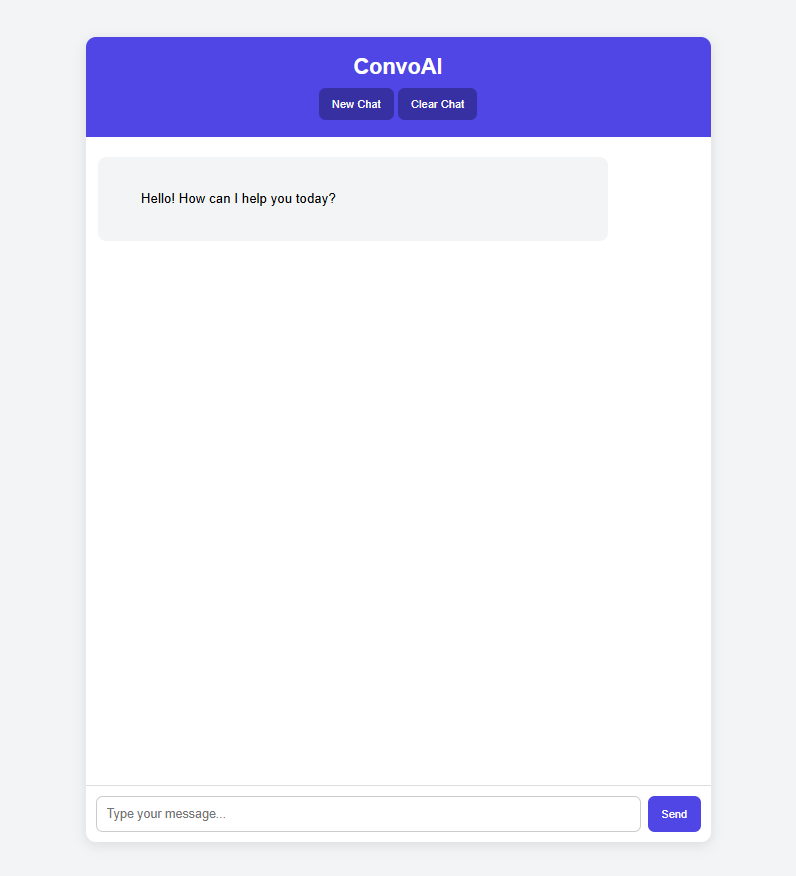
Caption: Chatbot interface for interacting with the Gemini-powered application.
4. Setting Up the Development Environment
A suitable development environment makes implementation easier to manage. For this project, Python and Visual Studio Code were used.
Step 1: Create a project directory
Create a folder for the chatbot project and open it in Visual Studio Code.
A simple project structure looks like this:
llm-chatbot/
│
├── app.py
├── .env
├── .gitignore
│
└── templates/
    └── index.html
The files have different responsibilities:
app.pycontains the Flask backend logic..envstores environment-specific configuration.index.htmlcontains the chatbot interface , embedded css styling and JavaScript functionality.- The frontend uses HTML for structure, CSS for styling, and JavaScript for handling user interactions. These technologies work together within the same HTML file to provide the chatbot experience.
.gitignoreprevents selected files from being committed..venvcontains the project’s virtual environment.
Step 2: Create a virtual environment
A virtual environment keeps project dependencies separate from other Python projects.
python -m venv .venvOn Windows PowerShell, activate it using:
.venv\Scripts\Activate.ps1Step 3: Install the required packages
Install Flask, the Google Gen AI SDK, and python-dotenv:
pip install flask google-genai python-dotenvStep 4: Configure the API key
An API key is required to authenticate requests to the Gemini service.
Instead of writing the key directly in the Python source code, store it in an environment file:
GEMINI_API_KEY=your_api_key_hereThe actual key should remain private. Never upload it to a public GitHub repository or include it in screenshots.
Add the following entries to .gitignore:
.env
.venv/
__pycache__/
This is an important security practice when developing applications that use external APIs.
5. Implementing the Flask Backend
Flask is a lightweight Python web framework. It allows developers to create routes that receive requests and return responses.
In our chatbot, Flask acts as the connection between the frontend and Gemini API.
Creating the Flask application
The backend begins by importing the required libraries and loading the environment configuration.
import os
from flask import Flask, request, jsonify
from dotenv import load_dotenv
from google import genai

load_dotenv()

app = Flask(__name__)

client = genai.Client(
    api_key=os.getenv("GEMINI_API_KEY")
)
Here is what each part does:
Flaskcreates the web application.requestreads incoming HTTP request data.jsonifyconverts Python data into a JSON response.load_dotenv()loads values from the.envfile.genai.Client()creates a client for communicating with Gemini.
Creating the chatbot API route
The /chat route receives user messages and requests generated content.
A simplified example of the request-handling logic is:
@app.route("/chat", methods=["POST"])
def chat():
    data = request.get_json(silent=True)

    if not data or not data.get("message"):
        return jsonify({
            "error": "Message is required"
        }), 400

    user_message = data["message"]

    try:
        response = client.models.generate_content(
            model="YOUR_CONFIGURED_GEMINI_MODEL",
            contents=user_message
        )

        return jsonify({
            "response": response.text
        })

    except Exception:
        app.logger.exception("Gemini API request failed")

        return jsonify({
            "error": "Unable to generate a response"
        }), 502
The model name should match the model configured and available for the project.
This example demonstrates the main backend flow. A complete implementation should also validate configuration, handle unexpected responses, and apply suitable request limits.
Understanding request and response data
The frontend sends a JSON request containing the user’s message.
For example:
{
    "message": "Explain what an API is."
}
The backend reads the message, sends it to Gemini, and returns a JSON response.
A successful response can follow this structure:
{
    "response": "An API allows different software applications to communicate."
}
JSON makes it easier for the frontend and backend to exchange information in a consistent format.
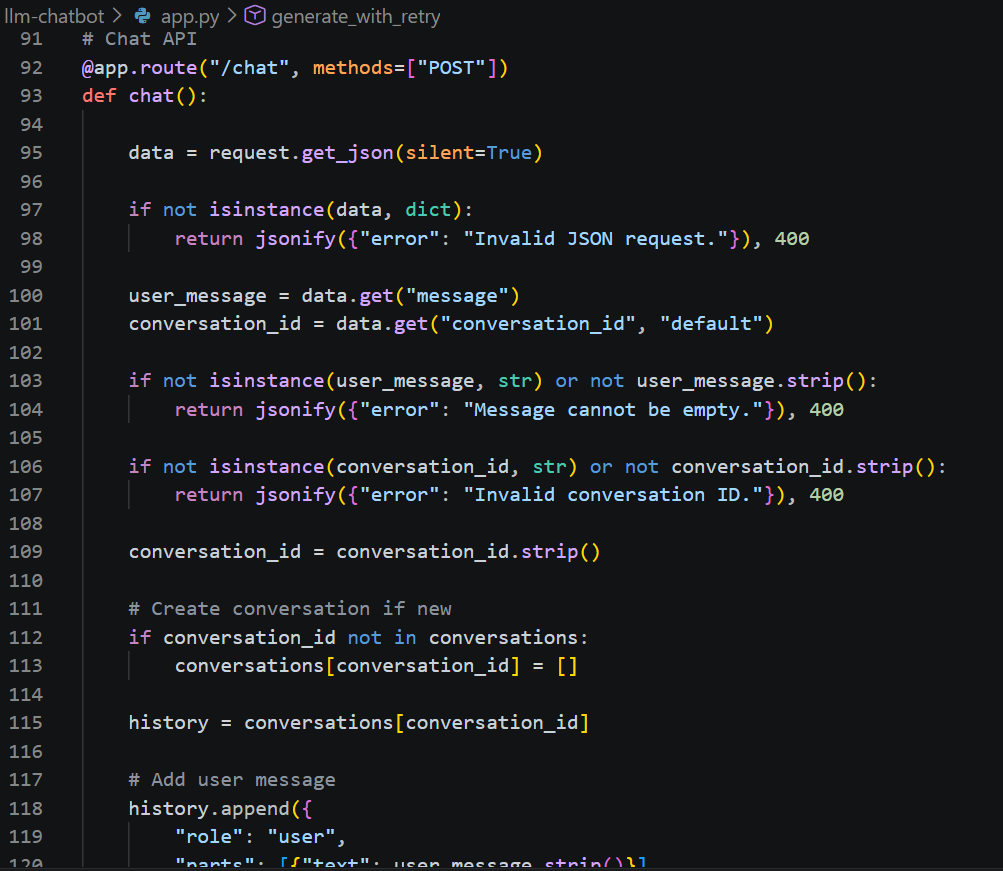
Caption: Flask Chat API implementation with request validation and conversation history management.
6. Understanding API Error Handling
An API request does not always succeed. The external service may be temporarily unavailable, the request may be invalid, or authentication and configuration problems may occur.
For this reason, error handling is an important part of API integration.
During project testing, the Gemini API returned a 503 UNAVAILABLE response. This indicated that the requested model service was temporarily unavailable.
The backend handled the exception and returned a 502 response because it could not complete the upstream request.
Common API errors
| Error | Possible reason |
|---|---|
| 400 Bad Request | Invalid request data |
| 401 Unauthorized | Authentication problem |
| 403 Forbidden | Access or permission issue |
| 429 Too Many Requests | Request limit exceeded |
| 500 Internal Server Error | Server-side failure |
| 503 Service Unavailable | Service temporarily unavailable |
Developers should not assume that every failed request is caused by their own code.
Logging helps identify what happened during execution. However, logs should never expose API keys, passwords, or other sensitive information.
For temporary service failures, applications can also implement controlled retries with exponential backoff. This means waiting longer between repeated attempts instead of sending continuous requests.
7. Testing the Chatbot
Testing helps confirm whether the different parts of the application communicate correctly.
The main focus of testing this project was checking the backend request and response flow.
Some useful test cases include:
| Test case | Expected behaviour |
|---|---|
| Send a valid message | Backend processes the message |
| Send an empty message | Backend returns a validation error |
| Send invalid JSON | Backend handles the request safely |
| Gemini generates a response | Backend returns the response as JSON |
| Gemini service is unavailable | Backend handles the exception |
| API key is missing | Application reports a configuration problem |
Testing should cover both successful and unsuccessful requests.
A chatbot may appear to work correctly when tested with one message, but that does not mean every possible situation has been handled. Developers should also test invalid input, service failures, and unexpected responses.
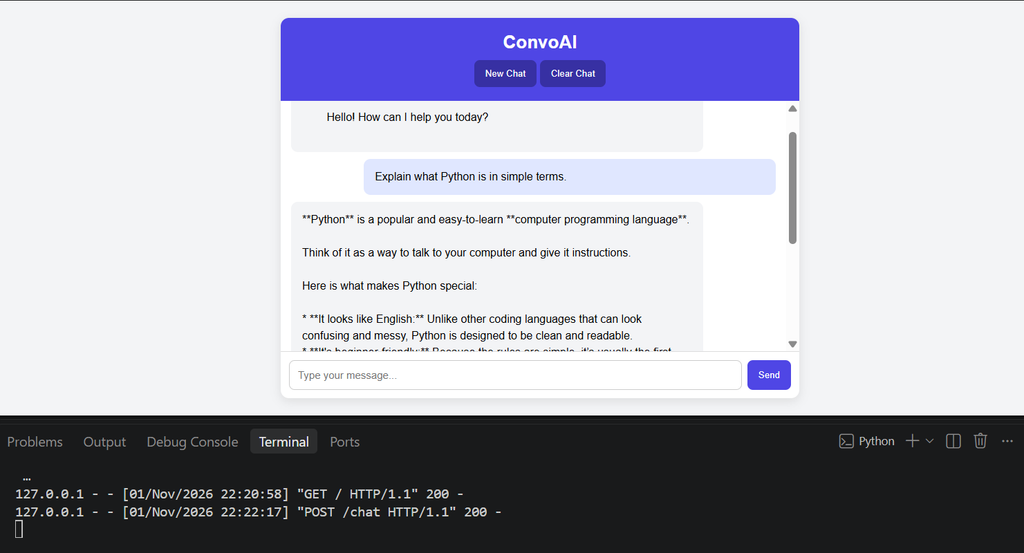
Caption: Testing the Gemini-powered chatbot and verifying successful backend API communication.
8. Challenges and Lessons Learned
Building an application that uses an external language model involves more than simply sending a prompt.
A few important lessons came from this implementation.
Understanding API communication
The frontend communicates with the backend, while the backend manages the Gemini API request.
The frontend does not need to handle the Gemini API key. This separation makes the application easier to maintain and helps protect sensitive credentials.
Handling service availability
The 503 UNAVAILABLE response during testing demonstrated that external services can experience temporary failures.
A reliable application should communicate errors clearly rather than assuming that every API call will succeed.
Managing sensitive information
Using environment variables helped separate configuration details from application code.
This is especially important when working with GitHub repositories and collaborative development.
Keeping the implementation modular
Separating the interface, backend logic, and configuration makes the project easier to understand and update.
It also provides a foundation for adding future features without placing every responsibility in a single file.
9. Possible Future Improvements
The current implementation provides a foundation for a basic Gemini-powered chatbot. It can be extended in several ways.
- Conversation history: Store previous messages and send relevant conversation context with later requests.
- User authentication: Introduce login and account management.
- Database integration: Store conversations and user preferences.
- Rate limiting: Restrict excessive requests to protect the backend.
- Streaming responses: Display generated text as it becomes available, where supported by the API.
- Automated testing: Add unit and integration tests for backend routes.
- Deployment: Host the application on a suitable cloud platform with secure environment configuration.
These are possible future enhancements, not features that should be considered complete until they are implemented and tested.
10. Conclusion
LLM API Integration provides a practical way to introduce language-model capabilities into software applications without training a model from scratch.
Through this project, we explored how to build a basic chatbot using Python, Flask, HTML, CSS, JavaScript, and the Google Gemini API. We covered environment setup, API authentication, frontend-backend communication, JSON request handling, and error management.
The project also highlights important development practices such as protecting API credentials, validating user input, separating application components, and handling external service failures.
For developers interested in Generative AI application development, understanding API integration is a useful starting point. By combining backend development with language-model services, it becomes possible to build applications that can be extended into more advanced solutions.
Ultimately, LLM API Integration is not just about connecting an API. It is about designing a reliable communication flow between the user, the application, and the language model.



Leave a Reply
You must be logged in to post a comment.