

Author: Davin Jehonadab
Category: Artificial Intelligence | Generative AI | Python
Introduction
Artificial Intelligence has transformed the way people interact with technology. From intelligent chatbots to automated customer support systems, AI-powered applications are becoming an important part of modern software development. One of the technologies driving this transformation is the Large Language Model (LLM).
Large Language Models can understand natural language, process user instructions, and generate meaningful responses. Instead of developing and training an AI model from scratch, developers can integrate existing models into their applications using Application Programming Interfaces (APIs).
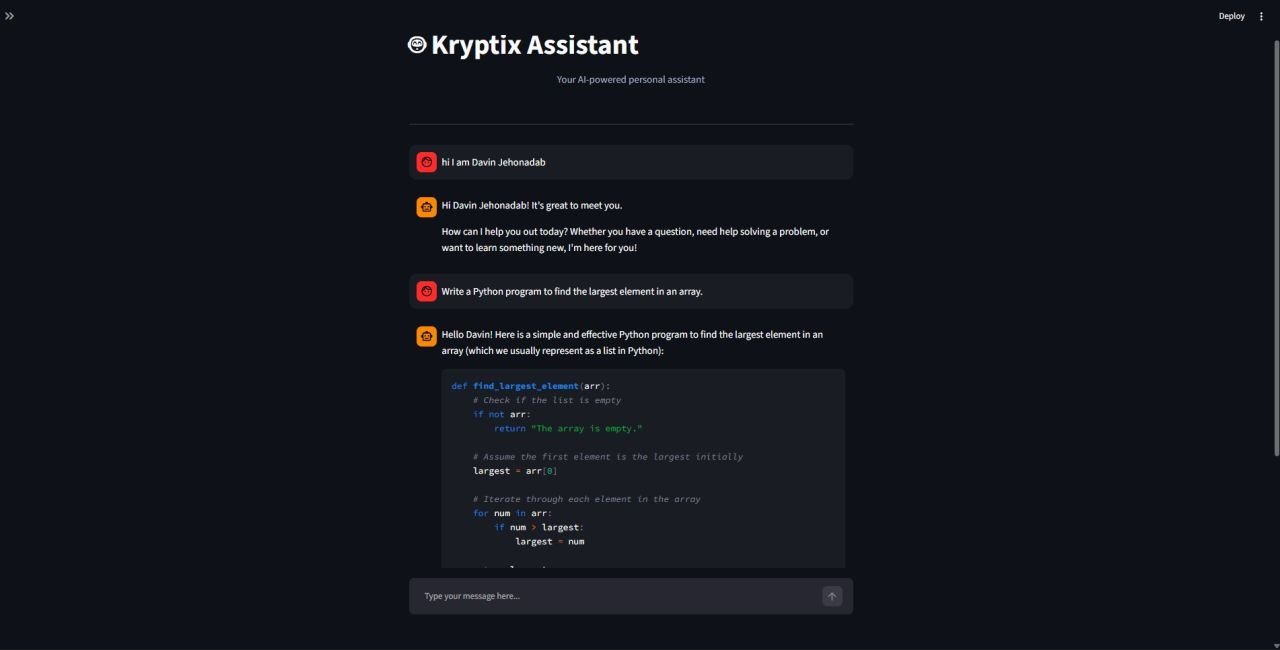
In this article, I will explore how LLM API integration works using Google’s Gemini API and explain its application through Kyrptix Assistant, a Python-based AI chatbot project. This project demonstrates how an external AI model can be connected to a software application to create an interactive conversational experience.
1. What Is LLM API Integration?
A Large Language Model is an artificial intelligence model trained on large amounts of data to understand and generate human-like text.
LLM API integration is the process of connecting an application to an external language model through an API. The application sends a prompt or question to the model, and the model processes the input and returns a generated response.
The general process involves:
- A user enters a question into the application.
- The application sends the question to its backend.
- The backend communicates with the LLM API.
- The language model processes the prompt.
- The generated response is returned to the application.
- The application displays the response to the user.
This approach allows developers to build intelligent applications without needing to train or host large language models themselves.
2. Introduction to Google Gemini API
Google Gemini is a family of generative AI models developed by Google. The Gemini API allows developers to integrate its capabilities into their own applications.
Using the Google GenAI Python SDK, developers can send prompts, receive generated responses, and build conversational applications.
Some important advantages include:
- Natural language understanding and text generation.
- Integration with Python applications.
- Support for different types of input, depending on the model.
- Flexible model selection.
- Reduced complexity compared with training a language model from scratch.
For this project, Google Gemini serves as the intelligence behind Kyrptix Assistant.
3. Technologies Used
The following technologies are relevant to developing a Python-based Gemini chatbot:
Python: The primary programming language used for application development and API communication.
Google Gemini API: Provides the generative AI capabilities required to understand user prompts and generate responses.
Google GenAI SDK: A Python library that simplifies communication with Google’s Gemini models.
FastAPI: Can be used as a backend framework to handle API requests and connect the user interface with the AI service.
Streamlit: Can be used to create an interactive chatbot interface using Python.
Python dotenv: Helps load environment variables, including API credentials, from a configuration file.
4. Understanding the API Integration Architecture
A typical Gemini-powered chatbot follows a simple request-response architecture.
The workflow can be represented as:
User → Chat Interface → Backend → Google Gemini API → Backend → Chat Interface → User
Each component has a specific responsibility.
- User Interface: Accepts questions and displays responses.
- Backend: Receives requests and manages communication with the AI service.
- Gemini API: Processes prompts and generates responses.
- Response Handling: Returns the generated text to the user interface.
Separating the frontend and backend makes the application easier to maintain, test, and extend.
5. Integrating Google Gemini API Using Python
The first step is to install the required Python packages.
pip install google-genai python-dotenvNext, obtain a Gemini API key through Google AI Studio and store it securely in an environment file.
Create a file named .env:
GEMINI_API_KEY=your_api_key_hereThe API key should remain private and should never be uploaded to a public GitHub repository.
Now, create a Python file and initialize the Gemini client.
import os
from dotenv import load_dotenv
from google import genai

load_dotenv()

api_key = os.getenv("GEMINI_API_KEY")

if not api_key:
    raise ValueError("Gemini API key is missing.")

client = genai.Client(api_key=api_key)

response = client.models.generate_content(
    model="gemini-3.8-flash",
    contents="Explain artificial intelligence in simple terms."
)

print(response.text)
Understanding the code:
load_dotenv()loads environment variables from the.envfile.os.getenv()retrieves the Gemini API key.genai.Client()initializes the connection to Google’s AI service.generate_content()sends the prompt to the selected Gemini model.response.textretrieves the generated response.
This example demonstrates the basic process of connecting a Python application to Google’s Gemini API. The model identifier should be adjusted if a different Gemini model is used in the actual project.
6. Building Kyrptix Assistant
After understanding the basic API integration process, the next step is applying it to a practical project.
Kyrptix Assistant is an AI chatbot project designed to provide users with an interactive conversational experience using Google’s Gemini API.
The main objective is to connect a user-facing chatbot with a generative AI model and display meaningful responses to user questions.
The application follows these general steps:
- The user enters a question into Kyrptix Assistant.
- The application receives the message.
- The message is passed to the backend for processing.
- The backend sends the prompt to Google Gemini.
- Gemini generates a response based on the given input.
- The response is returned and displayed in the chatbot interface.
Conversation history can also be maintained to provide contextual responses. Instead of treating every question as an independent request, the application can use previous messages as context for subsequent interactions.
This project demonstrates how an external AI service can be integrated into a Python application to create a practical Generative AI solution.
7. Challenges and Best Practices
During the development of an LLM-powered application, developers should consider several important factors.
API Key Security: API keys must be stored securely using environment variables. They should never be exposed in frontend code or public repositories.
Error Handling: API requests may fail because of network problems, service interruptions, or request limits. Proper exception handling helps prevent unexpected application failures.
Conversation Management: Maintaining relevant conversation history improves the continuity of chatbot interactions.
Response Time: AI-generated responses may take time. Efficient request handling and appropriate timeouts help improve the user experience.
Response Reliability: AI-generated answers should be checked when accuracy is important. Developers should not assume that every generated response is automatically correct.
Following these practices helps create more reliable and maintainable AI applications.
8. Real-World Applications of LLM API Integration
LLM API integration has applications across many industries.
- Education: AI learning assistants can explain concepts and answer student questions.
- Customer Support: Chatbots can help users find information and resolve common queries.
- Healthcare Administration: AI assistants can help organize general information and answer administrative questions.
- Business Automation: Language models can assist with drafting, summarization, and information processing.
- Software Development: AI-powered tools can help developers understand code and generate programming suggestions.
The same integration principles used in Kyrptix Assistant can be extended to build more advanced AI-powered solutions.
Conclusion
Integrating Large Language Models into software applications is an important step in modern AI development. Through the Google Gemini API and Python, developers can build intelligent applications without having to train and maintain their own large language models.
Developing Kyrptix Assistant provided an opportunity to explore how an external generative AI service can be connected to a practical chatbot application. It also highlights the importance of API communication, secure credential management, prompt processing, and conversational interfaces.
As Generative AI continues to evolve, understanding LLM API integration will be a valuable skill for developers who want to build practical AI-powered applications.
Kyrptix Assistant represents a step forward in my journey of exploring Artificial Intelligence and developing real-world Generative AI solutions.
References
- Google AI for Developers – Gemini API: https://ai.google.dev/gemini-api/docs
- Google GenAI Python SDK: https://github.com/googleapis/python-genai
- Python Documentation: https://docs.python.org/3/
- FastAPI Documentation: https://fastapi.tiangolo.com/
- Streamlit Documentation: https://docs.streamlit.io/


Leave a Reply
You must be logged in to post a comment.