

Artificial Intelligence has transformed how we access and process information. Large Language Models (LLMs) can generate human-like responses, explain complex topics and assist with various tasks. However, what happens when we want an AI model to answer questions using information from a specific document rather than relying entirely on its general knowledge?
This is where Retrieval-Augmented Generation (RAG) becomes useful.
RAG combines information retrieval with the text-generation capabilities of Large Language Models. It allows an AI application to retrieve relevant information from an external knowledge source and use that information to generate context-based responses.
In this article, we will explore how to build a RAG system with Python, using Google Gemini API and ChromaDB. We will walk through the complete implementation process, from extracting information from a PDF document to retrieving relevant content and generating answers using an LLM.
1. What is Retrieval-Augmented Generation (RAG)?
Retrieval-Augmented Generation, commonly known as RAG, is an approach that enhances LLM-based applications by connecting them to an external knowledge source.
A traditional LLM generates responses based on its training data and the information provided in the prompt. However, it may not have access to specific documents, recently updated information or private knowledge bases.
RAG addresses this limitation by retrieving relevant information from an external source before generating a response.
For example, imagine having a 100-page textbook and wanting to ask questions about its contents. Instead of manually searching through the textbook, a RAG application can retrieve the relevant sections and provide them to an LLM to generate an answer.
How Does RAG Work?
A basic RAG architecture consists of two major stages:
1. Document Ingestion
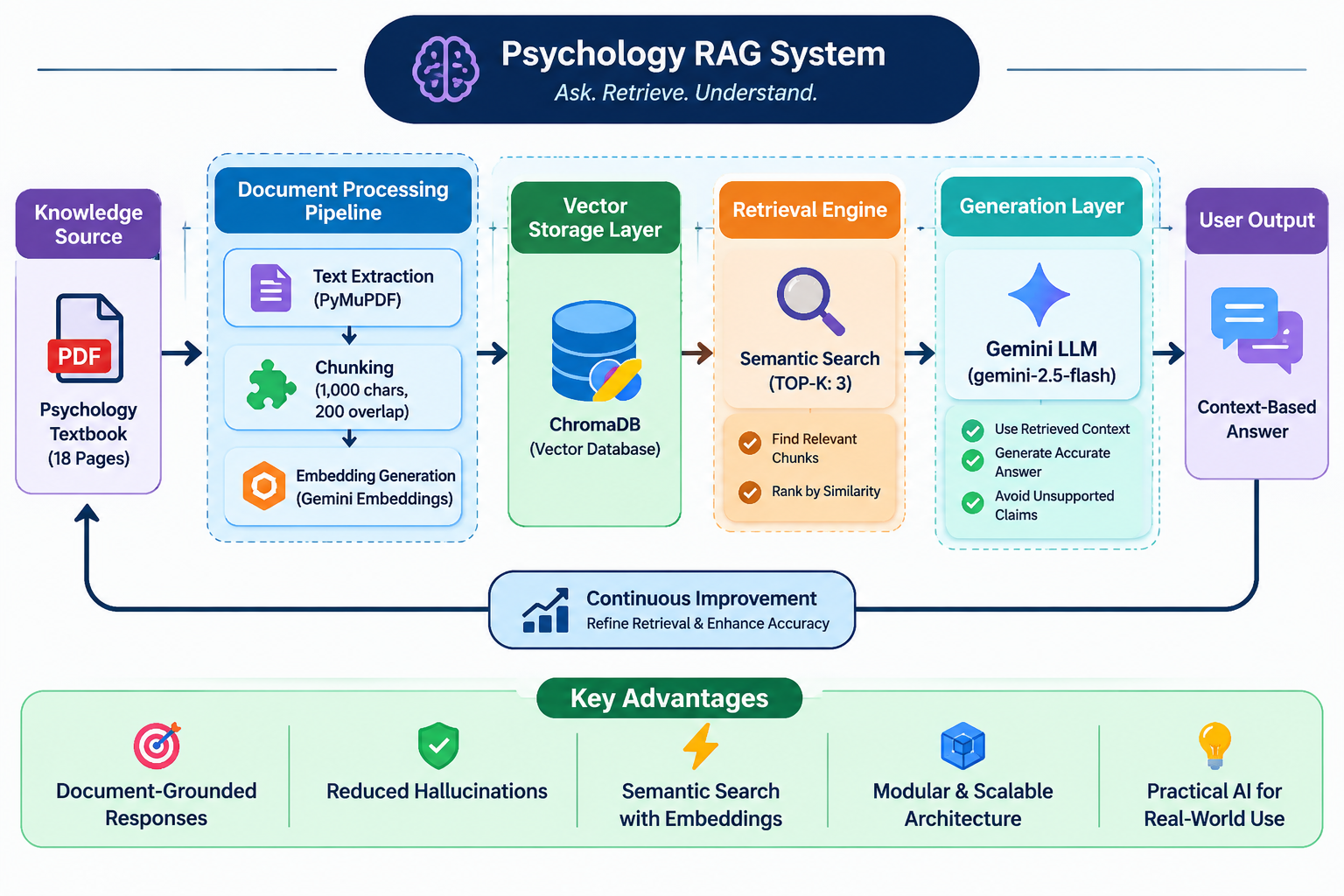
- Extract text from the source document.
- Divide the extracted text into smaller sections called chunks.
- Generate numerical representations (embeddings) for the chunks.
- Store the embeddings in a vector database.
2. Retrieval and Generation
- Accept a question from the user.
- Convert the question into an embedding.
- Retrieve the most relevant document chunks from the vector database.
- Provide the retrieved information and question to an LLM.
- Generate an answer using the supplied context.
The overall workflow can be represented as:
Document → Text Extraction → Chunking → Embeddings → Vector Database → Retrieval → LLM → Answer
2. Project Overview: Building a Psychology RAG System
To understand how RAG works in practice, let’s consider a document-based question-answering application.
For this implementation, an 18-page psychology textbook PDF was selected as the knowledge source. The document covered topics such as:
- Introduction to psychology
- Behaviour and mental processes
- History and evolution of psychology
- Branches of psychology
- Psychology in India
- Psychology in everyday life
The objective was to develop a system that could accept questions and generate answers using information retrieved from this document.
Technologies Used
The following technologies and tools were used:
| Technology | Purpose |
|---|---|
| Python | Main programming language |
| PyMuPDF | PDF text extraction |
| Google Gemini API | Embedding generation and answer generation |
| ChromaDB | Vector storage and retrieval |
| Google GenAI SDK | Integration with Gemini models |
| python-dotenv | Environment variable management |
| VS Code | Development environment |
| Git and GitHub | Version control and project hosting |
The implementation was developed using individual Python modules to understand each component of the RAG pipeline.
3. Step-by-Step Implementation of the RAG System
Step 1: Environment Setup
The first step was creating a Python project and setting up a virtual environment.
A virtual environment helps maintain project-specific dependencies without interfering with other Python applications.
The required libraries were installed using pip, including PyMuPDF, ChromaDB, Google GenAI SDK and python-dotenv.
A .env file was also created to securely store the Gemini API key instead of directly including sensitive credentials in the source code.
Step 2: Extracting Text from the PDF
Before generating embeddings, the content of the PDF needed to be converted into readable text.
For this purpose, PyMuPDF was used.
A Python script named extract_text.py was created to open the PDF and extract text from every page.
The extracted content was saved in extracted_text.txt, with page markers included to preserve the original page organisation.
This process converted the PDF into text that could be further processed by the RAG pipeline.
Step 3: Splitting Text into Chunks
Once the text was extracted, it was divided into smaller sections called chunks.
Chunking is important because retrieving a few relevant sections is generally more efficient than providing an entire document to the LLM for every question.
For this implementation, the following configuration was used:
- Chunk size: 1,000 characters
- Chunk overlap: 200 characters
The overlap allows neighbouring chunks to share some content, helping preserve context when information extends across chunk boundaries.
The generated chunks were saved in chunks.txt.
Step 4: Generating Embeddings Using Gemini
The next step was converting the text chunks into numerical representations called embeddings.
Embeddings represent text as vectors, allowing the system to compare the semantic similarity between different pieces of content.
Google’s gemini-embedding-001 model was used to generate embeddings for the document chunks.
Each generated embedding was stored along with its corresponding text and chunk ID in embeddings.json.
These embeddings form the foundation of the semantic retrieval process.
Step 5: Storing Embeddings in ChromaDB
After generating the embeddings, they needed to be stored in a system that could efficiently retrieve relevant information.
ChromaDB was selected as the vector database.
A collection named psychology_documents was created to store the document chunks and their corresponding embeddings.
Each record included:
- A unique chunk ID
- The original text
- The generated embedding
- Associated metadata
Persistent storage was configured so that the database could retain the stored information between program executions.
Step 6: Retrieving Relevant Information
With the embeddings stored in ChromaDB, the retrieval process could be implemented.
Whenever a user enters a question, the system generates an embedding for that question using the same Gemini embedding model.
ChromaDB then compares the question embedding with the stored document embeddings and retrieves the most relevant chunks.
In this implementation, the top three chunks were retrieved for each question.
This process is known as semantic search. Unlike simple keyword matching, semantic search uses vector representations to identify content that is meaningfully related to the query.
Step 7: Generating Answers Using Gemini
Retrieving relevant information is only one part of the RAG pipeline. The next step is using that information to generate a meaningful response.
Google’s gemini-2.5-flash model was integrated for answer generation.
The retrieved chunks were combined with the user’s question to create a prompt containing instructions for the model.
The prompt instructed Gemini to:
- Answer using only the supplied context.
- Avoid using outside knowledge.
- Respond with “The answer is not available in the provided document.” when the information is unavailable in the supplied context.
Gemini then generated a natural-language response using the retrieved information.
This completed the core RAG pipeline.
4. Integrating the Components into a Complete Application
Initially, each stage of the implementation was developed and tested using separate Python scripts.
After verifying that the individual components worked correctly, the code was organised into reusable modules.
The final modular structure included:
| Python file | Function |
|---|---|
document_loader.py | Extracts text from PDF documents |
text_chunker.py | Divides text into smaller chunks |
embeddings.py | Generates embeddings using Gemini |
vector_store.py | Stores embeddings in ChromaDB |
retrieval.py | Retrieves relevant document chunks |
generation.py | Generates answers using Gemini |
A main application file, main.py, was then created to integrate the retrieval and generation components.
The application accepts questions through the terminal, retrieves relevant document chunks and generates answers using the LLM.
This modular approach makes the code easier to understand, maintain and extend.
5. Testing the System: RAG vs. Non-RAG
An important part of developing the application was understanding how RAG-based responses differ from normal LLM responses.
A separate script named compare_rag.py was created to compare both approaches using the same questions.
Test Case 1: A Question Available in the Document
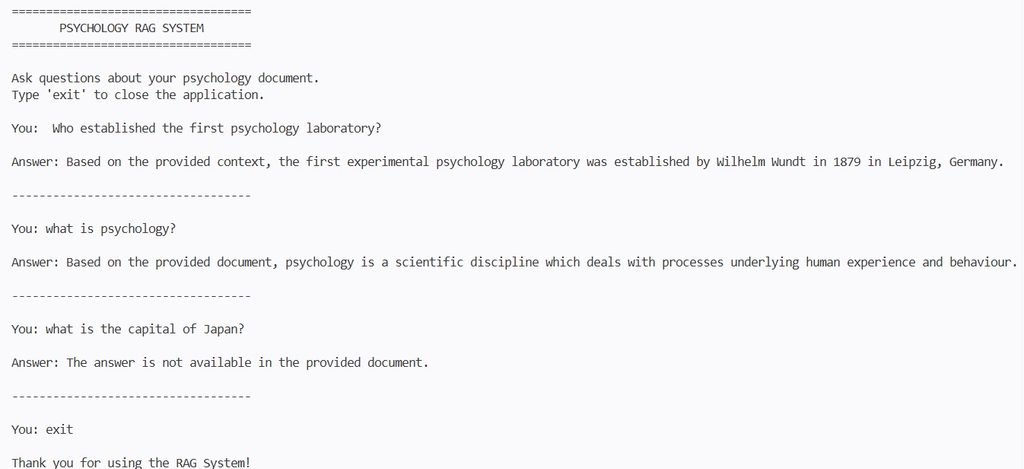
Question: Who established the first psychology laboratory?
Non-RAG response:
Gemini answered that Wilhelm Wundt established the first experimental psychology laboratory in 1879 in Leipzig, Germany.
RAG response:
The system retrieved relevant information from the psychology document and generated the following answer:
“Based on the provided context, the first experimental psychology laboratory was established by Wilhelm Wundt in 1879 in Leipzig, Germany.”
Both responses were correct. However, the RAG response was generated using information retrieved from the selected document.
Test Case 2: A Question Outside the Document
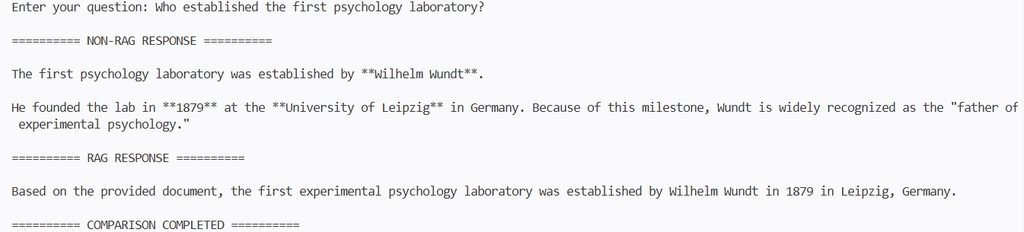
Question: What is the capital of Japan?
Non-RAG response:
Tokyo.
RAG response:
“The answer is not available in the provided document.”
This comparison demonstrated an important difference between the two approaches.
A normal LLM can answer using its general knowledge, whereas this RAG implementation was instructed to generate responses using the retrieved document context.
It is worth noting that prompt instructions alone cannot guarantee that an LLM will always reject unsupported questions. Additional retrieval relevance checks can further improve reliability.

6. Challenges and Key Learning Outcomes
Building this project provided practical experience with several important Generative AI concepts.
Some of the major learning outcomes included:
Understanding embeddings: Learning how text is converted into numerical vectors and compared based on semantic similarity.
Working with vector databases: Understanding how ChromaDB stores embeddings and retrieves relevant information.
Understanding the RAG pipeline: Learning how document processing, retrieval and answer generation work together.
Prompt engineering: Understanding how clear instructions and relevant context influence LLM responses.
Modular programming: Organising code into reusable Python modules for easier maintenance.
Testing and evaluation: Comparing RAG and non-RAG responses to understand the importance of document-grounded answers.
The project also highlighted the importance of retrieval quality. If irrelevant chunks are retrieved, the generated response may be less accurate. Improving chunking strategies and retrieval relevance is therefore an important area for further development.
7. Project Repository
The completed implementation was organised into a modular Python project.
A README file containing project details and setup instructions was created, along with a requirements file for dependency installation. Git was used for version control, and the project was uploaded to GitHub.
Project Name: Psychology RAG System
GitHub Repository: https://github.com/Himaja142006/psychology-rag-system
The repository contains the Python implementation, modular application files, source PDF, configuration example and project documentation.
8. Future Enhancements
Although the basic RAG application is working, there are several opportunities to improve it further.
Some possible enhancements include:
- Implementing more advanced and context-aware chunking strategies.
- Improving retrieval accuracy through relevance filtering.
- Adding source references to generated answers.
- Supporting multiple documents and larger knowledge bases.
- Developing a web-based interface for easier interaction.
- Exploring frameworks such as LangChain and LlamaIndex.
- Experimenting with hybrid search and reranking techniques.
These improvements could help develop the basic implementation into a more advanced document question-answering application.
Conclusion
Building a RAG system with Python provided a practical understanding of how retrieval and generation can work together in a Generative AI application.
From extracting text from a PDF to generating embeddings, integrating ChromaDB, retrieving relevant information and generating answers using Gemini, each stage helped demonstrate the role of different technologies in the RAG architecture.
More importantly, this implementation showed how an LLM can be connected to an external knowledge source to generate responses grounded in retrieved information.
As Generative AI continues to evolve, understanding concepts such as embeddings, semantic search, vector databases and Retrieval-Augmented Generation provides a valuable foundation for developing practical AI applications.

Leave a Reply
You must be logged in to post a comment.