

Introduction
Most chatbot demos answer a question and stop. Real AI agents have to plan, choose tools, act on the results and decide when they are done. As part of my internship at Valentius Kryptix, the “Agentic AI Workflow” milestone asked me to build exactly that, and to prove it works with numbers instead of “I tried a few cases and it looked fine.”
What the agent does
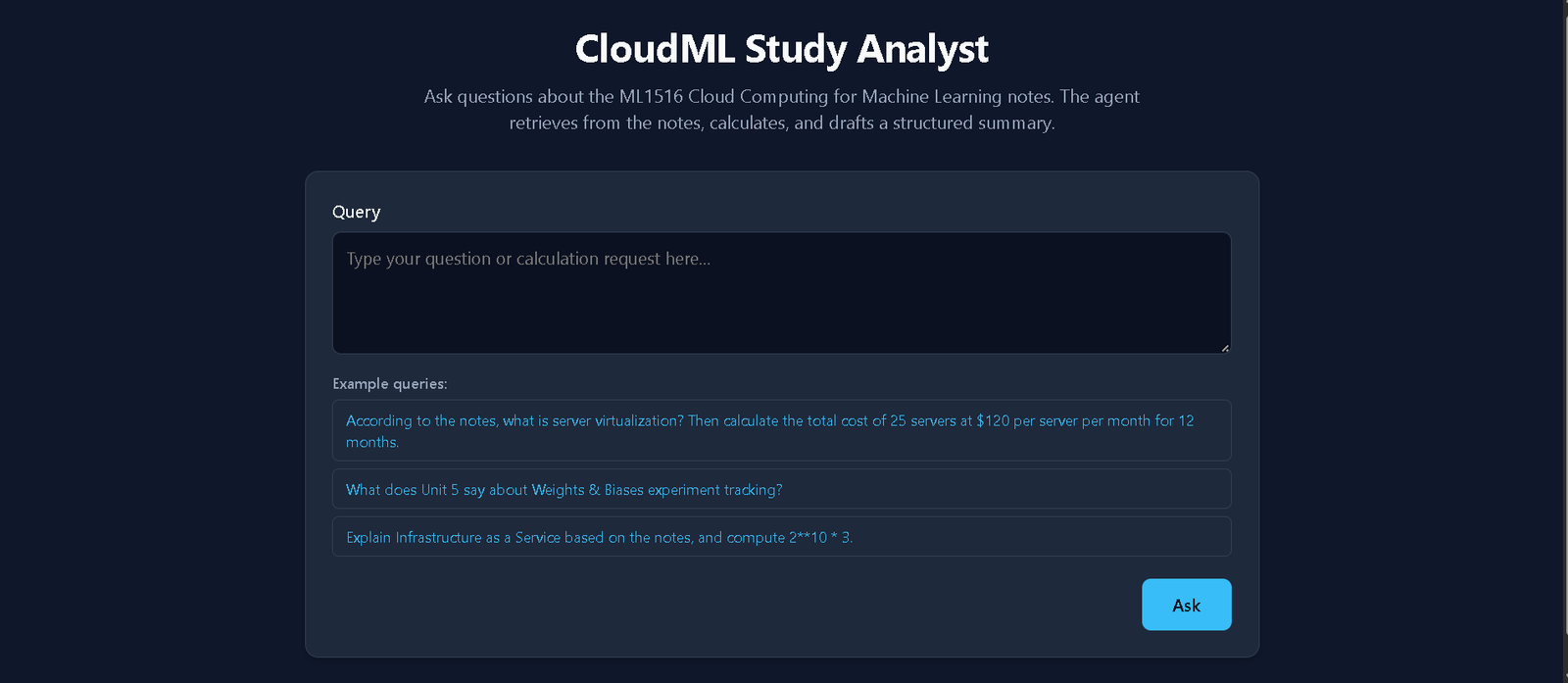
The agent handles one multi-step pattern: look up facts in the notes, calculate something, then draft a structured summary. For example:
“According to the notes, what is server virtualization? Then calculate the total cost of 25 servers at $120 per server per month for 12 months.”
The agent searches the notes, finds the definition with its source page, calls a calculator for 25 × 120 × 12 = 36,000, and returns a summary with three fields: TOPIC, FINDINGS (with citations) and COMPUTED.
Architecture
The agent is built with LangChain’s agent framework and Google’s Gemini model, with temperature set to 0 for consistent behaviour. It has three distinct tools:
- retrieve_notes: searches a ChromaDB vector store of my lecture notes using Gemini embeddings and returns the top matching chunks with file name and page number.
- calculator: a safe arithmetic evaluator built on Python’s AST module. It only allows numbers and basic operators, so it can never run arbitrary code.
- format_summary: produces the final TOPIC / FINDINGS / COMPUTED output.
I chose retrieval and calculation over web search on purpose. Both give repeatable results, which makes an evaluation meaningful. A web search tool changes its answers from day to day.
Customising the agent
The milestone required at least one customisation. I wrote a specialised system persona called “CloudML Study Analyst” with a fixed strategy: plan, then act, then summarise. It also has three strict rules:
- Write a short “Reason:” line before every tool call.
- Use the calculator for all arithmetic, never mental maths.
- Never invent numbers. If the notes or the question don’t contain a needed value, say it is missing.
Rule 3 mattered a lot. When I asked what it would cost to store 500 GB for a year, the agent correctly said the notes contain no price per GB instead of making one up.
Tracing: seeing why the agent did what it did
Every step is logged to the console and to a JSONL file: the tool called, its input, the agent’s stated reason and the result. This turned debugging from guessing into reading. Tracing is how I found that the model sometimes skips the “Reason:” line even though the prompt requires it.
I also added loop guards: a cap on total tool calls, a block on exact duplicate calls, a per-tool ceiling and a stop after repeated tool errors. If any guard fires, the agent is forced to answer with what it already has.
Evaluation: the honest part
I wrote 12 test cases across seven categories: multi-step, missing data, out of scope, error handling, retrieval only, calculation only and mixed scope. Each case has expected tools, expected computed values and nine automated checks, covering tool usage, tool order, output format, citation pages and more. A case passes only if every applicable check passes.
The result: 10 of 12 cases passed, a pass rate of 83.3%. All 4 multi-step cases and both missing-data cases passed.
The two failures taught me the most:
- Out-of-scope question (“What is the capital of France?”): the agent answered in plain text and skipped the structured summary. This is a real agent failure, because the model decided no tool was needed and ignored the required output format.
- Invalid expression (“5 +* 3”): the agent handled it correctly, but wrote “N/A (Invalid syntax)” in the computed field. My checker looked for the word “error” and marked it wrong. This was a flaw in my evaluation, not in the agent.
I left both failures in the README instead of tuning the prompt until everything passed.
Deployment
The checker for this milestone required a live public URL, so I wrapped the agent in a FastAPI app with a simple web interface that shows the answer and the full step-by-step trace. I deployed it on Render because it runs a normal Python server, which suits a local vector database better than serverless platforms. The app includes input validation, a rate limit of 10 requests per minute per IP, and safe error messages that never expose API keys.
Key learnings
- Measure, don’t guess. An evaluation set showed failure modes that manual testing missed, and it also exposed bugs in my own test checks.
- Tracing makes agents debuggable. Logging each tool call with its reason shows exactly where the model drifts from its instructions.
- Guardrails build trust. Loop guards, input limits and a “report missing data, don’t invent it” rule make an agent far more reliable than a raw LLM call.
Known limitations
The agent only knows five unit PDFs, and image-only pages are not indexed. Twelve test cases is a small sample, and results can vary between runs. My checks are rule-based, so a correct answer worded differently can still fail. The free hosting tier also sleeps when idle, so the first request can take close to a minute.
Conclusion
Building the agent took a few hours. Evaluating it honestly took the most thought and taught me the most. An agent that passes 10 of 12 tests with documented failures is more useful than one I merely “tried a few times.” Try the live demo, read the code and let me know what you think.
Live demo: https://agentic-ai-workflow-ek5k.onrender.com/
GitHub: https://github.com/KRISH18833/agentic-ai-workflow

Leave a Reply
You must be logged in to post a comment.