

A backend API is only half of an app. Users need a screen to click on. In this post, I share how I built a React frontend for a task manager during my Full Stack Web Development internship at Valentius Kryptix.
The React frontend talks to a REST API I built earlier with Node.js, Express and SQLite. It supports login, registration, and full create, view, edit and delete for tasks. Below is what I built and what I learned.
Who This Post Is For
This post is for beginners who know basic React and want to connect it to a real API. If you have only built static pages so far, this is a good next step. You will see how routing, forms and error handling fit together.
What I Built
The app is a personal task manager. Each user has their own account and their own tasks.
- Login and registration pages
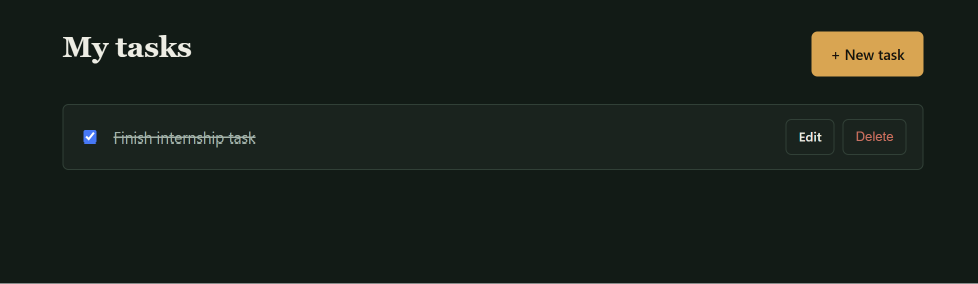
- A task list with checkboxes to mark tasks done
- A detail page for each task
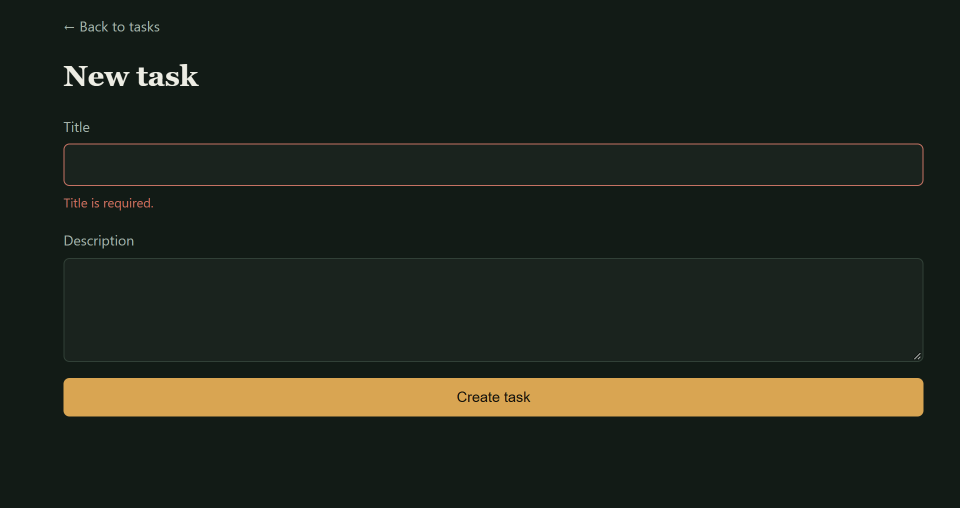
- One form used for both creating and editing tasks
- A layout that works on phones and desktops
Tools I Used
I kept the tool list short:
- React for building the interface
- Vite for a fast development server and build
- React Router for moving between pages
- The Fetch API for talking to the backend
- Plain CSS for styling
How I Structured the Project
I split the code by job. One folder holds the pages. Another holds small reusable parts like the navbar, spinner and error banner.
All network calls live in one API client file. It adds the login token to each request and turns errors into clear messages. When I wanted to change how errors look, I only had to edit one place.
Four Techniques That Made the React Frontend Work
Protecting Routes with React Router
Some pages should only be seen by logged-in users. I wrapped the task pages in a small ProtectedRoute component. If there is no token, it sends the user to the login page.
It also remembers where the user was going. After login, they land on the right page.
This only controls what the screen shows. The real security is on the server, which rejects requests without a valid token.
Showing Loading and Error States
A React frontend should never leave the user staring at a blank screen. Every request in my app has three visible states:
A spinner while data loads
The data itself when it arrives
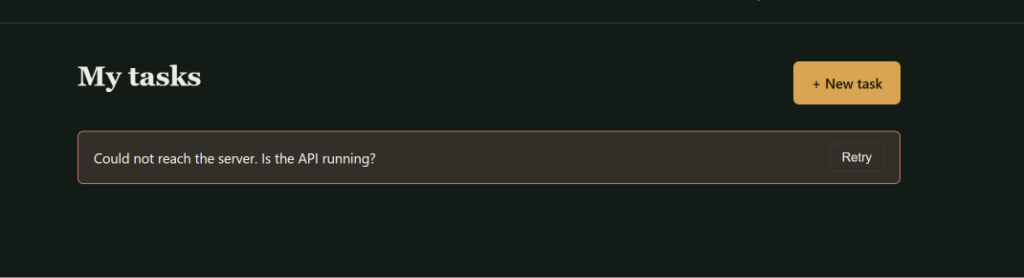
An error message with a Retry button if something fails
I tested this by stopping the backend and refreshing the page. The app showed the error message instead of breaking. Learn more about HTTP status codes to write better messages.
Validating Forms Before Submitting
The forms check input before calling the API. The email must look like an email. The password needs at least six characters. A task title cannot be empty.
This gives users instant feedback and avoids needless requests. Server-side validation still stays in place, because a client can always be bypassed.
Keeping State Simple with Context
I did not use Redux. The only data shared across pages was who is logged in. React Context was enough for that.
Everything else stays inside the component that uses it. Choosing the simplest tool that fits kept my React app easy to read.
What I Learned
Building the React frontend showed me that good apps handle the unhappy paths well. That means expired tokens, a stopped server, an empty list and a bad form entry.
It also showed me that a clear API makes the frontend much easier to write. Consistent status codes and error messages saved me time.
One issue that tripped me up was outside the React code itself — when I downloaded my project files, the folder structure got scrambled, with files landing loose instead of inside their proper subfolders. I had to manually verify every file was in the right place before Git would track the project correctly. It was a good reminder that a working app depends on more than just the code being correct.
I also ran into a frustrating issue where my terminal kept rejecting my git commit messages because of how quotation marks were being interpreted. Switching to writing the commit message into a separate text file and pointing git to that file instead solved it. Small tooling issues like that taught me as much as the actual coding did.
Related Reading
Learn more about Valentius Kryptix’s software development services
See how Valentius Kryptix approaches EdTech solutions
Try the React Frontend Yourself
The full code is on GitHub : task-frontend repository. The README explains how to run it against the Task API.
If you are learning to connect React to a backend, I hope this React frontend project gives you a clear starting point. Clone it, break it on purpose, and see how the loading and error states behave.


Leave a Reply
You must be logged in to post a comment.