
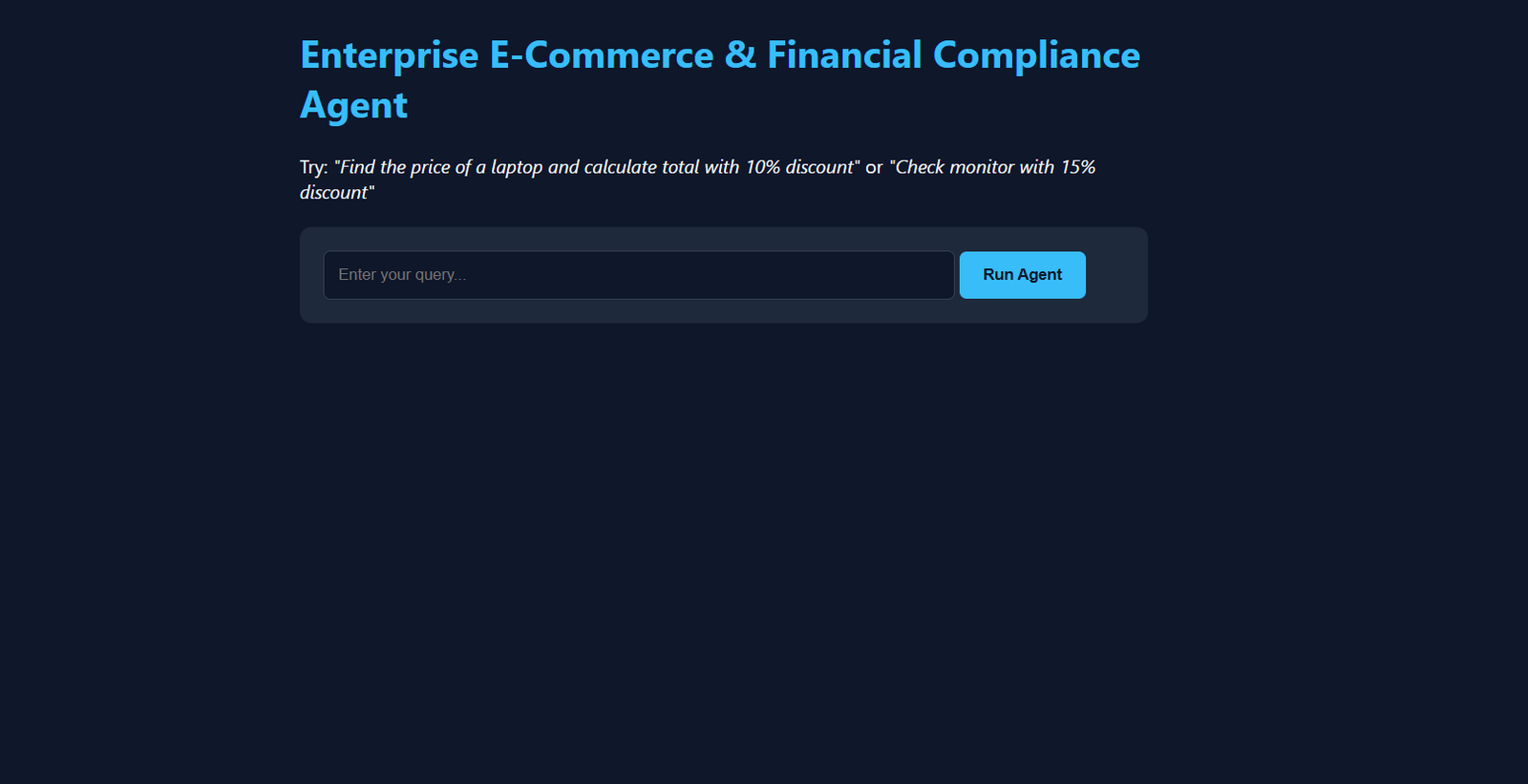

Large Language Models (LLMs) are remarkably capable at generating text, summarizing documents, and answering general questions. However, when deployed inside real-world enterprise environments—such as e-commerce customer support or financial quoting—standard single-shot LLMs fall short. They hallucinate arithmetic, lack access to live inventory data, and often struggle to enforce strict business policies.
To bridge the gap between passive text generation and reliable task execution, I designed, evaluated, and deployed an Autonomous E-Commerce & Financial Compliance Agent as part of my Agentic AI Workflow milestone at Valentius Kryptix.
Moving Beyond Single-Shot Prompts to ReAct Agents
In a traditional LLM pipeline, a user prompt goes into a model and a static response comes out. In contrast, an agentic workflow equips the LLM with external tools and an iterative reasoning loop (commonly known as ReAct—Reason + Act). Instead of guessing an answer, the agent inspects the query, decides which tool to invoke, observes the returned data, and plans its next action until the task is complete.
For this architecture, I combined:
- LangChain (
create_agent) for orchestrating the multi-step reasoning and tool-calling loop. - Groq (
openai/gpt-oss-120b) attemperature=0for low-latency inference and deterministic tool selection. - FastAPI & Vercel to expose the agent as a serverless REST API with an interactive frontend that visualizes intermediate execution steps.
Designing Deterministic Tools
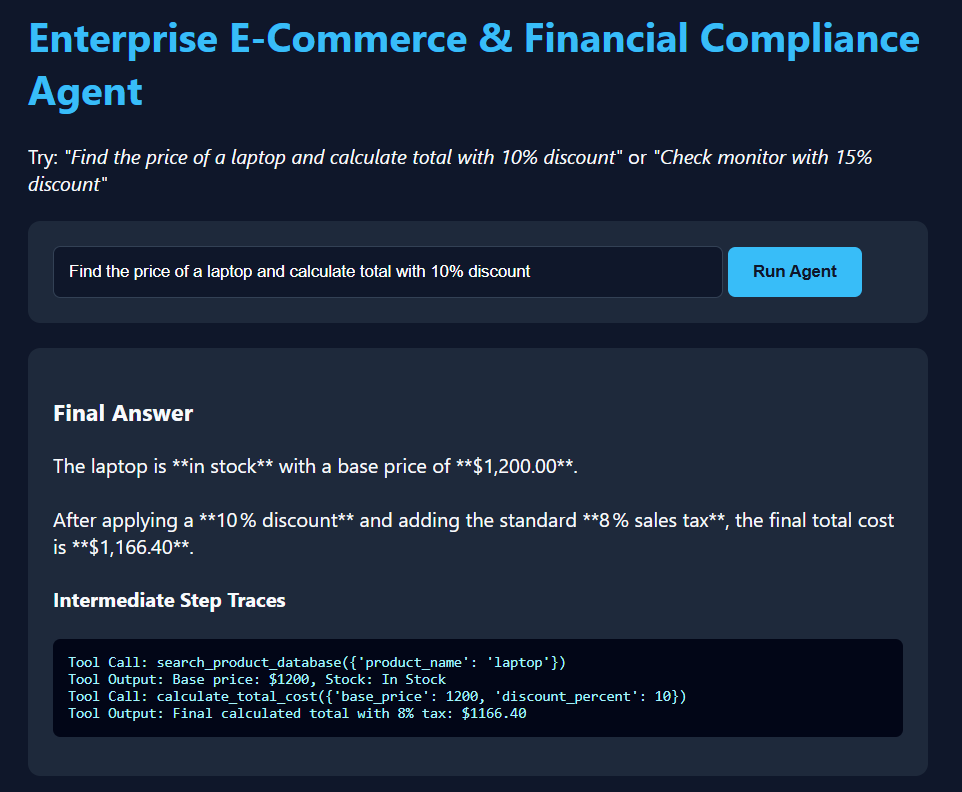
To prevent the LLM from inventing prices or miscalculating percentages, I isolated business logic into two dedicated Python tools decorated with LangChain’s @tool interface:
search_product_database(product_name: str): Queries the internal catalog to retrieve exact base pricing and real-time stock status (In Stock,Low Stock, orOut of Stock).calculate_total_cost(base_price: float, discount_percent: float): Executes deterministic arithmetic to apply promotional discounts and a mandatory 8% sales tax, formatting the result to two decimal places.
Enforcing Business Rules with a Compliance Persona
Giving an agent tools is only half the battle; ensuring it obeys operational constraints is equally critical. Without explicit guardrails, an eager agent might calculate a discounted quote for an item that is out of stock—creating a poor customer experience and financial liability.
To enforce compliance, I engineered a strict system persona:
“You are an Enterprise E-Commerce & Financial Compliance Assistant. Always verify product availability and base price using the search tool first. If a product is ‘Out of Stock’ or ‘Product not found in catalog.’, state that clearly and DO NOT calculate a total cost. If in stock, always use the calculate_total_cost tool to apply discounts and 8% tax accurately.”
When a user asks, “Find a monitor price and apply a 15% discount,” the agent first calls search_product_database("monitor"), observes Stock: Out of Stock, and immediately halts the pricing workflow—returning a compliant refusal rather than invoking calculate_total_cost.
Systematic Benchmarking: The 10-Case Evaluation Harness
Prompt tweaks can easily introduce regressions in multi-step workflows. Rather than relying on manual spot checks, I built an automated 10-case evaluation harness (agent.py) that benchmarks the agent across happy paths, boundary conditions, and negative guardrails:
- Multi-Step Chaining: Looking up an in-stock laptop (
$1,200) and applying a 10% discount plus 8% tax ($1,166.40). - Boundary Discounts: Testing
0%and50%discount edge cases onIn StockandLow Stockitems. - Missing Catalog Guardrails: Querying uncataloged items like
"smartwatch"or"tablet"to verify the agent reports them as not found without hallucinating prices. - Out-of-Stock Guardrails: Requesting discounts on
"monitor"to confirmcalculate_total_costis never triggered.
Every test run logs full intermediate traces ([Tool Call], [Tool Output], and [Final Answer]) and exports structured results to custom_evaluation_results.csv, achieving a 100% pass rate (10/10) across the suite.
Deploying to Production & Lessons Learned
Wrapping the agent in FastAPI and deploying on Vercel highlighted several practical engineering lessons that rarely surface in local notebooks:
- Observability Builds Trust: Exposing intermediate tool calls directly in the web interface allows users and engineers to audit why the agent reached a conclusion, transforming a black-box response into a transparent workflow.
- Environment & Dependency Hygiene: Transitioning from local Windows development to Linux serverless builds required strict UTF-8 encoding for
requirements.txt, lean dependency management to stay within serverless bundle limits, and defensive sanitization of environment API keys. - Separation of Concerns: Keeping deterministic calculations inside Python tools while letting the LLM handle natural language intent and routing delivers the best of both worlds—conversational flexibility backed by predictable execution.
Try It Yourself
You can test multi-step queries and inspect live tool-calling traces on the deployed application at agentic-ai-iwpr.vercel.app, or explore the full codebase and evaluation CSV on GitHub.
Live Interactive Demo: https://agentic-ai-iwpr.vercel.app/
Source Code & Evaluation Suite: https://github.com/pasiketansaig5genai-blip/Agentic-AI

Leave a Reply
You must be logged in to post a comment.