

Modern Large Language Models (LLMs) have transformed how developers build intelligent software, enabling applications to explain complex computer science topics, debug code, and hold natural, human-like conversations. However, one of the most common misconceptions among developers integrating LLMs for the first time is assuming that the API inherently remembers past interactions. In reality, raw LLM APIs are completely stateless by design—every single HTTP request is processed in isolation unless conversation state, memory management, and behavioral boundaries are deliberately engineered in the application layer. Without explicit state management, an AI assistant forgets what a user asked just seconds earlier, rendering multi-turn tutoring, follow-up questioning, and iterative problem-solving impossible.
During my Artificial Intelligence Internship at Valentius Kryptix, I designed and built StudyBuddy, a command-line conversational study assistant written in Python. The goal of StudyBuddy was straightforward yet technically demanding: create a fast, reliable, context-aware academic assistant for college students that explains technical concepts clearly, respects strict domain guardrails, maintains multi-turn conversation memory without hitting token limits, and gracefully recovers from API model outages.
In this comprehensive engineering walkthrough, I will break down the entire architecture of StudyBuddy—from setting up a secure Python virtual environment and initializing the Google GenAI SDK (`google-genai`), to crafting anti-hallucination system prompts, implementing a bounded sliding context window (`MAX_MESSAGES = 10`), and building an automated multi-model fallback loop for production resilience.
1. Why Stateless LLM APIs Need Application-Layer Architecture
When you send a prompt to a REST or SDK endpoint of a foundation model, the server processes your input tokens, predicts the most probable completion tokens, returns the response, and immediately discards the session state. While this stateless architecture allows cloud providers to scale inference across millions of concurrent requests, it shifts the responsibility of conversational continuity onto the client application.
To turn a stateless API into an intelligent multi-turn assistant, our Python application needs to solve four distinct engineering problems:
1. Credential Security and Environment Isolation: Protecting sensitive API keys from accidental exposure in public version control repositories while keeping dependencies reproducible across machines.
2. Behavioral Consistency via System Instructions: Preventing the model from generating overly verbose responses, hallucinating unverified facts, or drifting away from educational topics.
3. Bounded Conversation Memory: Passing enough prior conversation turns so the assistant remembers user context (such as their name, academic major, and current topic) without sending infinitely growing payloads that increase latency and token usage.
4. Fault-Tolerant Model Routing: Ensuring the application does not crash when a specific model endpoint experiences high traffic (`503 Service Unavailable`) or version deprecation (`404 Not Found`).
StudyBuddy addresses each of these challenges cleanly inside a modular, readable Python codebase (`app.py`).
2. Setting Up a Secure Python Environment and API Client
Security and dependency isolation form the foundation of any production-grade AI project. Hardcoding API keys directly into Python scripts is one of the fastest ways to compromise cloud credentials once code is pushed to GitHub. To prevent this, StudyBuddy separates configuration from source code using a Python virtual environment (`venv`) and environment variables managed via `python-dotenv`.
Project Directory Structure:
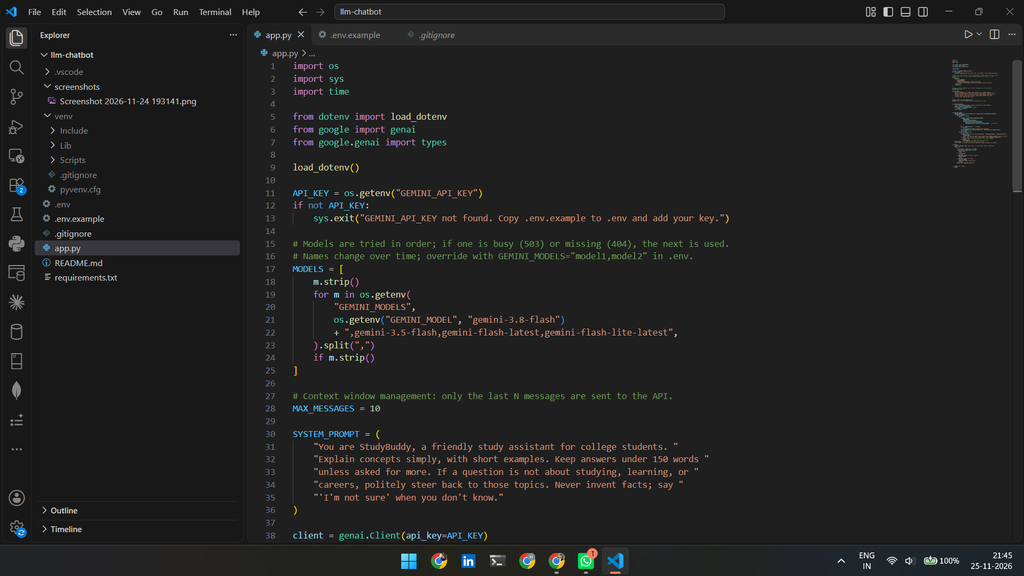
– `app.py`: The core application entry point containing configuration loading, system instructions, model fallback logic, sliding window context management, and the interactive terminal loop.
– `.env`: Local, untracked file storing the actual `GEMINI_API_KEY` and optional model overrides.
– `.env.example`: A safe template committed to version control showing contributors which environment variables need to be configured.
– `.gitignore`: Explicitly excludes `.env`, `venv/`, and `__pycache__/` so neither secrets nor local environment binaries are tracked by Git.
– `requirements.txt`: Pins the exact dependencies required to run the project.
The project relies on two primary Python libraries:
– `google-genai`: The official Google GenAI SDK, which provides a clean, modern interface (`genai.Client`) for communicating with Gemini models and passing structured conversation histories and system configurations.
– `python-dotenv`: Automatically parses the local `.env` file at startup via `load_dotenv()`, injecting environment variables into `os.environ` so they can be accessed securely with `os.getenv()`.
Fail-Fast Startup Validation:
Rather than allowing the program to start and fail cryptically mid-conversation when an API call is made, `app.py` implements fail-fast validation right at initialization:
– It reads `API_KEY = os.getenv(“GEMINI_API_KEY”)`.
– If `API_KEY` is missing or empty, `sys.exit()` terminates execution immediately with a clear, actionable developer message instructing the user to copy `.env.example` to `.env` and insert their valid key.
– Once verified, the SDK client is instantiated cleanly via `client = genai.Client(api_key=API_KEY)`.
3. Prompt Engineering: Designing Guardrails and Persona Boundaries
Even the most capable foundation model will behave unpredictably without clear instructions. By default, general-purpose LLMs tend to write lengthy essays, over-explain simple concepts, or answer unrelated off-topic questions. For a college study assistant used inside a terminal window, long walls of text hurt readability and slow down active learning.
To solve this, StudyBuddy defines a dedicated `SYSTEM_PROMPT` passed alongside every generation request. This system prompt acts as a persistent behavioral contract governing tone, length, domain boundaries, and factual reliability:
1. Clarity and Concise Formatting:
The prompt instructs the model: *”You are StudyBuddy, a friendly study assistant for college students. Explain concepts simply, with short examples. Keep answers under 150 words unless asked for more.”* This keeps terminal output crisp, scannable, and easy to digest during quick study sessions, while still allowing students to request deeper dives whenever needed.
2. Strict Academic Domain Focus:
To prevent the chatbot from being misused as a generic entertainment bot, the system prompt enforces domain boundaries: *”If a question is not about studying, learning, or careers, politely steer back to those topics.”* This keeps interactions productive and aligned with academic and career mentorship.
3. Anti-Hallucination Guardrail:
Large Language Models are notorious for generating plausible-sounding but incorrect facts when asked about obscure or ambiguous topics. To prioritize accuracy over guesswork, the system prompt explicitly mandates: *”Never invent facts; say ‘I’m not sure’ when you don’t know.”* Establishing an explicit fallback phrase dramatically reduces confident hallucinations in educational settings.
4. Interactive Session Control Commands:
Beyond natural language prompts, the terminal loop intercepts built-in utility commands before sending anything to the LLM API:
– Typing `reset` clears the in-memory conversation history list, allowing the student to switch to a completely new subject with a clean context slate.
– Typing `quit` gracefully exits the command-line loop without raising keyboard interrupt tracebacks.
4. Implementing a Sliding Context Window (`MAX_MESSAGES = 10`)
To deliver a natural conversational experience, every user message and assistant reply is stored sequentially in an in-memory conversation list. On each new turn, the application sends this conversation history to the Gemini API so the model can resolve pronouns, understand follow-up questions, and recall previously shared details.
However, sending an unbounded conversation history creates two serious scaling bottlenecks:
– Increasing Token Consumption and Cost: Every turn re-sends all prior messages, causing input token counts to grow quadratically over a long study session.
– Higher Latency and Context Overflow: Larger payloads take longer to transmit and process, and extremely long sessions can eventually exceed model context limits or degrade retrieval focus.
StudyBuddy solves this using a sliding context window controlled by the constant `MAX_MESSAGES = 10`. Before building each API request, the application slices the history buffer to retain only the most recent 10 messages (representing the last 5 complete user-assistant exchanges).
Why `MAX_MESSAGES = 10` Works Well in Practice:
– Immediate Working Memory: Five full conversational turns are more than enough for the assistant to remember who the student is, what subject they are studying, and what follow-up examples or analogies were just discussed.
– Predictable Payload Size: Because the history buffer never exceeds 10 messages, API latency and token usage remain bounded and consistent whether the user has sent 6 messages or 60 messages.
– Clean Memory Reset: When a student finishes studying one topic and types `reset`, the buffer empties immediately, preventing context bleed between unrelated subjects.
5. Automated Model Fallback Architecture for High Availability
In real-world AI engineering, depending on a single hardcoded model name is a common single point of failure. Cloud LLM endpoints occasionally experience transient capacity spikes returning HTTP `503` (model busy/overloaded), or older preview model identifiers get retired returning HTTP `404` (model not found). If an application catches no exceptions or has no backup model configured, a temporary upstream hiccup crashes the entire user session.
To make StudyBuddy resilient against both transient overload and model lifecycle changes, `app.py` implements an ordered `MODELS` fallback chain:
– Dynamic Environment Override: Developers can customize the model priority order at runtime without editing Python code by setting `GEMINI_MODELS=”model1,model2″` in `.env`.
– Sensible Production Defaults: If no override is provided, the script constructs a prioritized list starting with `GEMINI_MODEL` (defaulting to `gemini-3.8-flash`), followed by `gemini-3.5-flash`, `gemini-flash-latest`, and `gemini-flash-lite-latest`.
– Sequential Failover Loop: When generating a response, the application iterates through the `MODELS` list in order. If the primary model throws an API availability or overload error, the exception handler catches it cleanly and automatically retries the exact same conversation payload against the next model in the list.
From the student’s perspective, this failover happens transparently behind the scenes—ensuring uninterrupted study sessions even during peak API traffic.
6. Testing Multi-Turn Context and Real-World Terminal Execution
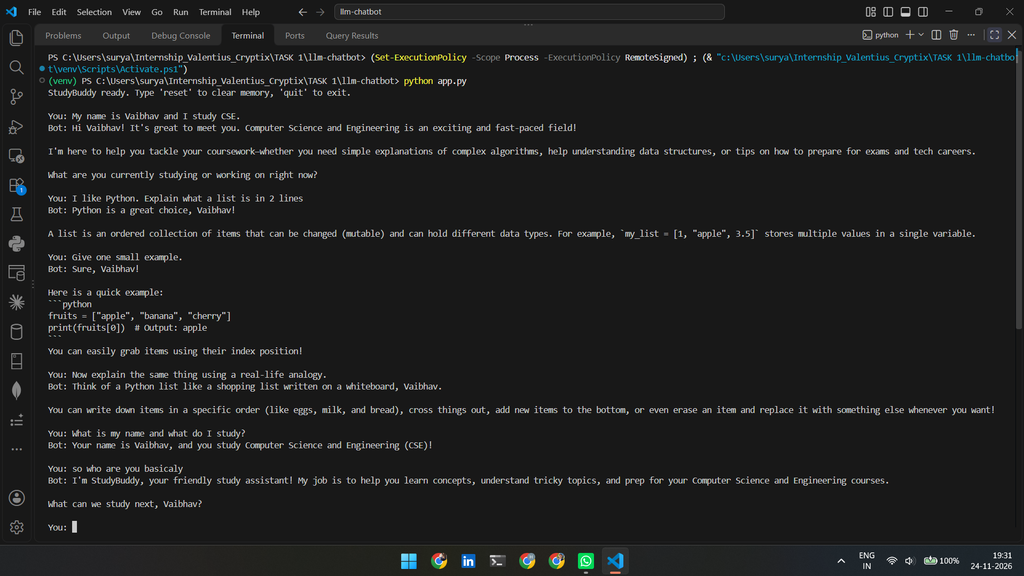
To validate that context persistence, prompt guardrails, and output formatting work together seamlessly, I conducted a six-turn interactive test session inside the VS Code integrated terminal:
– Turn 1 (User Profile Initialization): I started the session by introducing myself: *”My name is Vaibhav and I study CSE.”* StudyBuddy greeted me by name and immediately tailored its academic suggestions toward Computer Science and Engineering coursework such as algorithms, data structures, and exam preparation.
– Turn 2 (Concise Concept Explanation): I asked the bot: *”I like Python. Explain what a list is in 2 lines.”* Respecting the brevity constraint in `SYSTEM_PROMPT`, the assistant delivered a clear, two-line explanation highlighting mutability and mixed data types.
– Turn 3 (Context-Dependent Follow-Up): Without mentioning the word “list” or “Python,” I simply typed: *”Give one small example.”* Because the sliding context window preserved prior turns, StudyBuddy understood the implicit reference and generated a clean Python snippet demonstrating list creation and zero-based indexing (`fruits[0]`).
– Turn 4 (Analogy Transformation): Next, I tested deeper pedagogical adaptability by asking: *”Now explain the same thing using a real-life analogy.”* The model retained the subject context and compared a Python list to an ordered shopping list written on a whiteboard where items can be added, crossed out, or replaced.
– Turn 5 (Longer-Range Memory Recall): Five turns into the conversation, I tested whether early session details were still intact by asking: *”What is my name and what do I study?”* StudyBuddy accurately recalled both *”Vaibhav”* and *”Computer Science and Engineering (CSE)”* without hesitation.
– Turn 6 (Persona Integrity Check): Finally, I asked *”so who are you basically”* to verify that multi-turn dialogue had not diluted the system instructions. The assistant reaffirmed its identity as StudyBuddy, summarizing its role in helping with CSE coursework and asking what topic to study next.
7. Key Engineering Takeaways and Best Practices
Building and testing StudyBuddy highlighted several essential principles for developers integrating LLM APIs into real-world Python applications:
– Never Hardcode Secrets or Model Names: Loading API keys and model chains via `.env` keeps repositories secure and makes switching models trivial as newer versions are released.
– Engineer Guardrails Up Front: Well-structured system prompts controlling response length, domain focus, and uncertainty handling dramatically improve user trust and output quality.
– Bound Your Conversation History: A sliding context window (`MAX_MESSAGES = 10`) strikes the ideal balance between rich multi-turn memory and predictable latency/token efficiency.
– Design for Graceful Degradation: Implementing a sequential model fallback chain turns potential `503` or `404` API failures into invisible recoveries.
Conclusion and Source Code
Effective LLM API integration is about much more than making a single text-generation call—it requires thoughtful state management, defensive error handling, security hygiene, and disciplined prompt engineering. By combining the `google-genai` SDK with a bounded sliding context window, strict system guardrails, and automated model fallbacks, StudyBuddy delivers a reliable, context-aware learning experience directly from the terminal.
You can inspect the full Python source code, `.env.example` configuration template, and setup instructions in my public GitHub repository:
https://github.com/vaibhavsw942/LLM-Chatbot.git

Leave a Reply
You must be logged in to post a comment.