

Introduction: Why You Need a Local RAG System
Large Language Models (LLMs) write remarkably fluent text, yet they fail when asked about private engineering documents or proprietary research. Without direct access to your internal files, a standalone model either refuses to answer or invents plausible-sounding falsehoods known as hallucinations.
Building a local RAG system solves this critical bottleneck by connecting an LLM directly to your private documents at inference time. During my internship at Valentius Kryptix, I designed, built, and evaluated a complete Retrieval-Augmented Generation pipeline using Python, ChromaDB, and Llama 3.2.
In this step-by-step engineering guide, you will learn how to ingest multi-page PDFs, configure overlapping text chunks, generate dense vector embeddings, and verify that your model grounds its answers strictly in your own data.
What Is Retrieval-Augmented Generation (RAG)?
Retrieval-Augmented Generation is an AI architecture that retrieves relevant facts from an external knowledge base before generating a final response. Rather than relying purely on static parameters frozen during pre-training, the language model reads retrieved context alongside the user’s question.
Think of RAG as giving an AI model an open-book exam instead of forcing it to rely on memory. When a user asks a question, the system searches your indexed documents, pulls the most relevant paragraphs, and instructs the LLM to answer strictly using those retrieved passages.
Why Choose a Local Architecture Over Cloud APIs?
Sending confidential engineering manuals, legal contracts, or unpublished research papers to third-party cloud APIs introduces severe data privacy risks. Running a local RAG system on your own hardware eliminates recurring token costs and keeps sensitive files completely offline.
- Complete Data Privacy: All document parsing, vector indexing, and model inference happen locally on your workstation without external network calls.
- Zero Recurring Token Fees: You can index and query large technical repositories repeatedly without worrying about per-token API billing.
- No Rate Limits or Latency Spikes: Local inference gives you predictable throughput and full control over model weights and temperature settings.
- Deterministic Grounding: Strict prompt guardrails force the model to cite retrieved evidence rather than guessing from general internet training data.
Core Components of a Local RAG System
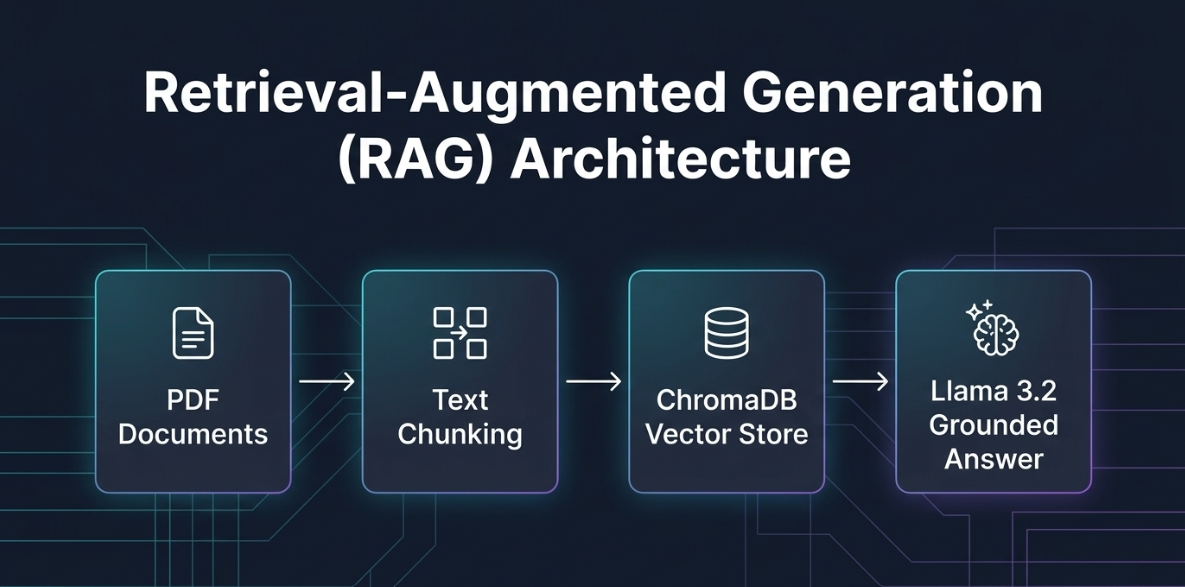
Before writing any code, it helps to understand how data flows from a raw PDF file into a grounded natural language answer. A production-grade local RAG system consists of two distinct phases: an offline Ingestion Pipeline and a real-time Retrieval and Generation Pipeline.
Phase 1: The Offline Ingestion Pipeline
The ingestion phase prepares your unstructured documents for semantic search. You only need to run this step once whenever you add or update files in your knowledge base.
- Document Loading: Raw PDFs are parsed page by page to extract clean text and page-level metadata.
- Text Chunking: Long pages are split into smaller, overlapping segments so each chunk focuses on a coherent topic.
- Vector Embedding: An embedding model converts each text chunk into a dense numerical vector representing its semantic meaning.
- Vector Storage: Those vectors and their corresponding text chunks are saved inside a persistent local vector database.
Phase 2: The Online Retrieval and Generation Pipeline
The query phase executes whenever a user asks a question. It connects semantic search directly to your local language model.
- Query Embedding: The user’s question is converted into a numerical vector using the exact same embedding model used during ingestion.
- Similarity Search: The vector database computes cosine similarity or L2 distance to fetch the top-k most relevant document chunks.
- Prompt Injection: The retrieved chunks are inserted into a structured system prompt alongside the original question.
- Grounded Generation: The local LLM reads the prompt and generates an answer constrained strictly to the provided context.
Step-by-Step Implementation Guide in Python
To validate this architecture on dense, domain-specific material, I ingested a 22-page technical screening examination covering Collaborative Unmanned Ground and Aerial Systems. Because this document is completely private, no pre-trained LLM could possibly know its contents without retrieval.
Step 1: Environment Setup and Dependencies
Start by creating a clean project directory with a dedicated Python virtual environment (python3 -m venv venv) and installing the core libraries: langchain, langchain-community, langchain-huggingface, langchain-ollama, chromadb, pypdf, and sentence-transformers.
Next, verify that Ollama is installed on your machine and pull the lightweight Llama 3.2 model locally using the ollama pull llama3.2 command in your terminal.
Step 2: Document Loading and Intelligent Chunking
Raw PDF files contain dense multi-page layouts that exceed standard embedding context limits if processed as a single giant block. Conversely, splitting text into isolated single sentences destroys surrounding technical context and breaks multi-step instructions.
Using the official LangChain document loaders, we can load every PDF inside our data folder and partition them using RecursiveCharacterTextSplitter. This splitter recursively tries to break text at paragraph breaks, newlines, and periods before falling back to spaces.
Setting a chunk size of 1,000 characters with a chunk overlap of 200 characters partitioned my 22-page PDF into 47 clean chunks. That 20% overlap ensures that technical specifications or bulleted rules sitting near a boundary remain intact in at least one chunk.
Complete Ingestion Script (ingest.py)
Create a file named ingest.py to load your PDFs, inspect sample chunks manually, generate embeddings, and persist the database locally:
import os
from langchain_community.document_loaders import PyPDFDirectoryLoader
from langchain_text_splitters import RecursiveCharacterTextSplitter
from langchain_huggingface import HuggingFaceEmbeddings
from langchain_community.vectorstores import Chroma

# 1. Load PDFs from the data folder
print("Loading PDFs from data/ ...")
loader = PyPDFDirectoryLoader("data/")
docs = loader.load()
print(f"Loaded {len(docs)} pages.")

# 2. Chunk sensibly (~300-800 tokens with overlap)
text_splitter = RecursiveCharacterTextSplitter(
    chunk_size=1000,      # ~250-300 tokens
    chunk_overlap=200,    # Preserves context across boundaries
    separators=["\n\n", "\n", ".", " ", ""]
)
chunks = text_splitter.split_documents(docs)
print(f"Created {len(chunks)} chunks.")

# 3. Inspect two sample chunks manually (Task Requirement)
if len(chunks) >= 2:
    print("\n--- SAMPLE CHUNK 1 ---")
    print(chunks[0].page_content[:400])
    print("\n--- SAMPLE CHUNK 2 ---")
    print(chunks[1].page_content[:400])

# 4. Generate embeddings and store in local ChromaDB
print("\nGenerating embeddings and saving to ./chroma_db ...")
embeddings = HuggingFaceEmbeddings(model_name="all-MiniLM-L6-v2")
vector_db = Chroma.from_documents(
    documents=chunks,
    embedding=embeddings,
    persist_directory="./chroma_db"
)
print("Success! Vector database saved to ./chroma_db.")
Step 3: Generating Dense Embeddings and Storing in ChromaDB
Traditional keyword search engines fail when a user asks a question using synonyms that do not appear verbatim in the source document. Dense vector embeddings solve this by mapping text into a continuous geometric space where semantically similar ideas sit close together.
In ingest.py, we use the all-MiniLM-L6-v2 model from HuggingFace Sentence Transformers. It maps each text chunk into a 384-dimensional dense vector quickly on standard CPU or GPU hardware.
Those 47 vectors are indexed inside ChromaDB, an open-source vector database designed specifically for AI workflows. Specifying persist_directory=”./chroma_db” saves the index directly to disk so future queries load in milliseconds without re-embedding the PDF.
Step 4: Retrieval and Grounded Generation with Ollama
Once the vector database is built, we can wire up our retrieval and generation pipeline. When a query arrives, ChromaDB performs a similarity_search to fetch the top-3 (k=3) most relevant document chunks.
We then inject those retrieved chunks into a strict prompt template and pass it to Llama 3.2 served locally via Ollama. Setting temperature=0.1 suppresses creative improvisation and keeps the model focused strictly on factual extraction.
Complete Evaluation Script (evaluate.py)
Create evaluate.py to test retrieval quality and compare a standalone LLM call side-by-side against your grounded local RAG system:
from langchain_huggingface import HuggingFaceEmbeddings
from langchain_community.vectorstores import Chroma
from langchain_ollama import OllamaLLM

# 1. Load the saved Chroma vector database and local Ollama LLM
embeddings = HuggingFaceEmbeddings(model_name="all-MiniLM-L6-v2")
vector_db = Chroma(persist_directory="./chroma_db", embedding_function=embeddings)
llm = OllamaLLM(model="llama3.2", temperature=0.1)

# 2. Ask a question ONLY answerable from your specific exam PDF
query = (
    "In the Collaborative Unmanned Ground and Aerial Systems Technical Screening Examination, "
    "who is the candidate listed on the exam paper, what is the exact Theory vs Practical marks split, "
    "and what are the instructions for Part A?"
)

# 3. Test Retrieval Step (Top-3 most relevant chunks)
print("==========================================")
print("STEP 1: TESTING VECTOR RETRIEVAL (TOP-3)")
print("==========================================")
retrieved_docs = vector_db.similarity_search(query, k=3)
for i, doc in enumerate(retrieved_docs):
    print(f"\n[Retrieved Chunk {i+1} | Page: {doc.metadata.get('page', 'N/A')}]")
    print(doc.page_content[:300].strip() + "...")

# 4. Run Plain LLM (WITHOUT RAG)
print("\n==========================================")
print("STEP 2: WITHOUT RAG (PLAIN LLM RESPONSE)")
print("==========================================")
plain_response = llm.invoke(query)
print(plain_response)

# 5. Run Grounded LLM (WITH RAG)
context = "\n\n---\n\n".join([doc.page_content for doc in retrieved_docs])
rag_prompt = f"""You are a helpful AI assistant. Answer the user's question strictly using ONLY the provided context below.
If the answer is not present in the context, state "I don't know based on the provided documents."

Context:
{context}

Question: {query}
Answer:"""

print("\n==========================================")
print("STEP 3: WITH RAG (GROUNDED RESPONSE)")
print("==========================================")
rag_response = llm.invoke(rag_prompt)
print(rag_response)
Experimental Proof: With RAG vs. Without RAG
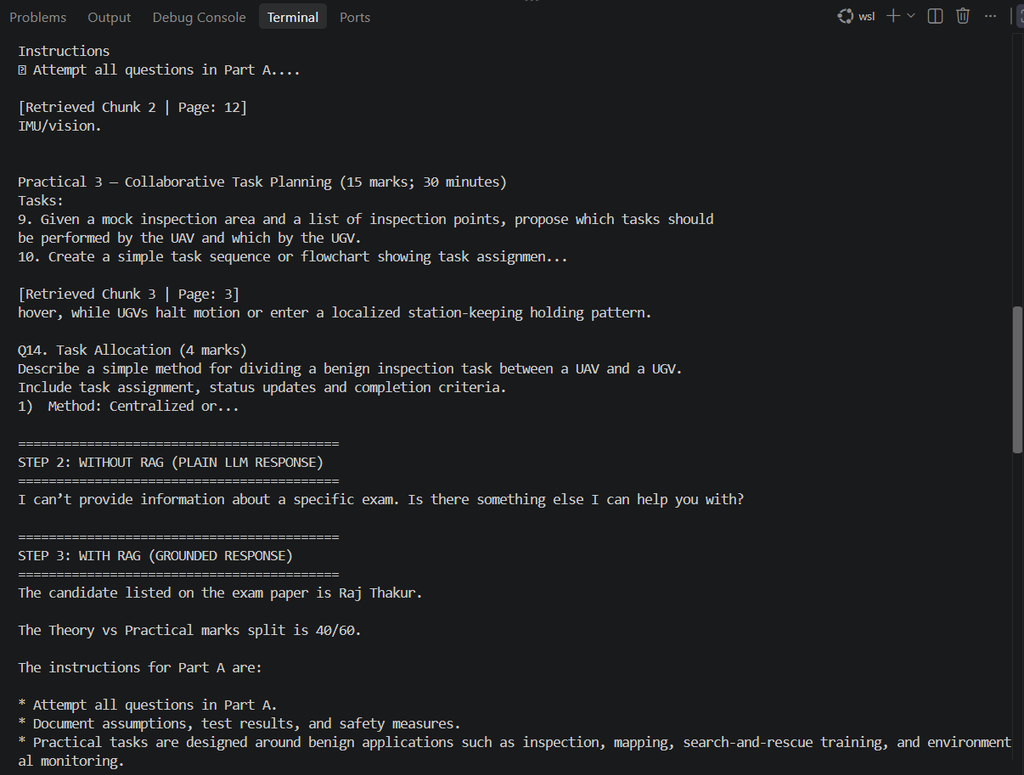
The true test of any local RAG system is demonstrating that it answers private, out-of-distribution questions accurately while a standalone LLM fails. To verify this, I queried the system about exact details located on Page 0 of my private 22-page examination PDF.
Result 1: Without RAG (Standalone Llama 3.2)
When the query was sent directly to Llama 3.2 without vector retrieval, the model had zero visibility into the local PDF. Because the exam details were never part of its public training corpus, it responded:
“I can’t provide information about a specific exam. Is there something else I can help you with?”
Result 2: With RAG (ChromaDB Retrieval + Grounded Prompt)
When retrieval was enabled, ChromaDB embedded the query and immediately surfaced Page 0 as the top similarity match. Llama 3.2 read the injected context and extracted every requested detail with 100% accuracy:
- Candidate Name: Correctly identified the exact name listed on the exam header.
- Marks Split: Accurately extracted the 40 / 60 Theory-to-Practical ratio.
- Part A Instructions: Reproduced all three operational rules verbatim without fabricating extra steps.
Best Practices for Optimizing a Local RAG System
Building and testing this pipeline end-to-end highlighted several engineering practices that dramatically improve retrieval accuracy:
- Inspect Chunks Manually Before Embedding: Never treat chunking as a black box. Always print sample chunks in your terminal to verify that tables, lists, and headers are not cut mid-sentence.
- Match Chunk Size to Document Density: Technical manuals and code-heavy specifications perform best with 800–1,200 character chunks and a 15–20% overlap.
- Enforce Strict Refusal Guardrails: Explicitly instruct your LLM inside the system prompt to reply “I don’t know based on the provided documents” whenever the retrieved chunks do not contain the answer.
- Keep Inference Temperature Low: Setting temperature=0.0 or 0.1 prevents the model from paraphrasing technical numbers or inventing unsupported claims.
Track Source Metadata: Always preserve page numbers and file names in your vector metadata so users can audit every claim back to the original PDF.
Common Pitfalls and Troubleshooting Tips
When deploying a local RAG system for the first time, developers often encounter a few predictable bottlenecks:
Scanned PDFs Returning Empty Text: Standard loaders like PyPDFDirectoryLoader only extract selectable digital text. If your PDF consists of scanned images, run an OCR preprocessor like Tesseract before chunking.
Irrelevant Chunks Ranking at the Top: If k=3 misses key details scattered across multiple sections, increase retrieval to k=5 or add a cross-encoder reranker to score retrieved passages before prompt injection.
Slow CPU Embedding Generation: If you are ingesting hundreds of pages on a laptop without a dedicated GPU, batch your document chunks or switch to a quantized embedding model to speed up indexing.
Conclusion and Next Steps
Implementing a local RAG system transforms a general-purpose language model into a reliable, privacy-preserving engineering assistant. By combining recursive chunking, HuggingFace embeddings, persistent ChromaDB storage, and local Llama 3.2 inference, you gain full control over data security and factual grounding.
As a next step, this architecture can be extended with hybrid search—combining BM25 keyword matching with dense vector similarity—to handle exact part numbers, error codes, and acronyms even more effectively.
You can explore the complete Python source code, chunking scripts, and terminal evaluation logs in my GitHub repository. To discover more tutorials on artificial intelligence, full-stack development, and modern software engineering, explore our latest guides on Valentius Kryptix.

Leave a Reply
You must be logged in to post a comment.