

Introduction
In modern web applications, users expect information to be updated instantly without continuously refreshing the page. Applications such as messaging platforms, online gaming systems, live dashboards, and collaboration tools depend on real-time communication to provide a smooth user experience.
Traditional HTTP communication follows a request-response model. The client sends a request to the server, and the server responds. If the client needs updated information, it must send another request. This approach can become inefficient for applications that require continuous communication.
WebSockets help solve this problem by establishing a persistent, two-way communication channel between a client and a server. As part of my internship at Valentius Kryptix, I explored WebSockets and real-time communication by developing a Real-Time Chat Application.
What Are WebSockets?
WebSocket is a communication protocol that enables full-duplex communication between a client and a server over a single, long-lived connection.
Unlike traditional HTTP communication, where the client generally initiates each request, WebSockets allow both the client and server to exchange data whenever needed after the connection is established.
Some important characteristics of WebSockets include:
- Persistent connection: The connection remains open until either side closes it.
- Two-way communication: Both client and server can send messages.
- Low communication overhead: Data can be exchanged without creating a new HTTP request for every message.
- Real-time updates: Information can be delivered immediately when events occur.
These characteristics make WebSockets useful for chat applications, live notifications, multiplayer games, and real-time monitoring systems.
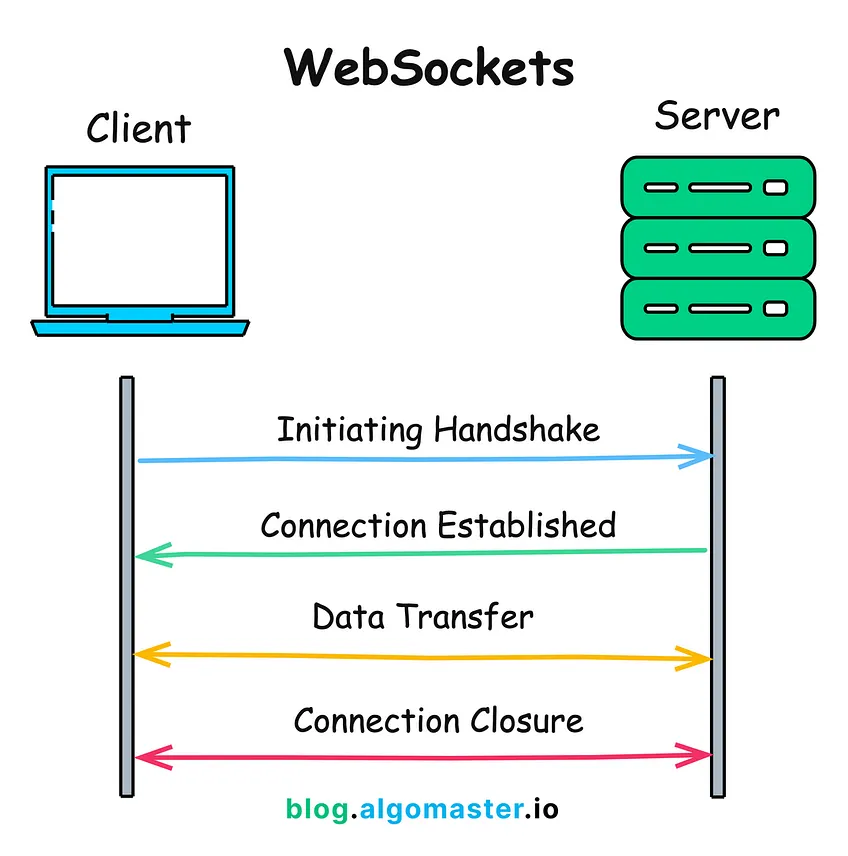
Fig.1 WebSockets and Real-Time Communication
Technologies Used in My Project
For this project, I used the following technologies:
- React.js: Used to develop the interactive frontend and display messages, online users, and chat updates.
- Node.js: Provides the JavaScript runtime environment for the backend.
- Express.js: Used to create and manage the backend server.
- Socket.IO: Used to establish real-time communication and manage events between connected clients and the server.
- HTML and CSS: Used to structure and style the chat interface.
The frontend and backend communicate through Socket.IO, allowing multiple users to exchange messages in real time.
Project Overview: Real-Time Chat Application
The main objective of this project was to understand how real-time communication works by implementing a functional chat application.
The application allows multiple users to join a chat session and exchange messages without refreshing the browser.
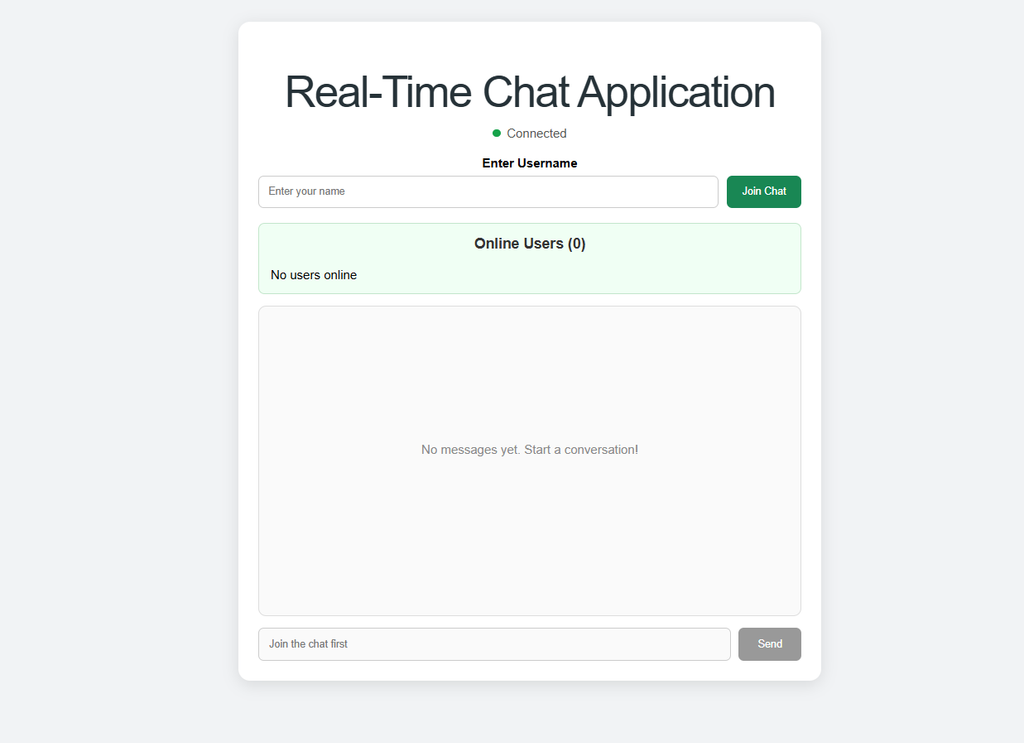
Fig.2 Real-Time Chat Application Interface
Key Features Implemented
1. Real-Time Messaging
Users can send messages that are immediately broadcast to other connected users. When a user sends a message, the frontend emits an event to the backend. The server receives the event and broadcasts the message to connected clients.
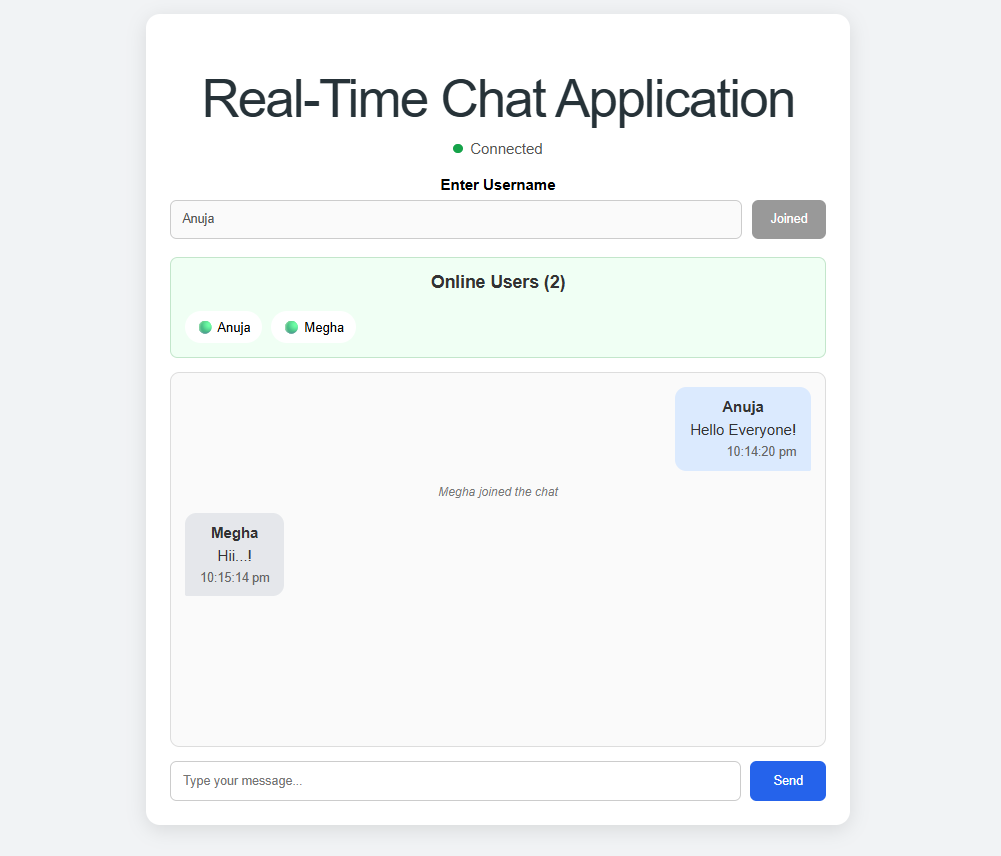
Fig.3 Real-Time Messaging Between Multiple Users
2. Online User Tracking
The application maintains a list of currently connected users. When a new user joins, the online user list and count are updated automatically.
3. Join and Leave Notifications
The application displays notifications when users join or leave the chat. This helps users understand who is currently participating in the conversation.
4. Connection and Disconnection Handling
The backend listens for connection and disconnection events. When a user disconnects, the server updates the online user list and informs the remaining users.
5. Interactive Chat Interface
The React frontend displays sent and received messages separately, includes timestamps, and automatically scrolls to the latest message.
How Does the Application Work?
The communication process can be understood through the following steps:
- A user opens the React application in a browser.
- The Socket.IO client establishes a connection with the Node.js backend.
- When the user enters a name, the frontend sends a
join_chatevent. - The backend registers the user and updates the online user list.
- When a user sends a message, the frontend emits a
send_messageevent. - The backend receives the message and broadcasts it using the
receive_messageevent. - Connected clients receive the message and update their chat interfaces.
- When a user closes the connection, the backend handles the
disconnectevent and updates the online user list.
This event-based communication makes the application interactive and responsive.
Important WebSocket and Socket.IO Techniques I Learned
While developing this project, I gained practical experience with several important concepts.
1. Establishing WebSocket Connections
I learned how a persistent connection is established between a browser and a backend server. I also explored how Socket.IO manages client-server communication.
2. Event-Based Communication
I implemented events such as join_chat, send_message, receive_message, online_users, and disconnect. These events helped me understand how different parts of a real-time application communicate.
3. Managing User Connections
I learned how to maintain connected users on the server using an in-memory data structure and update the application whenever users join or disconnect.
4. Debugging WebSocket Connections
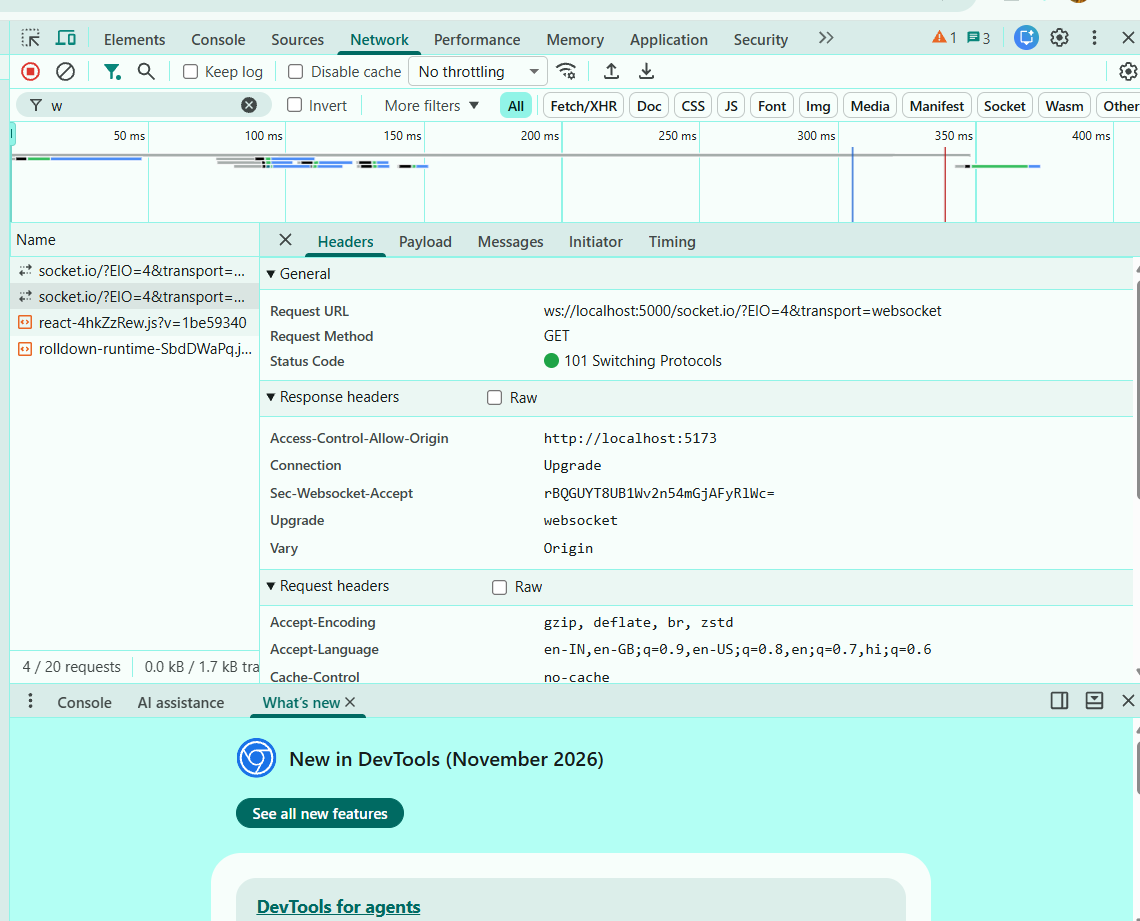
One important part of the project was verifying that the application used an actual WebSocket connection.
Using the browser’s Developer Tools, I opened the Network tab and selected the WS filter. I checked the Socket.IO connection request:
ws://localhost:5000/socket.io/?EIO=4&transport=websocket
The request returned the status code 101 Switching Protocols, confirming that the HTTP connection had successfully upgraded to a WebSocket connection.
This helped me understand the difference between ordinary HTTP requests and WebSocket communication.
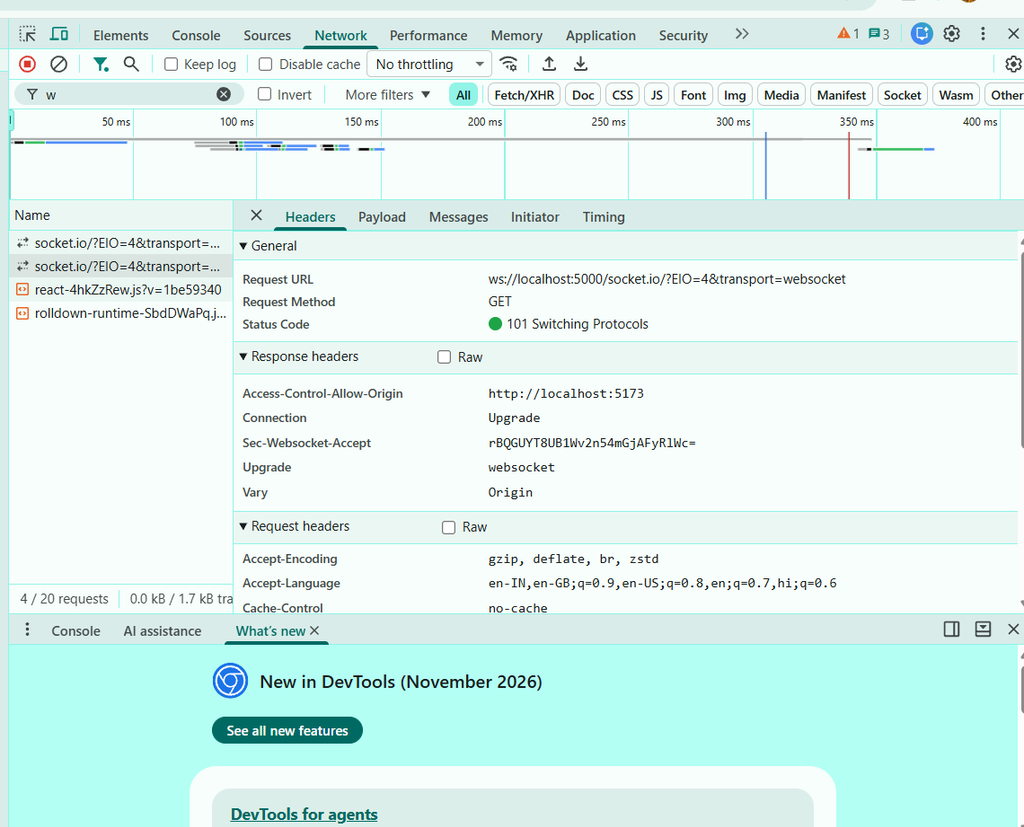
Fig 4. Successful Websocket Connection – 101 Switching Protocols
Challenges and How I Addressed Them
During development, I worked on connecting the React frontend with the Node.js backend and ensuring that messages were delivered to connected users.
Another important area was managing online users correctly. When users joined or disconnected, the application needed to update the online count and display appropriate notifications.
I also used browser Developer Tools to inspect network requests and verify the WebSocket handshake. These activities helped me improve my debugging and problem-solving skills.
Applications of WebSockets in Real-World Systems
WebSockets are useful in many real-world applications, including:
- Messaging applications: Instant communication between users.
- Live dashboards: Continuous updates of business or system information.
- Online gaming: Real-time interaction between multiple players.
- Collaboration platforms: Live updates when multiple users work together.
- Notification systems: Immediate delivery of alerts and updates.
They are especially valuable when applications need frequent, two-way communication.
Conclusion
Working on the Real-Time Chat Application helped me understand how WebSockets support real-time communication in modern web applications.
Through this project, I gained practical experience with React.js, Node.js, Express.js, and Socket.IO. I learned how to establish persistent connections, exchange messages using events, manage connected users, handle disconnections, and verify WebSocket communication through browser Developer Tools.
This experience strengthened my understanding of full-stack development and gave me practical exposure to building event-driven applications.
I am grateful to Valentius Kryptix for providing this learning opportunity as part of my internship. I look forward to applying these concepts in more advanced projects and continuing to improve my development skills.
Project Repository:
https://github.com/Anuja319/RealTimeChatApp
Technologies: React.js | Node.js | Express.js | Socket.IO | WebSockets | JavaScript


Leave a Reply
You must be logged in to post a comment.