

Software development is not just about writing code. It is also about ensuring that code is secure, efficient, maintainable, and free from bugs. Identifying these issues manually can be time-consuming, especially when working with large codebases.
As part of my internship at Valentius Kryptix, I was assigned a task to develop an AI-powered code review platform called CodeSage AI. This project gave me an opportunity to explore AI integration, modern web development technologies, and secure application development.
In this article, let’s explore CodeSage AI, its features, technologies, and how it helps developers improve their code quality.
What Is CodeSage AI?
CodeSage AI is an AI-powered code review platform designed to analyze source code and provide intelligent, actionable feedback.
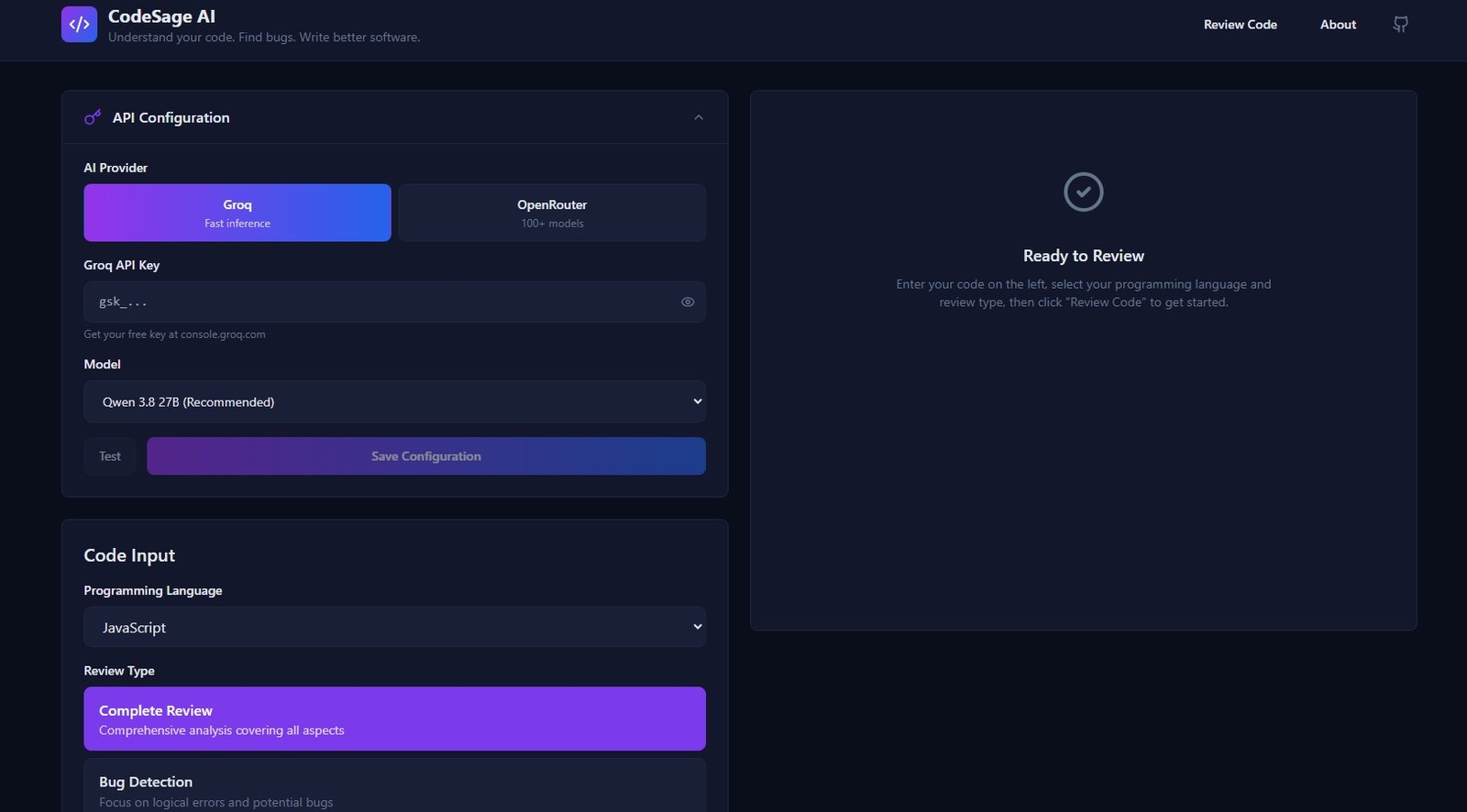
The platform allows developers to paste their source code, select a programming language, choose a review type, and receive detailed AI-generated recommendations within seconds.
Instead of manually searching for every possible issue, developers can use CodeSage AI as an additional layer of assistance during the development process.
Key Features of CodeSage AI
1. AI-Powered Bug Detection
Finding bugs early is essential for building reliable applications.
CodeSage AI analyzes source code to identify:
- Logical errors
- Incorrect conditional statements
- Potential runtime issues
- Unexpected behavior
- Common programming mistakes
It also provides recommendations to help developers understand and resolve identified issues.
2. Security Auditing
Security is one of the most important aspects of software development.
CodeSage AI examines code for common security vulnerabilities, unsafe coding practices, and potential attack vectors.
This helps developers identify security concerns before deploying their applications.
3. Performance Analysis
Writing functional code is important, but writing efficient code is equally necessary.
CodeSage AI highlights:
- Inefficient operations
- Unnecessary complexity
- Potential performance bottlenecks
- Opportunities for optimization
These recommendations help developers improve application performance and efficiency.
4. Code Quality Reviews
Maintaining clean and readable code makes software easier to understand and update.
CodeSage AI provides suggestions related to:
- Code readability
- Naming conventions
- Code structure
- Maintainability
- Programming best practices
5. Multiple Review Modes
One of the useful features of CodeSage AI is its ability to provide different types of code reviews.
Users can choose from five review modes:
- Complete Review: Analyzes code across multiple quality dimensions.
- Bug Detection: Focuses on logical errors and potential bugs.
- Security Audit: Identifies common security risks.
- Performance Analysis: Highlights optimization opportunities.
- Code Quality: Focuses on readability and maintainability.
This flexibility allows developers to focus on specific areas of improvement.
6. Support for Multiple Programming Languages
CodeSage AI supports more than 14 programming languages, including:
- JavaScript
- TypeScript
- Python
- Java
- C
- C++
- C#
- Go
- Rust
- PHP
- HTML
- CSS
- SQL
This makes the platform useful for developers working across different programming environments.
7. Real-Time Streaming Results
CodeSage AI includes real-time streaming functionality.
Instead of waiting for the entire AI response to finish, users can see the generated feedback progressively.
This improves the user experience and makes the review process feel faster and more interactive.
How Does CodeSage AI Work?
Using CodeSage AI is straightforward.
Step 1: Open the CodeSage AI platform.
Step 2: Paste your source code into the editor.
Step 3: Select the appropriate programming language.
Step 4: Choose a review mode based on your requirements.
Step 5: Add optional context describing what the code is expected to do.
Step 6: Click the Review Code button.
Step 7: Analyze the AI-generated feedback and recommendations.
The platform presents structured results to help developers understand potential problems and improve their code.
Technologies Used to Build CodeSage AI
This project was developed using modern web development technologies.
| Technology | Purpose |
|---|---|
| Next.js | Application framework |
| React.js | User interface development |
| TypeScript | Type-safe development |
| Tailwind CSS | Responsive UI styling |
| OpenAI API | AI-powered code analysis |
| Vercel | Application deployment |
These technologies helped create a responsive and interactive web application.
Security and Privacy
Security was an important consideration during development.
CodeSage AI incorporates several security-focused practices:
- Server-side API key management.
- API keys are not exposed to the client.
- Server-side input validation.
- Safe error handling.
- Request cancellation support.
These measures help provide a more secure and reliable application experience.
My Internship Experience at Valentius Kryptix
Developing CodeSage AI was a valuable learning experience as part of my internship at Valentius Kryptix.
Through this assigned task, I gained practical exposure to several important areas of software development.
Some of the key things I explored include:
- Integrating AI capabilities into web applications.
- Working with the OpenAI API.
- Developing responsive interfaces using Next.js and React.
- Using TypeScript for better code organization.
- Implementing real-time streaming responses.
- Understanding server-side validation and API security.
- Deploying web applications using Vercel.
This task helped me connect theoretical knowledge with practical development and understand how AI can be integrated into real-world applications.
I would like to thank Valentius Kryptix for providing me with this opportunity to work on an interesting project and strengthen my technical skills.
Why Is AI-Powered Code Review Important?
As software applications become more complex, maintaining code quality becomes increasingly challenging.
AI-powered code review tools can support developers by helping them:
- Identify potential bugs earlier.
- Discover common security vulnerabilities.
- Improve code readability.
- Understand unfamiliar code.
- Find performance optimization opportunities.
- Reduce repetitive code review efforts.
However, AI-generated recommendations should always be reviewed and validated by developers. AI tools are assistants, not replacements for thorough testing and professional code reviews.
Conclusion
CodeSage AI demonstrates how artificial intelligence can make software development more efficient and accessible.
By combining bug detection, security auditing, performance analysis, and code quality recommendations into a single platform, CodeSage AI provides developers with a convenient way to improve their source code.
Building this project as an internship task at Valentius Kryptix was an important step in my development journey. It allowed me to explore modern technologies, work with AI integration, and gain practical experience in building and deploying a real-world web application.
As AI continues to transform software engineering, projects like CodeSage AI show how intelligent tools can support developers in building better software.
Try CodeSage AI
Explore the live application and experience AI-powered code reviews.
Live Demo: https://codesage-ai-tau.vercel.app
Developed as part of an internship task assigned by Valentius Kryptix.
Tags: CodeSage AI, Valentius Kryptix, Internship Project, AI Code Review, Artificial Intelligence, Next.js, React.js, TypeScript, OpenAI API, Web Development, Software Engineering

Leave a Reply
You must be logged in to post a comment.