

Introduction
Frontend development is an important part of modern web application development because it defines how users interact with a website. A good frontend should be attractive, responsive, user-friendly, and easy to navigate.
As part of my internship at Valentius Kryptix, I have been working on developing a React-based frontend for a portfolio web application. The main objective of this task is to improve the existing website structure by using React and creating reusable components.
Before starting this task, I had experience working with HTML, CSS, and JavaScript. Through this project, I got an opportunity to apply my existing knowledge and understand how React helps developers build structured and interactive web applications.
In this blog, I will share my development process, the technologies used, challenges faced, and the important things I learned while building the React frontend.
1. Why React for Frontend Development?
React is a popular JavaScript library used for building user interfaces. It allows developers to divide a website into smaller, reusable components instead of writing the complete interface in a single file.
Some important advantages of React include:
- Reusable Components: Components can be created once and reused across different pages.
- Virtual DOM: React efficiently updates the user interface when application data changes.
- State Management: Hooks such as useState help manage changing data.
- Easy Navigation: React Router makes navigation between different pages easier.
- API Integration: React can communicate with backend services to display dynamic information.
These features make React a useful choice for developing scalable and maintainable web applications.
2. Technologies Used in My Project
During this development task, I worked with the following technologies:
React.js: Used to build the frontend interface using reusable components.
Vite: Used to create and run the React development environment. It provides a fast development server.
HTML and CSS: Used for structuring web pages and designing their appearance.
JavaScript: Used for application logic, user interactions, and handling data.
React Router DOM: Used to manage navigation between different pages.
Node.js and Express.js: Used in the backend to create API endpoints.
MongoDB: Used as the database for storing application information.
Combining these technologies helps create a connection between the frontend, backend, and database.
3. Setting Up the React Environment
The first step was understanding the existing portfolio project and its folder structure. Since I already had an existing website developed using HTML, CSS, and JavaScript, I focused on continuing the project using React rather than starting everything from scratch.
I created a separate React frontend using Vite and organized the source files into different folders.
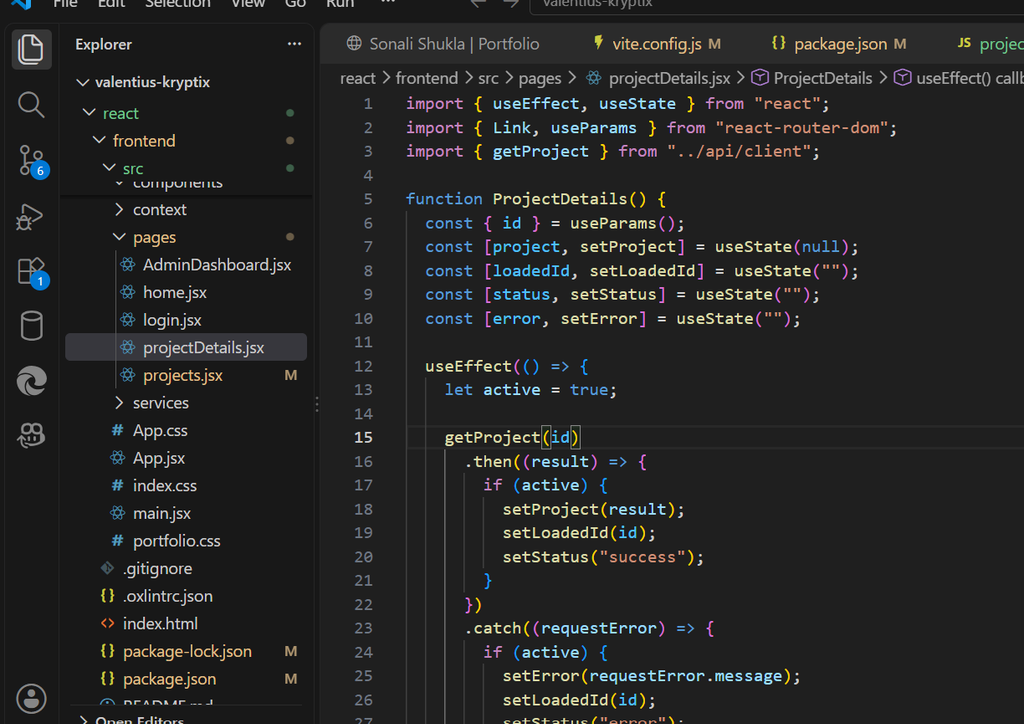
The main folders included:
- components – for reusable UI components.
- pages – for different application pages.
- services – for service-related functionality.
- context – for shared application state.
- api – for backend API communication.
This organization makes the application easier to understand, maintain, and expand.
Figure 1: React frontend project structure and ProjectDetails component in Visual Studio Code.
4. Creating Reusable React Components
After setting up the environment, I started organizing the frontend into smaller components and pages.
In React, components help developers divide the user interface into independent sections. For example, a navigation bar, project card, login form, and dashboard can be developed separately.
The biggest advantage of this approach is code reusability. Instead of writing the same code repeatedly, developers can reuse existing components wherever required.
This also makes debugging easier because individual components can be modified without changing the entire application.
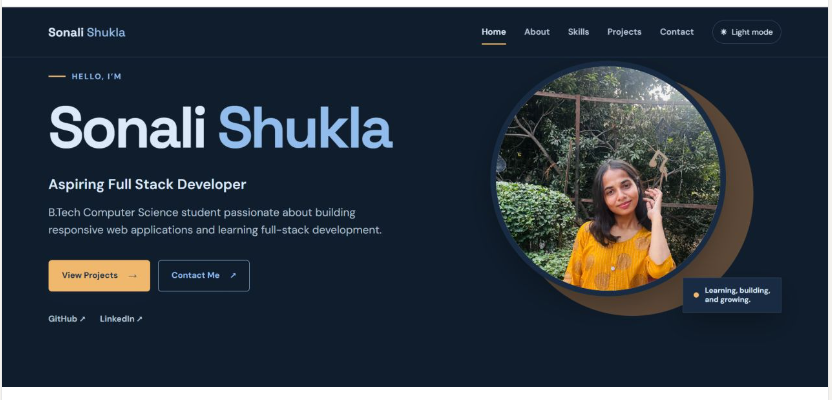
Figure 2: Running React frontend displaying the portfolio website.
5. Implementing Navigation Using React Router
Navigation is an important feature of every web application. Users should be able to move between different sections without facing unnecessary page reloads.
I used React Router DOM to organize navigation between different pages of the application.
Some of the pages included in the frontend are:
- Home page
- Login page
- Projects page
- Project details page
- Admin dashboard
React Router also provides useful features such as useParams, which allows developers to access dynamic values from the URL.
6. Connecting React Frontend with Backend APIs
One of the most important parts of this task was understanding frontend and backend communication.
A frontend application often needs information stored on the server. Instead of displaying static data, it can request information through APIs.
In my project, I worked on API integration for retrieving project information.
For example, the ProjectDetails component uses the useParams hook to get the project ID from the URL. It then calls the getProject function to request the corresponding project information from the backend.
I also used React hooks such as useState and useEffect to manage the project data and handle API requests.
This helped me understand how frontend components communicate with backend services and display dynamic information.
7. Handling Loading and Error States
While working with APIs, I learned that requests may take time or sometimes fail.
A good frontend should provide feedback to users instead of displaying a blank screen.
I worked with different state variables to manage:
- Project information.
- Loading and request status.
- Error messages.
- Successfully retrieved data.
For example, if a project cannot be retrieved, the application should display an appropriate error message. Similarly, while the information is loading, the interface should communicate that the request is in progress.
Handling these situations improves the overall user experience and makes an application more reliable.
8. Challenges I Faced During Development
During this task, I faced several practical challenges.
One of the initial challenges was organizing the existing project files into a proper React structure. Understanding the correct import paths between components and pages also required attention.
Another challenge was connecting the frontend with backend APIs and understanding how dynamic project IDs work with React Router.
I also learned the importance of checking terminal errors, browser console messages, and API responses while debugging.
These challenges helped me improve my problem-solving skills and understand that debugging is an essential part of software development.
9. Key Learnings and Skills Gained
This internship task helped me improve my practical knowledge of frontend development.
My major learnings include:
- Setting up a React application using Vite.
- Understanding component-based architecture.
- Creating reusable React components.
- Managing application state using useState.
- Handling side effects using useEffect.
- Implementing navigation using React Router DOM.
- Connecting frontend components with backend APIs.
- Understanding asynchronous JavaScript.
- Debugging import path and API-related errors.
- Organizing project files for better maintainability.
Most importantly, I understood that frontend development is not limited to designing web pages. It also involves application logic, data communication, usability, and proper project organization.
Conclusion
Building a React frontend has been a valuable learning experience during my internship at Valentius Kryptix.
Through this task, I got the opportunity to work with React, Vite, React Router, reusable components, and backend API integration. I also learned how to identify errors, organize application files, and manage dynamic information.
This experience has strengthened my understanding of frontend development and motivated me to continue exploring full-stack development.
I look forward to improving the application further by enhancing its responsiveness, user experience, and functionality.
Every development task provides an opportunity to learn something new, and this project has been another important step in my journey toward becoming a skilled software developer.
Author: Sonali Shukla
Role: Software Development Intern – Valentius Kryptix

Leave a Reply
You must be logged in to post a comment.