

1. Introduction to RAG and Project Overview
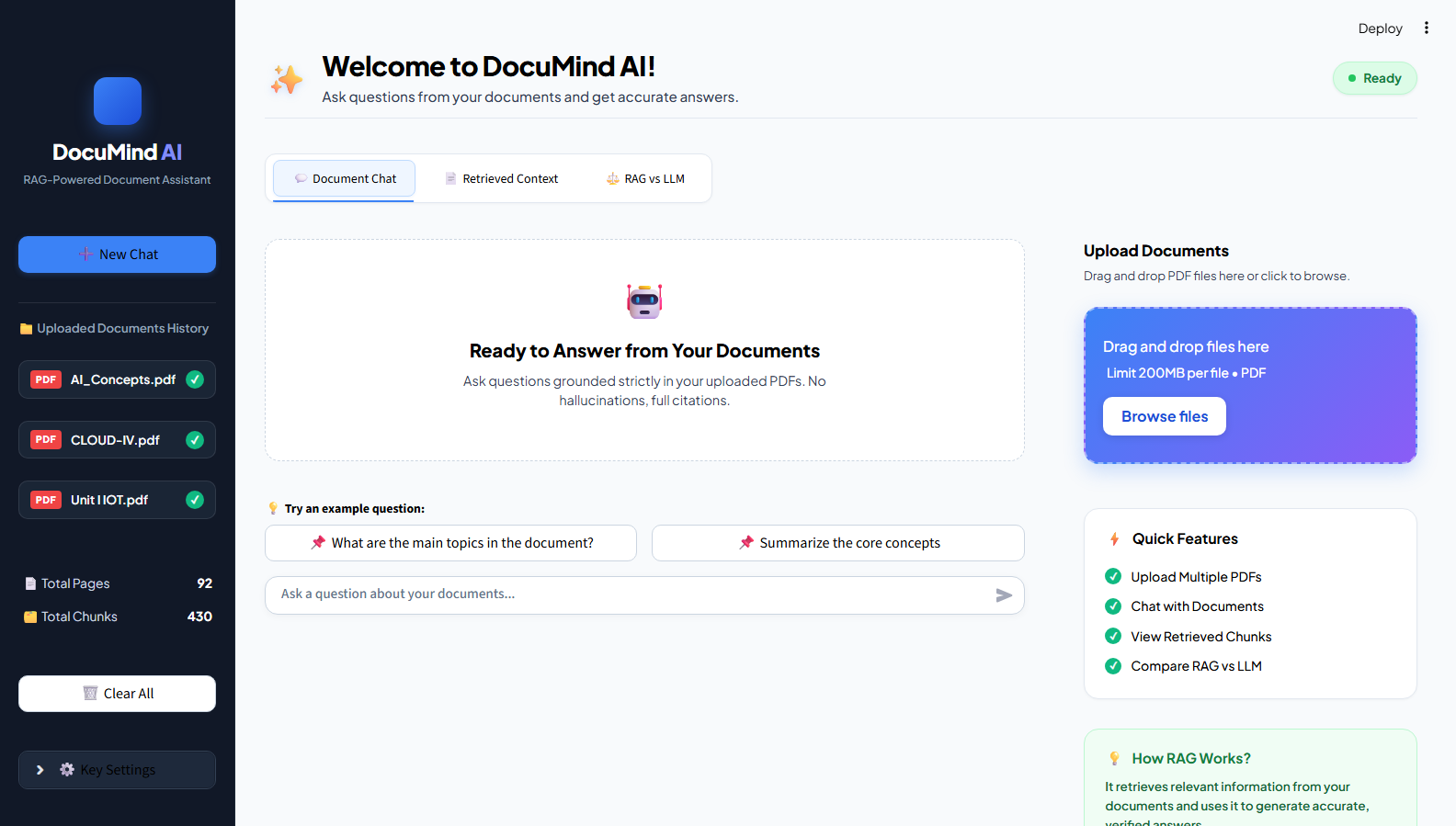
Have you ever tried finding a particular piece of information in a large PDF document? Going through multiple pages just to find one answer can be time-consuming. This is one of the problems I wanted to address through my project, DocuMind AI – RAG-Powered Document Assistant.
Large Language Models (LLMs) such as Google Gemini can answer questions, generate content, and explain complex topics. However, they may not always have access to specific information stored in personal documents or private datasets. Sometimes, they may even generate answers that sound correct but are not supported by the available information. This is known as hallucination.
This is where Retrieval-Augmented Generation (RAG) becomes useful.
RAG combines information retrieval with the response-generation capabilities of LLMs. Instead of relying only on the model’s existing knowledge, it retrieves relevant information from an external source and provides it as context before generating an answer.
While working on my internship project at Valentius Kryptix, I explored how this approach could be used to make document-based question answering easier.
The idea behind DocuMind AI is simple: users upload PDF documents, ask questions about their content, and receive answers based on the information available in those documents.
The system follows three main stages:
- Retrieval: Finds relevant information from uploaded documents.
- Augmentation: Provides the retrieved information as context along with the user’s question.
- Generation: Uses an LLM to generate a response based on the supplied context.
This allows users to interact with their documents without having to manually search through every page.
2. Technology Stack
One interesting part of this project was understanding how different technologies work together to build a complete RAG application.
Here are the main technologies I used:
| Technology | Purpose |
|---|---|
| Python | Backend development and application logic |
| Streamlit | Building the interactive user interface |
| Google Gemini API | Generating natural-language responses |
| Sentence Transformers | Converting text into embeddings |
| ChromaDB | Storing and retrieving vector embeddings |
| PyMuPDF | Extracting text from PDF documents |
Python was used to connect the different components and implement the application’s core functionality.
Streamlit helped me create an interactive interface where users can upload documents and communicate with the AI assistant.
Google Gemini API is responsible for generating responses using the information retrieved from the uploaded documents.
Sentence Transformers converts text into numerical representations called embeddings. These embeddings help the system understand the semantic meaning of document content.
ChromaDB is used as the vector database to store embeddings and retrieve relevant information through similarity search.
PyMuPDF handles PDF text extraction, making the document content available for further processing.
Understanding the purpose of each technology helped me see how document processing, vector search, and language generation fit into one application.
3. System Architecture and Workflow
The most important part of a RAG application is its workflow. Each stage prepares information for the next one, eventually allowing the system to answer questions using uploaded documents.
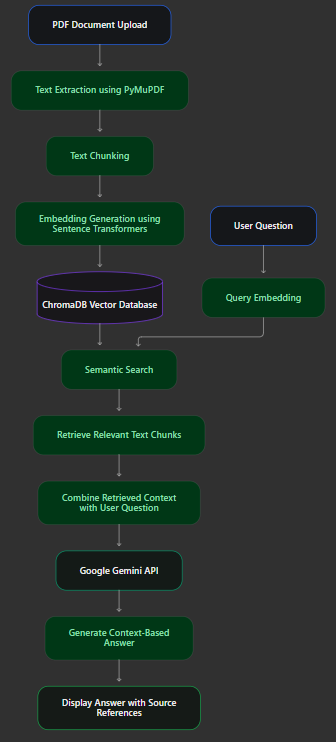
DocuMind AI follows two major phases: document processing and question answering.
A. Document Processing
Step 1: PDF Upload and Text Extraction
The process starts when a user uploads a PDF document. PyMuPDF extracts the text from the document so that it can be processed by the application.
Step 2: Text Chunking
An entire document may contain hundreds of pages, so processing it as one large block of text is not practical.
To make retrieval easier, the extracted text is divided into smaller sections called chunks. Overlapping chunks can also be used to preserve context between consecutive sections.
Document names and page information can be maintained as metadata to help identify the original source.
Step 3: Embedding Generation
The next step is converting each text chunk into a numerical representation called an embedding.
Sentence Transformers is used for this process. These embeddings capture the semantic meaning of the text, helping the system identify related information even when the exact words in a question are different from those in the document.
Step 4: Vector Database Storage
The generated embeddings, original text chunks, and associated metadata are stored in ChromaDB.
This allows the application to search through the document collection whenever a user submits a question.
B. Question Answering
Step 5: User Query
The user enters a question related to the uploaded PDF.
Step 6: Semantic Retrieval
The question is converted into an embedding and compared with the stored document embeddings.
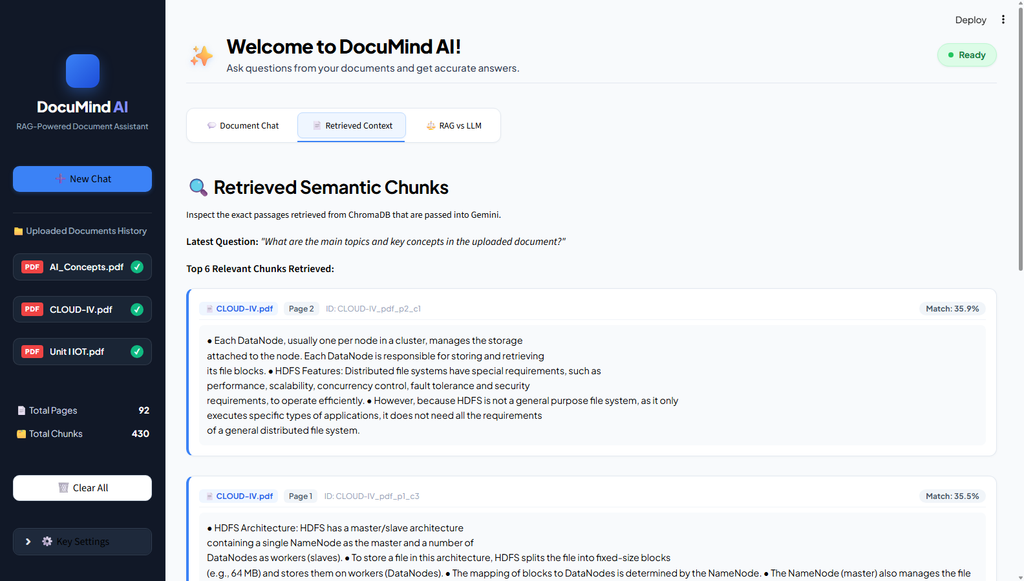
ChromaDB retrieves the most relevant text chunks based on semantic similarity.
Step 7: Context Preparation and Answer Generation
The retrieved chunks are combined with the user’s question and passed to Google Gemini API.
Gemini uses the provided context to generate a natural-language response.
Finally, the answer is displayed to the user along with available source references.
Overall RAG Workflow
4. Implementation and Application Features
After understanding the workflow, I focused on bringing the different components together into a usable application.
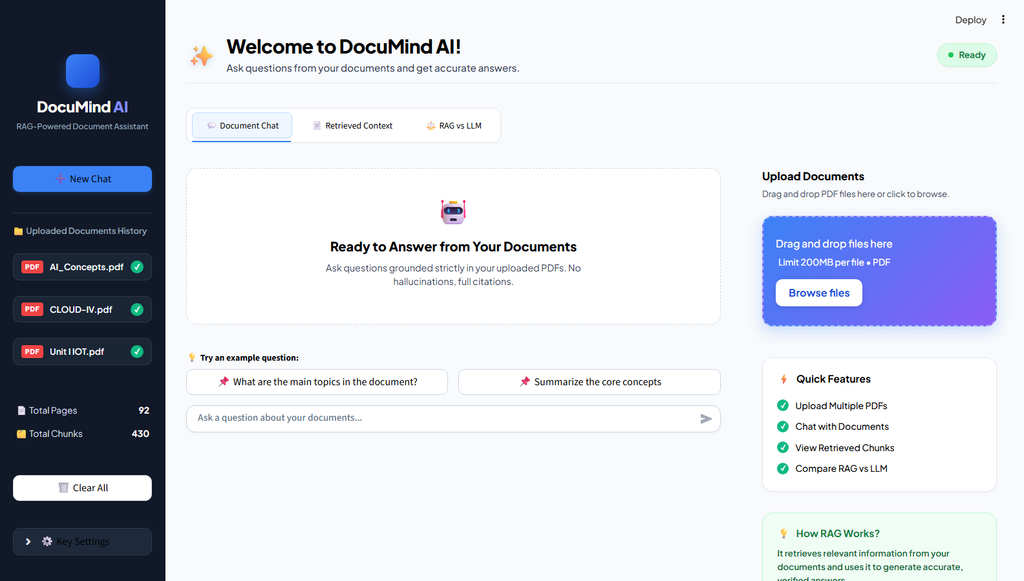
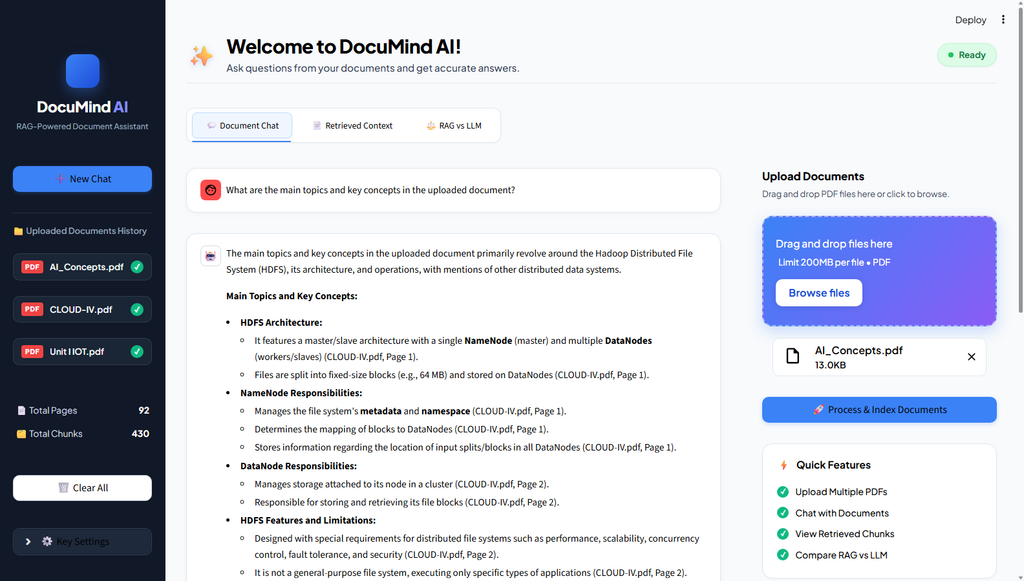
The application is designed with a simple interface so users can upload documents, ask questions, and inspect the information used to generate answers.
Some of the important components are:
4.1 Document Upload and Processing
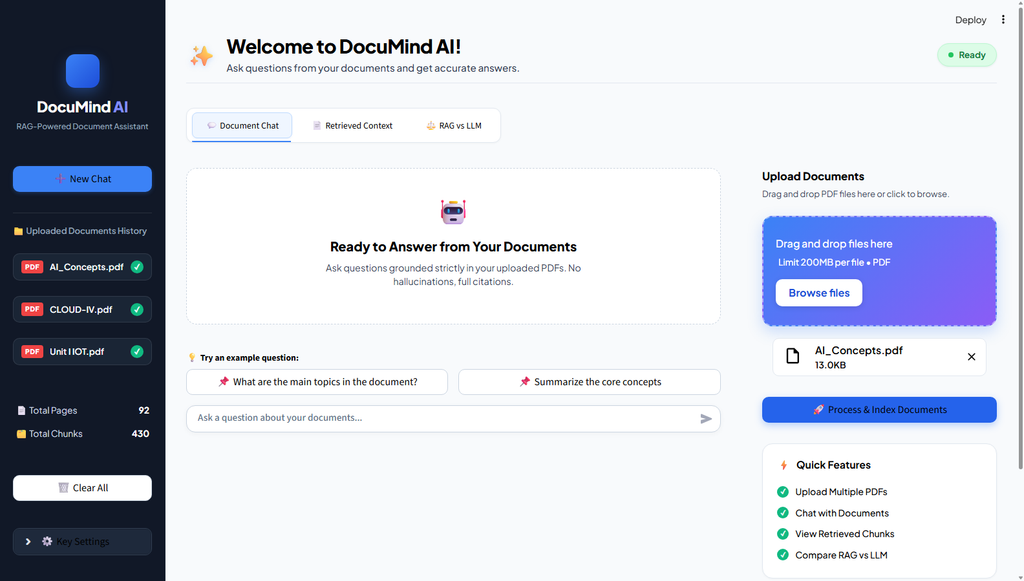
Users can upload PDF files through the application. The system extracts their content and prepares the documents for embedding generation and storage.
The extracted information is divided into smaller chunks to make relevant information easier to retrieve.
4.2 Embedding Generation and Storage
Each chunk is converted into an embedding using Sentence Transformers.
These embeddings are stored in ChromaDB along with their corresponding text and document metadata.
This creates a searchable collection of information from the uploaded documents.
4.3 Semantic Search and Retrieval
When a user asks a question, the system searches the vector database for relevant chunks.
Instead of depending only on exact keyword matching, semantic search helps identify information based on its meaning.
The retrieved chunks are then used as context for answer generation.
4.4 Gemini-Based Answer Generation
The retrieved information is passed to Google Gemini API along with the user’s question.
The prompt is designed to encourage the model to answer using the supplied document context rather than inventing unsupported information.
If the required information is not available in the retrieved context, the system should indicate that it could not find the answer in the uploaded documents.
4.5 Application Interface
The application includes three main sections:
- Document Chat: Allows users to ask questions and receive answers based on uploaded PDFs.
- Retrieved Context: Displays the relevant document sections retrieved by the system, along with available source information.
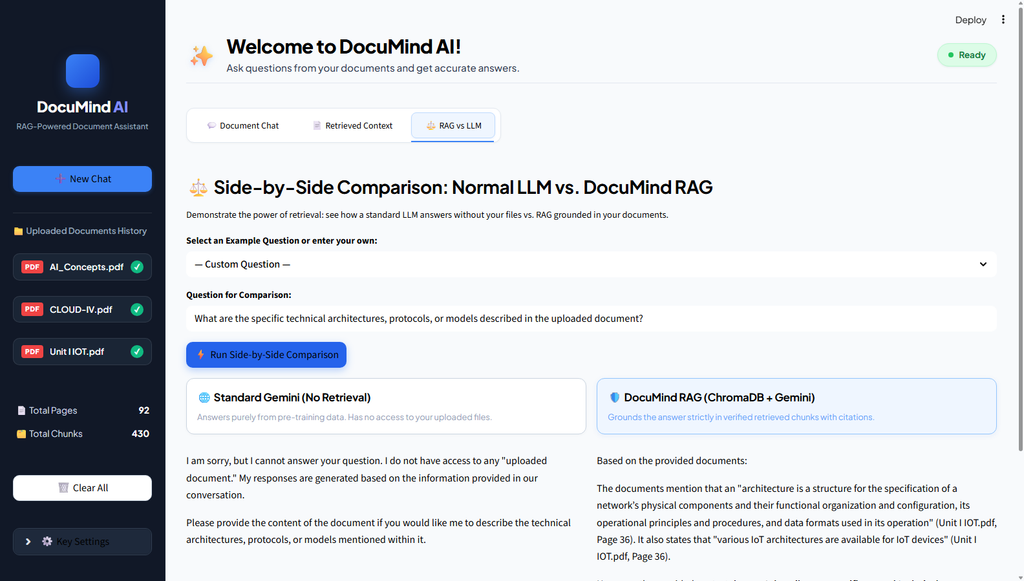
- RAG vs LLM: Allows users to compare a normal LLM response with a response generated using document retrieval.
These sections make it easier to understand not only the final answer but also how the system arrives at it.
Application Screenshots
Screenshot 1 – Main DocuMind AI Dashboard
Screenshot 2 – PDF Upload and Document Processing
Screenshot 3 – Document Chat with Generated Answer
Screenshot 4 – Retrieved Context
Screenshot 5 – RAG vs LLM Comparison
5. RAG vs Normal LLM: What’s the Difference?
One of the most interesting aspects of this project is understanding how a RAG-based system differs from a normal LLM chatbot.
A normal LLM generates answers using its existing knowledge and the information included in the prompt. It does not automatically search through a user’s uploaded documents.
A RAG system, on the other hand, retrieves relevant information from an external knowledge source before generating an answer.
To understand this better, imagine uploading a technical PDF containing information about a particular topic.
If you ask a normal LLM a question about a specific detail found only in that PDF, it may not know the exact answer.
With RAG, the system can search the uploaded document, retrieve the relevant section, and provide it to the LLM as context.
| Feature | Normal LLM | RAG System |
|---|---|---|
| Information source | Existing model knowledge and prompt | Retrieved documents and prompt |
| Document retrieval | Not performed | Performed |
| Embeddings | Not required for basic answering | Used for semantic search |
| Vector database | Not required | Used |
| Document-specific answers | Depends on provided context | Retrieves relevant document content |
| Source references | Not automatic | Can provide document references |
The RAG vs LLM comparison feature in DocuMind AI helps demonstrate the practical value of connecting language models with external knowledge sources.
It also highlights that the quality of a RAG response depends on retrieving the right information, not just using a powerful language model.
6. Challenges and Key Learnings
Building this project helped me understand that developing an AI application involves more than simply connecting an API and displaying its response.
Some of the concepts I explored during the development process were:
Understanding Text Chunking: I learned why large documents need to be divided into smaller sections and how overlapping chunks can help preserve context.
Working with Embeddings: Understanding how text is converted into numerical vectors gave me a better idea of how semantic search works.
Exploring Vector Databases: Working with ChromaDB helped me understand how embeddings can be stored and searched based on similarity.
Improving Information Retrieval: I learned that retrieving relevant information is an important step in producing useful answers. Even a good language model may generate an irrelevant response if the retrieved context is not appropriate.
Integrating an LLM: Connecting Google Gemini API with the retrieved document content helped me understand how prompt construction influences the generated response.
Understanding RAG Limitations: I also learned that RAG does not completely eliminate hallucinations. The quality of the response still depends on document extraction, retrieval relevance, and how the model uses the supplied context.
Overall, this project gave me practical exposure to several concepts in Generative AI and helped me understand how individual components work together in a real-world application.
7. Conclusion, Future Enhancements and Project Repository
Working on DocuMind AI was a valuable learning experience because it allowed me to explore Retrieval-Augmented Generation beyond just its theoretical concepts.
I gained a better understanding of PDF processing, text chunking, embeddings, vector databases, semantic search, and LLM integration.
One of my biggest takeaways from this project is that a useful AI application is not built around the language model alone. The way information is prepared, stored, retrieved, and provided as context plays an equally important role.
There are several possibilities for improving the application in the future, including:
- Supporting additional document formats such as DOCX and TXT.
- Implementing hybrid search using keyword and semantic retrieval.
- Adding reranking techniques to improve retrieval relevance.
- Supporting scanned documents through OCR.
- Improving document management and conversation history.
Project Details
Project Name: DocuMind AI – RAG-Powered Document Assistant
GitHub Repository: https://github.com/Jeevi-2906/RAG-SYSTEM
Internship Organization: Valentius Kryptix
I would like to thank Valentius Kryptix for providing me with the opportunity to explore and work on practical AI-based projects during my internship.
This experience has encouraged me to continue learning and exploring more applications of Artificial Intelligence, Machine Learning, and Generative AI.

Leave a Reply
You must be logged in to post a comment.