

Introduction
An AI Code Review Tool helps developers analyze source code, identify potential issues, and improve code quality with the support of artificial intelligence.
Software development is growing rapidly, and writing clean, reliable code has become more important than ever. Developers often spend a significant amount of time reviewing code, identifying bugs, fixing logical errors, and improving code quality. Traditional code review can be time-consuming, especially when working on large projects.
An AI Code Review Tool can make this process easier by using artificial intelligence to analyze source code and provide useful feedback. It helps developers identify potential issues, understand their code better, and improve their programming practices.
To explore this approach, we developed CodeSentry AI – an Intelligent Code Review Assistant during our internship at Valentius Kryptix. The project focuses on making code analysis more accessible through an AI-powered interface that reviews submitted code and provides suggestions for improvement.
In this article, we will explore CodeSentry AI, its key features, the technologies used in its development, how AI-powered code review works, and the benefits of using artificial intelligence in software development.
Why Is Code Review Important in Software Development?
Code review is an essential part of the software development process. It involves examining source code to identify mistakes, improve readability, and ensure that the code follows good programming practices.
Whether a project is small or large, reviewing code helps developers maintain quality and reduce errors before software is released.
Some important reasons why code review matters include:
1. Identifying Bugs and Errors
Code reviews help developers find syntax errors, logical mistakes, and other issues that may affect how an application works.
2. Improving Code Quality
Reviewing code encourages developers to write clean, readable, organized, and maintainable programs.
3. Strengthening Security
Examining source code can help identify potential security weaknesses and unsafe coding practices before they become bigger problems.
4. Learning and Knowledge Sharing
Code reviews allow developers to learn from different approaches, understand better coding techniques, and improve their programming skills.
5. Reducing Development Time
Finding problems earlier can reduce the time spent debugging and fixing issues later in the development process.
As software projects become more complex, reviewing every line of code manually can become challenging. This is where AI-powered code review tools can provide additional support to developers.
Introducing CodeSentry AI: An Intelligent Code Review Assistant
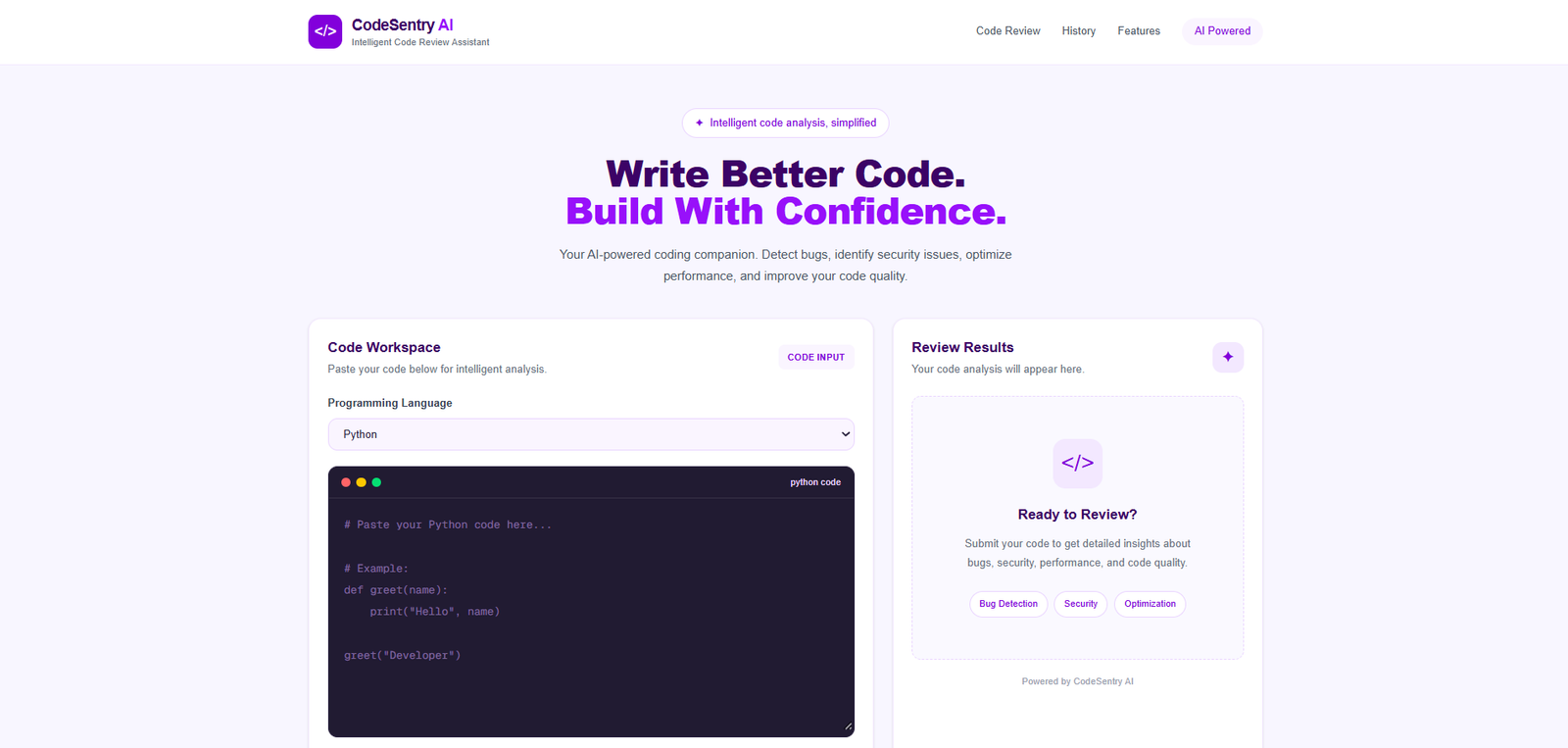
CodeSentry AI is an AI-powered code review assistant developed as part of our internship project at Valentius Kryptix. The main objective of this project is to make code analysis easier, faster, and more accessible for developers.
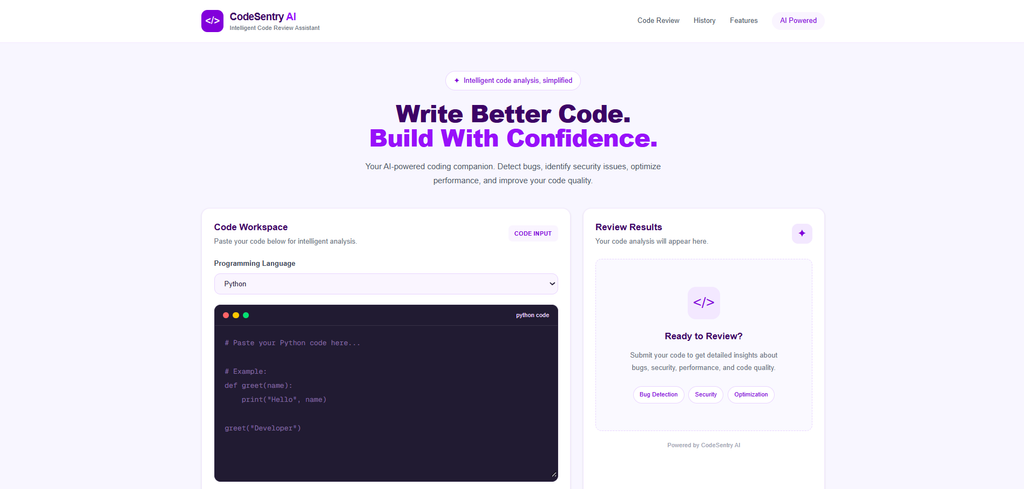
The application provides a simple interface where users can enter their source code, select a programming language, and request an AI-powered review. It then generates feedback to help users understand potential coding issues and improve their code.
CodeSentry AI supports multiple programming languages, including Python, JavaScript, TypeScript, Java, C++, and C. This makes it useful for developers and students working with different programming technologies.
The application also includes input validation, a dedicated review results area, streaming responses, review cancellation, and review history. These features help create a more convenient and interactive code review experience.
By combining a user-friendly interface with AI-powered analysis, CodeSentry AI demonstrates how artificial intelligence can support everyday software development tasks.
Key Features of CodeSentry AI
CodeSentry AI includes several features designed to make code analysis easier and more efficient. Its AI-powered functionality helps developers understand potential issues and receive suggestions for improving their source code.
1. AI-Powered Code Review
The application analyzes user-submitted source code using artificial intelligence and generates a detailed review with helpful feedback.
2. Bug and Logical Error Detection
CodeSentry AI helps identify potential bugs, logical mistakes, and coding errors that may affect program functionality.
3. Security Analysis
The tool can highlight potential security-related concerns in source code and help developers become more aware of unsafe coding practices.
4. Code Quality Suggestions
It provides recommendations to improve code readability, structure, efficiency, and maintainability.
5. Multiple Programming Language Support
The application allows users to select different programming languages before submitting their code for review, making it useful for developers working with different technologies.
6. Interactive Review Experience
The application provides streaming review responses, allowing users to see AI-generated feedback as it becomes available. It also includes review cancellation and review history features for a more convenient experience.
Together, these features make CodeSentry AI a useful demonstration of how artificial intelligence can support code analysis and help developers improve their programming practices.
How Does CodeSentry AI Work?
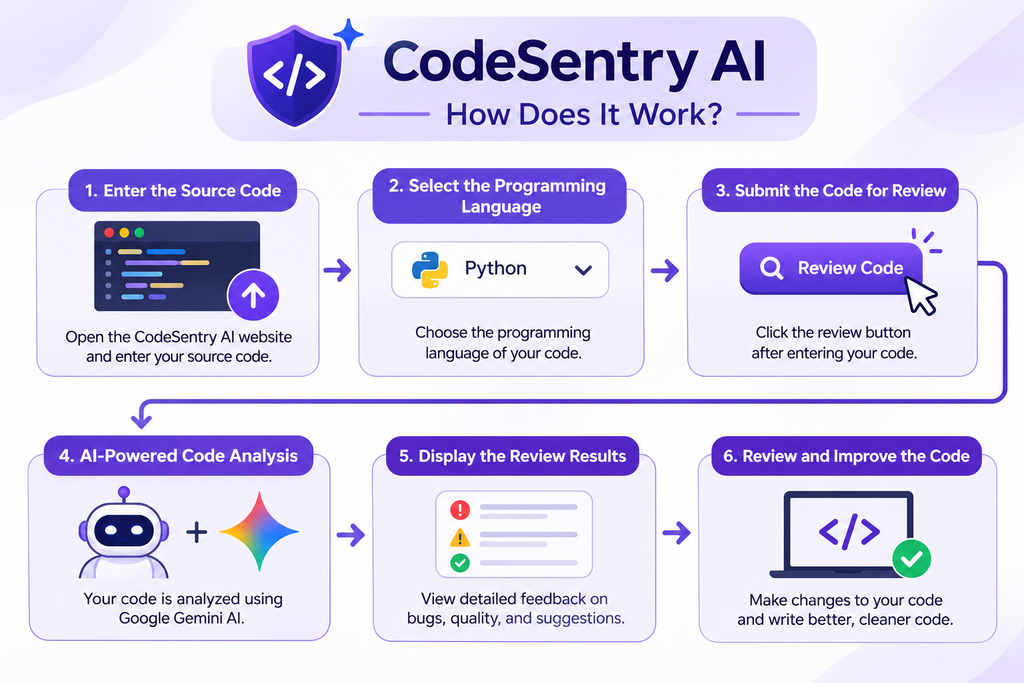
CodeSentry AI follows a simple workflow that allows users to submit their source code and receive AI-generated feedback.
The process can be explained in the following steps:
1. Enter the Source Code
Users begin by opening the CodeSentry AI website and entering their source code into the code input area.
2. Select the Programming Language
Users select the programming language of their code from the available language options. This helps the AI understand the context of the submitted code.
3. Submit the Code for Review
After entering the code and selecting the language, users click the review button to start the analysis. The application validates the input before sending it for review.
4. AI-Powered Code Analysis
The application sends the submitted code to its backend API, which connects with the Google Gemini AI API to generate a code review.
5. Display the Review Results
The generated review is streamed to the interface, allowing users to view the feedback as it arrives. The results help users understand potential bugs, logical errors, security concerns, and code improvement suggestions.
6. Review and Improve the Code
Users can study the feedback, make changes to their source code, and use the suggestions to improve their programming practices.
This workflow demonstrates how CodeSentry AI combines a simple user interface, backend API integration, and artificial intelligence to provide an interactive code review experience.
Technologies Used to Build CodeSentry AI
CodeSentry AI was developed using modern web development technologies and artificial intelligence. Each technology plays an important role in creating a responsive application and delivering AI-powered code analysis.
1. Next.js
Next.js is a React-based framework used to build the CodeSentry AI web application. It provides the application structure and supports both frontend development and backend API routes.
2. React
React is a JavaScript library used to build the user interface. It helps create interactive components and manage application states, such as code input, language selection, loading indicators, and review results.
3. TypeScript
TypeScript adds static typing to JavaScript. It helps developers write more structured code, identify certain errors during development, and improve code maintainability.
4. Google Gemini AI API
The Gemini API provides the artificial intelligence capabilities of CodeSentry AI. It is used to analyze submitted source code and generate feedback, including potential bugs, logical issues, and suggestions for improvement.
5. Vercel
Vercel is the deployment platform used to host CodeSentry AI. It makes the application accessible online so users can try the code review assistant through a web browser.
By combining these technologies, CodeSentry AI demonstrates how modern web development frameworks and generative AI can work together to create a practical software development tool.
Benefits of AI-Powered Code Review
Artificial intelligence is changing how developers approach software development. AI-powered code review tools can make code analysis more convenient by providing quick feedback and helping developers identify areas that need improvement.
Some of the major benefits include:
1. Faster Code Analysis
AI-powered tools can analyze submitted code and generate feedback quickly. This helps developers review their code without manually examining every issue first.
2. Improved Code Quality
These tools provide suggestions related to code structure, readability, and maintainability, encouraging developers to follow better coding practices.
3. Early Identification of Potential Issues
AI code review assistants can highlight possible bugs, logical errors, and security-related concerns, helping developers investigate problems earlier.
4. Better Learning Experience
For students and beginner programmers, AI-generated explanations can make it easier to understand coding mistakes and learn from them.
5. Increased Developer Productivity
By providing automated feedback, AI tools can reduce some repetitive code-review work and allow developers to focus more on building and improving applications.
6. Support for Multiple Programming Languages
AI-powered code review applications that support different programming languages can be useful for developers working across various technologies.
Although AI-powered tools offer several advantages, their suggestions should always be reviewed and tested by developers. They are designed to assist human decision-making, not completely replace professional code reviews.
Challenges in Traditional Code Review
Traditional code review is an important practice, but it can sometimes present challenges, especially when working on large or complex software projects.
1. Time-Consuming Process
Manually reviewing large amounts of source code can take considerable time, particularly when developers need to examine multiple files and functions.
2. Human Errors
Developers may occasionally overlook bugs, logical mistakes, or potential security issues during manual reviews.
3. Complex Code Structures
Understanding complicated code written by different developers can make the review process more difficult.
4. Limited Review Resources
In smaller development teams, limited time and resources can make it challenging to review every part of a project thoroughly.
5. Repetitive Work
Reviewing similar coding patterns and identifying common mistakes repeatedly can become tedious.
AI-powered code review assistants can help address some of these challenges by providing additional analysis and feedback. However, human expertise remains essential for understanding project requirements and validating suggestions.
Future Scope of CodeSentry AI
CodeSentry AI provides a foundation for exploring how artificial intelligence can improve software development workflows. With further development, the application could include additional capabilities to make code analysis more comprehensive and useful.
Some possible future enhancements include:
1. Advanced Security Scanning
Adding more detailed security analysis could help developers identify vulnerabilities and follow safer coding practices.
2. Support for More Programming Languages
Expanding language support could make the application useful to a wider range of developers.
3. Code Optimization Recommendations
Future versions could provide more detailed suggestions for improving performance and reducing unnecessary code complexity.
4. Integration with Development Platforms
Integration with platforms such as GitHub could make it easier to review code as part of an existing development workflow.
5. Detailed Code Reports
Generating downloadable code review reports could help developers track issues and document improvements.
These enhancements represent potential future development opportunities rather than features currently available in the application.
Conclusion: Making Code Review Smarter with CodeSentry AI
Artificial intelligence is creating new opportunities in software development by making code analysis more accessible and efficient. AI-powered code review tools can help developers identify potential issues, understand coding mistakes, and improve the quality of their applications.
CodeSentry AI, developed during our internship at Valentius Kryptix, demonstrates how modern web technologies and artificial intelligence can be combined to build an intelligent code review assistant.
Through this project, we explored frontend development, API integration, AI-powered code analysis, input validation, and application deployment. It also provided an opportunity to understand how AI can support developers in their everyday programming tasks.
Although AI-generated suggestions should always be verified by developers, tools like CodeSentry AI can serve as useful assistants for learning, debugging, and improving code quality.
As AI technology continues to evolve, intelligent code review solutions have the potential to become an increasingly valuable part of modern software development.
Explore CodeSentry AI: https://codesentry-ai-five.vercel.app/
The journey of building CodeSentry AI highlights how an AI Code Review Tool can help make software development smarter, more accessible, and more efficient.
References and Further Reading
To learn more about the technologies and concepts discussed in this article, explore the following resources:
- Next.js Documentation: https://nextjs.org/docs
- React Documentation: https://react.dev/learn
- TypeScript Documentation: https://www.typescriptlang.org/docs/
- Google Gemini API Documentation: https://ai.google.dev/gemini-api/docs
- Vercel Documentation: https://vercel.com/docs
These official resources provide further information about the technologies used in developing modern AI-powered web applications.

Leave a Reply
You must be logged in to post a comment.