

A write-up of the multi-turn chatbot I built for my internship — real conversation memory, two different context-window strategies, and error handling that doesn’t fall over the first time the API hiccups.
Field notes from a backend project · Node.js, Express, OpenAI API
One of my tasks this cycle at Valentius Kryptix was to get hands-on with LLM APIs beyond a single request-response call — the goal was a chatbot that could hold a real conversation, manage its own context window as that conversation grows, and fail gracefully when the network or the API doesn’t cooperate. This post walks through what I built, the decisions behind it, and a couple of bugs that were more instructive than the parts that worked on the first try.
The problem with the naive version
The simplest possible chatbot sends one message, gets one reply, and forgets everything. That’s fine for a demo and useless for anything real — ask a follow-up question and the model has no idea what you were just talking about. The fix sounds simple: keep a list of every message and resend the whole thing each turn. It works, right up until the conversation gets long enough that you’re resending hundreds of messages on every request, which is slow, expensive, and eventually runs past the model’s context limit entirely. So the real task wasn’t “call an LLM API” — it was “call an LLM API without your prompt growing forever.”
Architecture
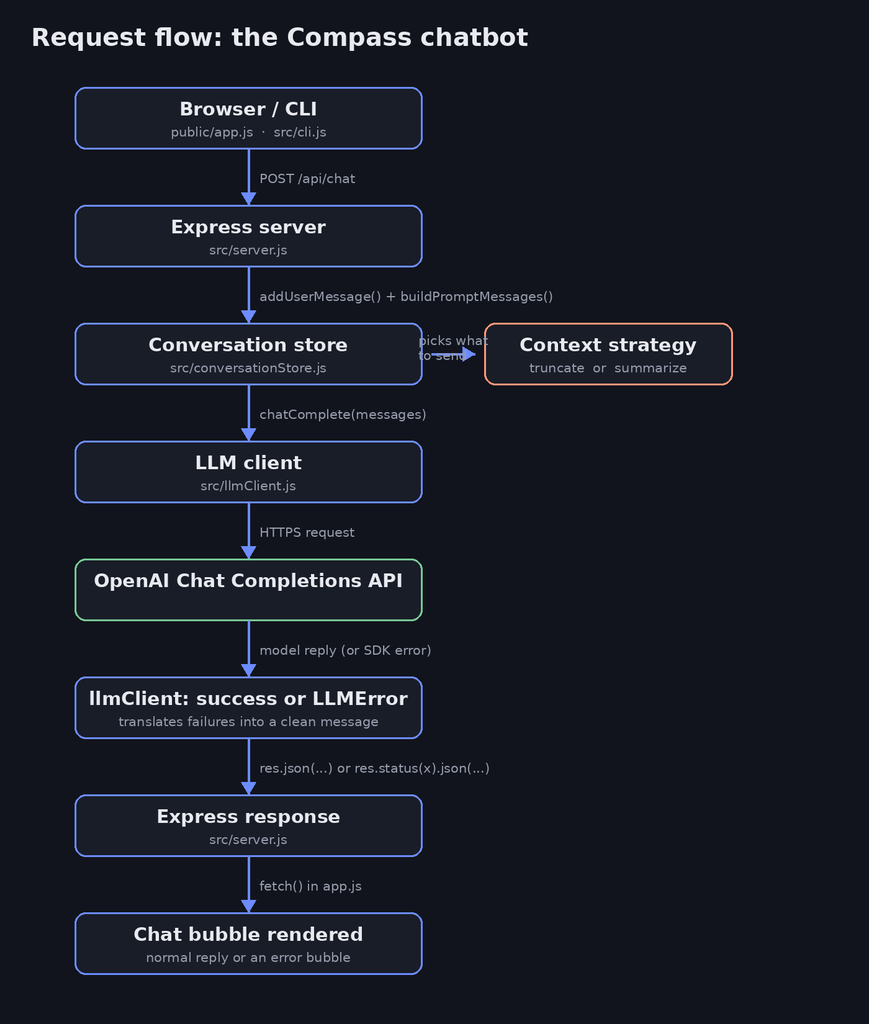
I split the project into a small number of focused pieces: an Express server that exposes one real endpoint, a conversation store that owns history and context management, and an LLM client that isolates every OpenAI-specific detail (and every way that call can fail) from the rest of the app.
Giving it an actual identity
A system prompt is what turns “generic assistant” into a product. I gave mine a name (Compass), a specific purpose (a study buddy that explains concepts and checks in before assuming what you meant), and explicit constraints — stay concise by default, admit uncertainty instead of guessing, never invent a source. That last one matters more than it sounds: without it, the first thing I noticed in testing was the model happily fabricating a plausible-sounding citation when asked “where’s that from?”
Context window management: two strategies, not one
This was the core of the assignment, so I implemented it two ways and made it switchable with an environment variable, rather than picking one and moving on:
- Truncation — the simple version. Only the last
Nmessages get sent to the model each turn. Cheap, predictable, and the right default for most use cases. - Summarization — the stretch goal. Once history passes a threshold, everything older than the last
Nmessages gets folded into a running text summary via a small extra LLM call, and that summary rides along as context instead of the raw messages. This keeps facts from early in a long conversation alive without the prompt growing without bound.
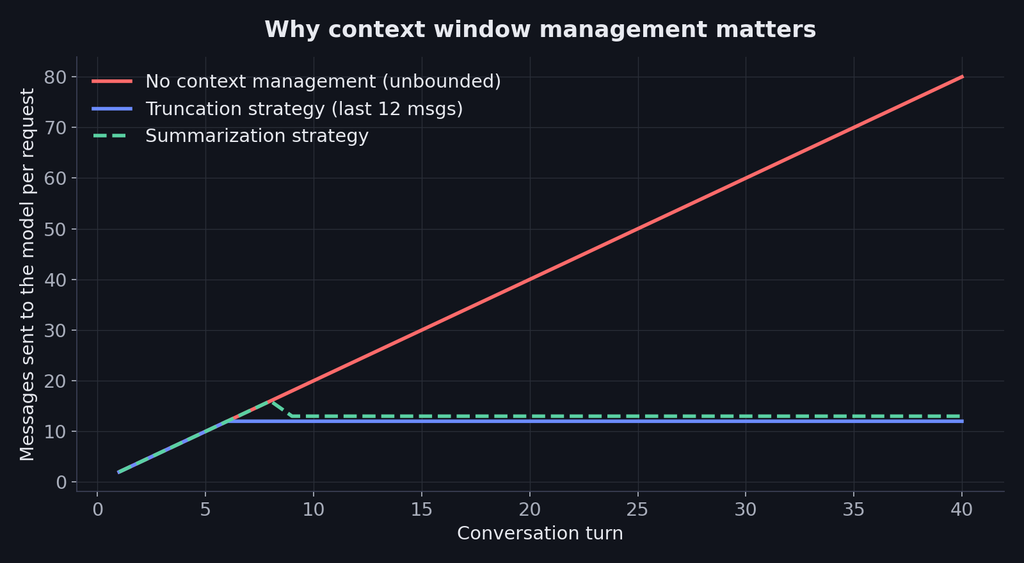
The summarization call runs after the user-facing reply is sent, not before it, so it never adds latency to what the person is waiting on. It’s also best-effort: if that background call fails, the conversation just falls back to plain truncation for that turn instead of breaking the chat — a small design choice, but one that avoids turning a nice-to-have feature into a new failure mode.
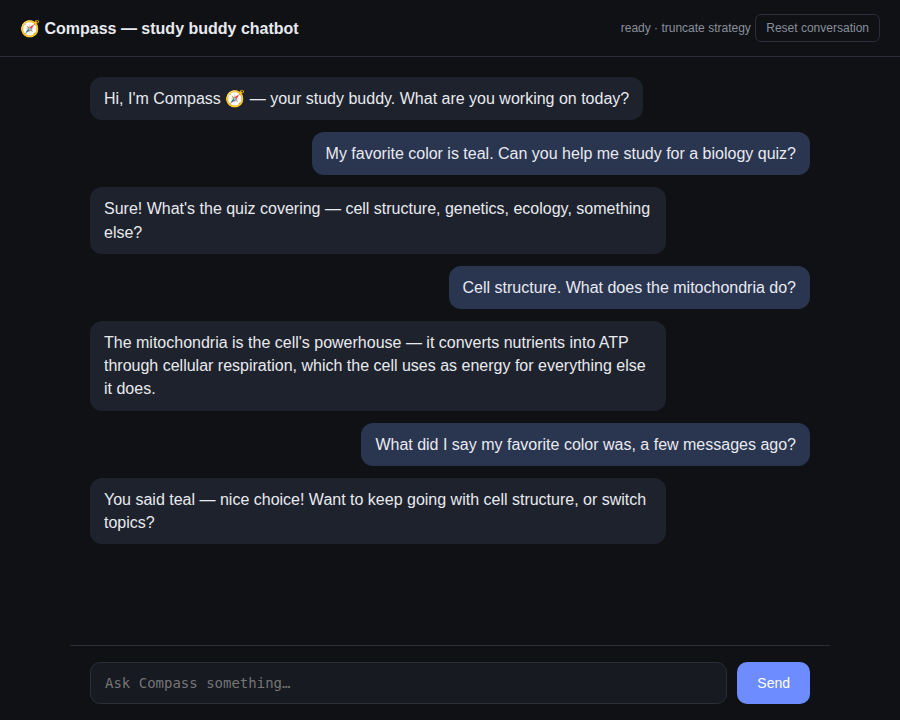
Proving it actually remembers
The real test of “multi-turn” is asking about something several messages back, not just the previous line:
Error handling, tested for real
It’s easy to write error handling that looks reasonable and has never actually run. I wanted mine to be tested against a genuine failure, not just reviewed by eye — so here’s the actual UI, mid-request, hitting a real error from a server with no API key configured:
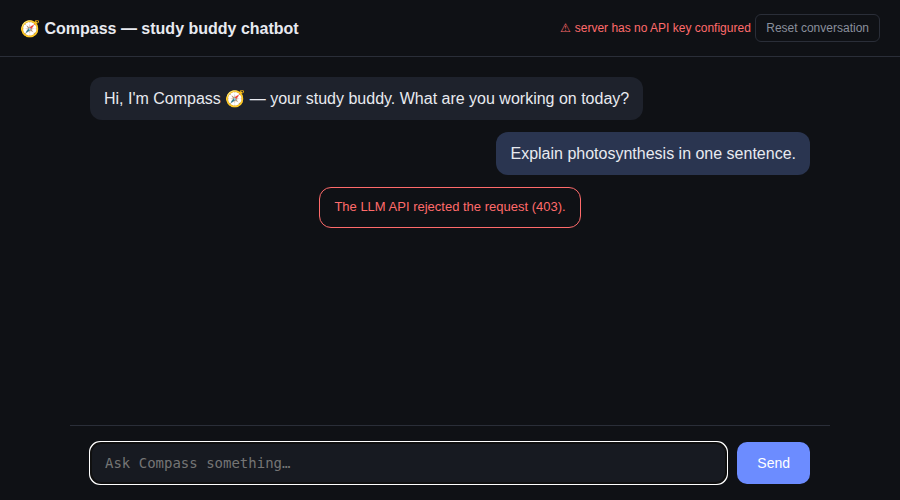
Under the hood, llmClient.js wraps the OpenAI SDK call and translates whatever it throws — a bad key, a rate limit, a provider outage, a timeout — into one small LLMError with a safe message and the right HTTP status. The Express route catches that and returns clean JSON; the frontend renders it as a visibly different bubble instead of leaving the “thinking…” placeholder stuck on screen.
The bug that taught me the most: the OpenAI SDK throws immediately at construction time if it can’t find an API key — before any request, before any of my try/catch blocks even exist yet. My first version crashed the entire server on boot in that case, which meant a config mistake looked like a total outage instead of a clear, catchable error. The fix was a one-line fallback so the client always constructs successfully, and the missing-key case gets caught cleanly on the first real request instead. Error handling has to cover the SDK’s failure modes, not just the network’s.
What’s next
The conversation history currently lives in a process-local Map, which is fine for development but won’t survive a restart or scale across multiple server instances — swapping that for Redis or a real database is the obvious next step before this goes anywhere near production. Rate limiting per user and real authentication on conversationId are on the same list.
Takeaways
The part of this project that felt most like real engineering wasn’t the API call itself — that’s a few lines with any provider’s SDK. It was everything around it: deciding what “context management” actually means and implementing it two different ways to compare them, and treating error handling as something to actually trigger and observe rather than just write and assume works. Both of those are the kind of detail that’s invisible when a demo goes well and very visible the moment it doesn’t.




Leave a Reply
You must be logged in to post a comment.