

Introduction
Artificial Intelligence applications can generate useful answers, but a general-purpose Large Language Model (LLM) may not always have access to the specific information contained in a private or user-provided document. This is where Retrieval-Augmented Generation (RAG) becomes useful.
As part of my internship project at Valentius Kryptix, I worked on building a simple RAG system that allows an AI model to answer questions using information retrieved from a document. The project helped me understand how document processing, embeddings, vector databases, information retrieval, and Large Language Models work together.
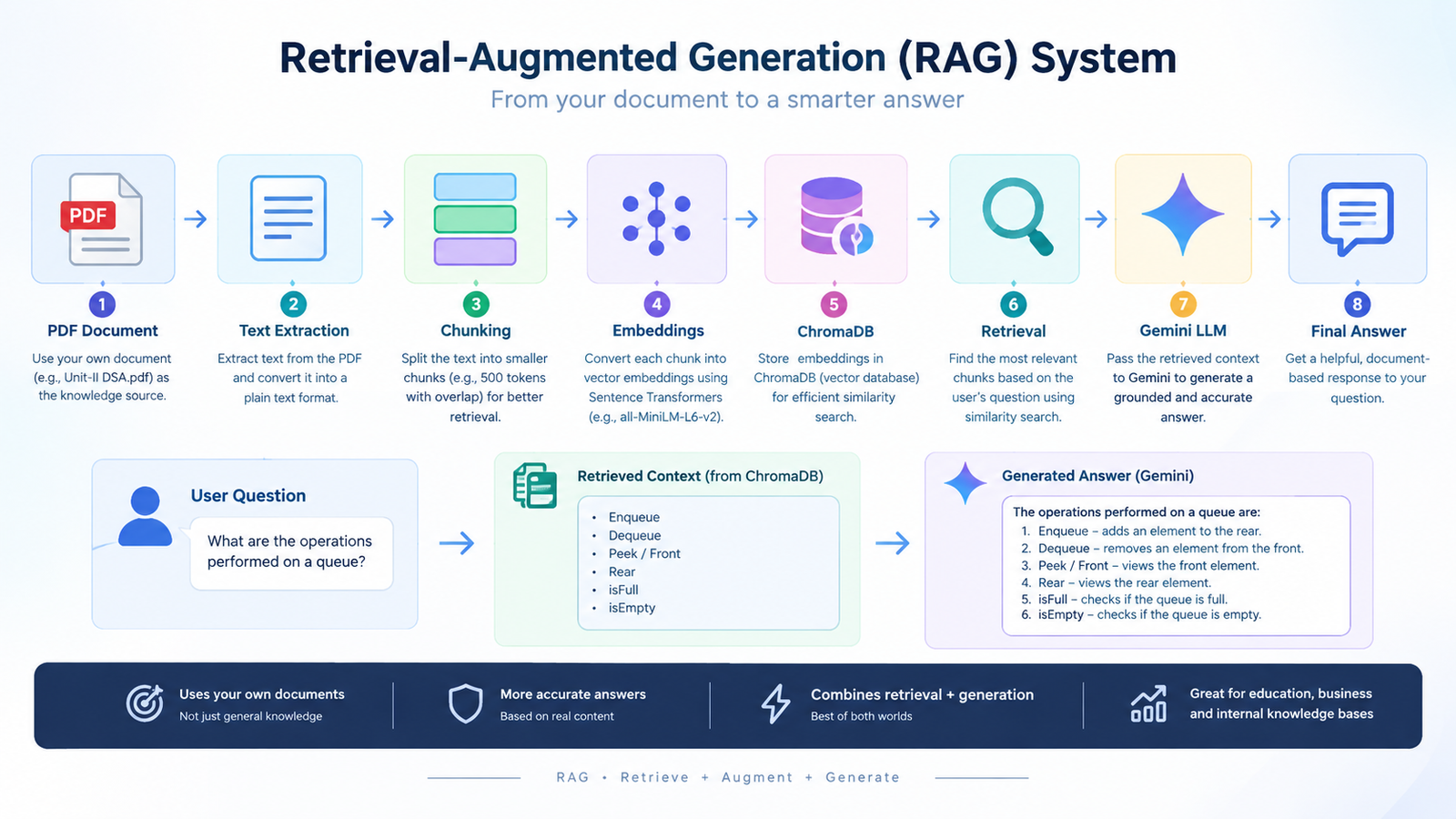
For this project, I used a Data Structures and Algorithms PDF (Unit-II DSA.pdf) as the source document. The system processes the document, divides it into smaller chunks, converts those chunks into embeddings, stores them in ChromaDB, retrieves relevant information when a question is asked, and finally uses Gemini to generate an answer based on the retrieved context.
What is RAG?
Retrieval-Augmented Generation, commonly called RAG, is an approach that combines information retrieval with text generation.
Instead of asking an LLM to answer a question only from its existing knowledge, a RAG system first searches a given knowledge source for relevant information. The retrieved information is then provided to the LLM as context so that it can generate a more relevant and document-based response.
A basic RAG workflow can be represented as:
Document → Text Extraction → Chunking → Embeddings → ChromaDB → Similarity Search → Gemini → Answer
This approach is particularly useful when working with documents such as notes, manuals, reports, company documents, or educational materials.
Step 1: Extracting Text from the PDF
The first step in my project was to use the Unit-II DSA.pdf document as the knowledge source.
The PDF content was extracted and converted into a text file. This made it easier to process the document programmatically before creating embeddings.
The extracted text contained topics related to Data Structures and Algorithms, including concepts such as queues and their operations.
Step 2: Splitting the Text into Chunks
A complete document can be too large to send directly to an LLM. Therefore, the extracted text was divided into smaller sections called chunks.
In my implementation, I used a chunk size of approximately 500 characters/tokens depending on the processing stage, with overlap between chunks. The overlap helps preserve context between neighboring sections.
After processing the document, the project successfully created and stored 50 chunks.
Chunking is an important part of a RAG system because better-organized chunks can improve the quality of information retrieved for a question.
Step 3: Creating Embeddings
After creating the chunks, each chunk was converted into a numerical representation called an embedding.
I used the all-MiniLM-L6-v2 embedding model through Sentence Transformers. Embeddings allow text with similar meanings to be represented in a way that makes similarity comparison possible.
For example, if a user asks about queue operations, the system can identify document chunks containing information about enqueue, dequeue, peek, and other queue operations.
Step 4: Storing Data in ChromaDB
The generated embeddings were stored in ChromaDB, a vector database that can be used for storing and searching embeddings.
I created a ChromaDB collection for the DSA document. When a question is asked, the system compares the question with the stored document embeddings and retrieves the most relevant chunks.
This retrieval step is one of the most important parts of the RAG architecture.
Step 5: Generating the Answer with Gemini
After retrieving the relevant document chunks, the retrieved content is passed to the Gemini LLM as context.
For example, I tested the system with the question:
“What are the operations performed on a queue?”
The retrieval system identified relevant information from the DSA document. Gemini then generated an answer based on that retrieved context.
The resulting answer included operations such as Enqueue, Dequeue, Peek/Front, Rear, isFull, and isEmpty, based on the information retrieved from the document.
RAG vs. Without RAG
I also created a comparison between answering a question without RAG and answering it with RAG.
Without RAG, the LLM provides a general answer based on its existing knowledge. With RAG, the model receives relevant information retrieved directly from the project document.
This comparison helped demonstrate why retrieval is useful when an application needs to answer questions based on a specific knowledge source.
Key Learnings
Building this project helped me understand several important AI concepts:
- How documents can be converted into machine-readable text.
- How chunking helps prepare documents for retrieval.
- How embeddings represent the meaning of text.
- How vector databases such as ChromaDB can store and retrieve embeddings.
- How similarity search can identify relevant document information.
- How retrieved context can be passed to an LLM for grounded answer generation.
- Why RAG can be useful for question answering over private or specific documents.
Conclusion
Building this RAG system gave me practical experience in connecting multiple AI components into a complete workflow. Instead of relying only on an LLM’s general knowledge, the system retrieves relevant information from a specific document and uses that information to generate an answer.
The project demonstrated the complete pipeline from PDF processing to chunking, embeddings, vector storage, retrieval, and Gemini-based generation.
This experience helped me understand the practical architecture behind document-based AI applications and provided a strong foundation for exploring more advanced RAG techniques in the future. ithuva daa



Leave a Reply
You must be logged in to post a comment.