

Introduction
A portfolio website is an important tool for developers who want to showcase their skills, projects, and professional journey. It provides a central place where recruiters, clients, and other developers can learn about a developer’s experience and explore their work. Building a portfolio website is also a valuable way to apply web development concepts to a practical project.
As part of my Full Stack Web App Development Internship at Valentius Kryptix, I worked on creating my personal portfolio website using HTML, CSS, and JavaScript. My goal was to build a clean, responsive, and user-friendly website that presents my technical skills, highlights my projects, and makes it easy for visitors to contact me.
In this article, I will explain the main sections of my portfolio website, the technologies I used, the design decisions I made, the challenges I encountered, and the lessons I learned during development.
What Is a Portfolio Website?
A portfolio website is a personal website that presents an individual’s skills, projects, experience, and contact details. For a software developer, it can demonstrate practical knowledge more effectively than a simple list of technologies.
A well-structured portfolio website can help developers:
- Showcase completed projects and explain the technologies used.
- Present their technical skills in an organized format.
- Provide links to GitHub repositories and professional profiles.
- Help recruiters and potential collaborators understand their capabilities.
- Build a professional online presence.
A portfolio should not only look attractive. It should also be easy to navigate, work across different devices, and provide accurate information about the developer’s work.
Project Overview: My Personal Portfolio Website
The main objective of my project was to create a personal portfolio website that introduces me as a Full Stack Developer and presents my development work in a clear and professional way.
I organized the website into five main sections:
- Home: Introduces me and provides navigation to the main sections.
- About Me: Describes my background, interests, and professional focus.
- Technical Skills: Groups my skills into frontend, backend, database, and development tools.
- Projects: Showcases applications I have worked on, including AgriVista and the School Management System.
- Contact: Provides my email address and links to my GitHub and LinkedIn profiles.
This structure allows visitors to find important information without searching through a long, unorganized page.
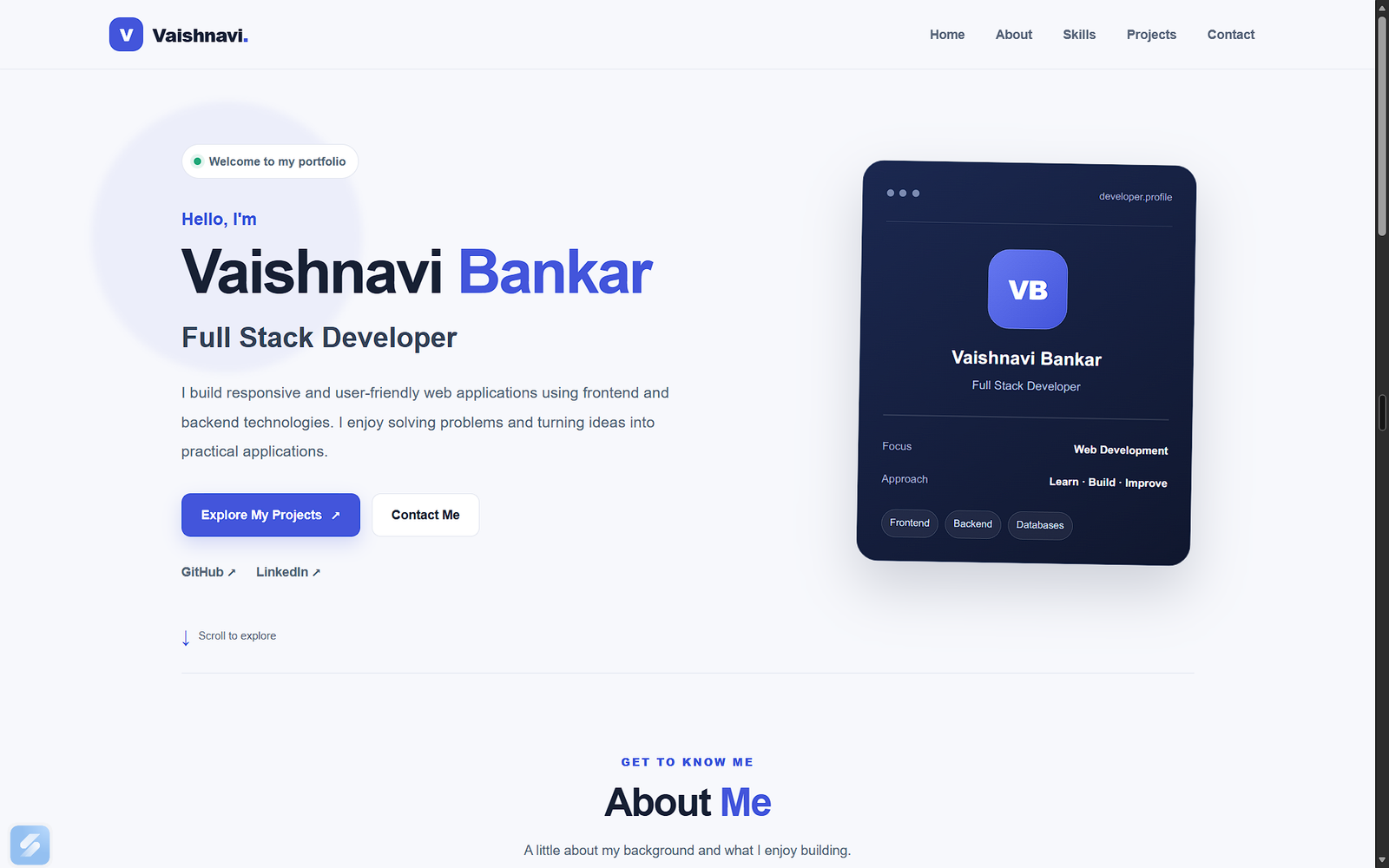
Personal portfolio website homepage introducing a Full Stack Developer.
Technologies Used to Build the Portfolio Website
I used three core web technologies to develop the website: HTML5, CSS3, and JavaScript. I also used Git and GitHub to manage and share the project code.
1. HTML5: Building the Structure
HTML5 provides the structure of a web page. I used HTML to create the navigation bar, headings, paragraphs, project cards, skill categories, buttons, and contact links.
I also used semantic HTML elements such as <header>, <nav>, <main>, <section>, <article>, and <footer>. These elements make the structure more meaningful and easier to maintain.
For example, the navigation bar helps visitors move between sections, while the project section groups related project information together.
2. CSS3: Designing the User Interface
CSS3 controls the visual presentation of the website. I used CSS to manage colors, spacing, typography, borders, buttons, cards, and section layouts.
I used Flexbox and CSS Grid to arrange content. Flexbox helped align items within individual components, while CSS Grid made it easier to organize skills and project cards into columns.
I also applied media queries to adapt the layout to different screen widths. Consistent spacing, readable text, and a clear visual hierarchy helped make the website easier to browse.
3. JavaScript: Adding Interactivity
JavaScript adds interactive behavior to a website. In my portfolio, I implemented a mobile navigation menu.
The menu button toggles an active CSS class on the navigation list. CSS then controls whether the menu is visible. The button symbol changes to indicate whether the menu is open or closed.
This feature keeps the navigation compact on smaller screens while allowing visitors to access all sections when needed.
4. Git and GitHub: Managing the Project
Git helps track changes made to source code, while GitHub provides an online repository for storing and sharing the project.
Using version control allows me to record updates, review changes, and maintain a history of development work. It also gives visitors a way to inspect the source code of my portfolio.
Designing a Responsive Portfolio Website
Responsive web design allows a website to adapt to different screen sizes. This is important because visitors may use mobile phones, tablets, laptops, or desktop computers.
A layout that works well on a large screen may become crowded on a smaller display. Text may wrap awkwardly, navigation links may overlap, and cards may become difficult to read if responsiveness is not considered.
To address these issues, I used CSS media queries to adjust the layout for different screen widths. On larger screens, multiple columns can display side by side. On smaller screens, the layout changes to a single column where appropriate.
I also focused on:
- Keeping text readable across devices.
- Providing enough spacing between buttons and links.
- Allowing skill tags to wrap onto new lines.
- Stacking project cards on narrow screens.
- Making the mobile navigation menu easy to open and close.
Testing at mobile, tablet, and desktop widths is an important part of checking whether these changes work as expected.
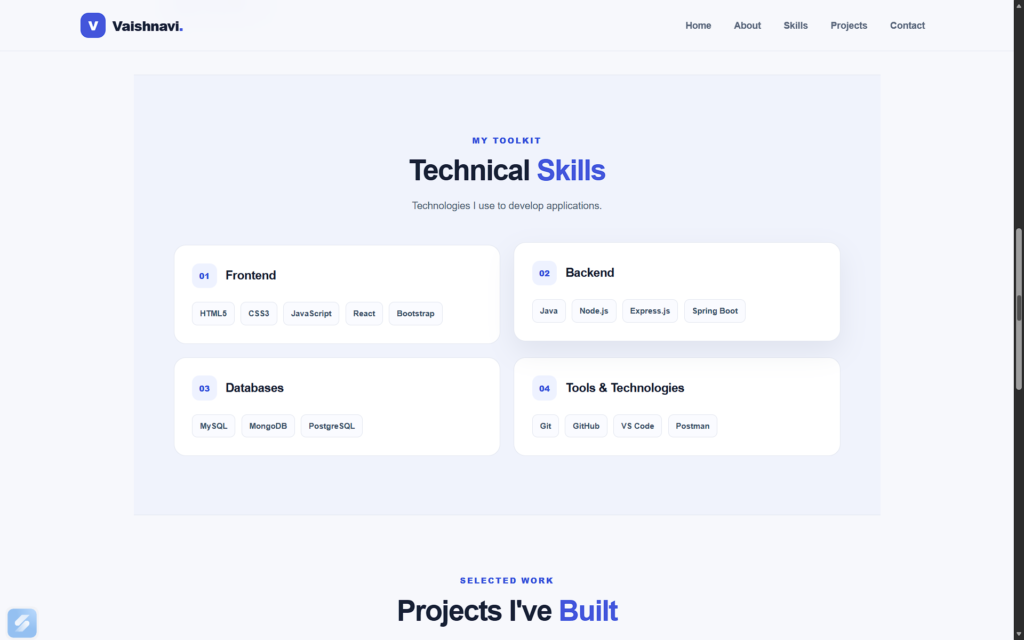
Responsive portfolio website technical skills section displaying frontend, backend, database, and development tools.
Creating a Clear Projects Section
The projects section is one of the most important parts of a developer’s portfolio. It connects technical knowledge with practical work by showing what the developer has built.
My portfolio currently highlights two projects.
AgriVista – Smart Crop Recommendation System
AgriVista is a smart agriculture project designed to support agricultural decisions using soil and weather information. It includes crop recommendation, yield prediction, fertilizer suggestions, and agricultural assistance.
The project brings together web development and machine learning concepts. It demonstrates how software can be used to address a practical problem in agriculture.
The technologies associated with this project include React, Java, Spring Boot, Python, machine learning, and MySQL.
School Management System
The School Management System is a full-stack application designed around a public school website and an administration panel. Its functionality includes notices, teacher applications, student admissions, and contact messages.
This project involves frontend development, backend APIs, and database management. It helped me work with the different parts of a web application and understand how they fit together.
The technologies associated with this project include React, Node.js, Express.js, PostgreSQL, and Prisma.
A useful project card should provide a short description, relevant technologies, and a working link to the source code or live application. Screenshots of the actual applications can also help visitors understand the interface.
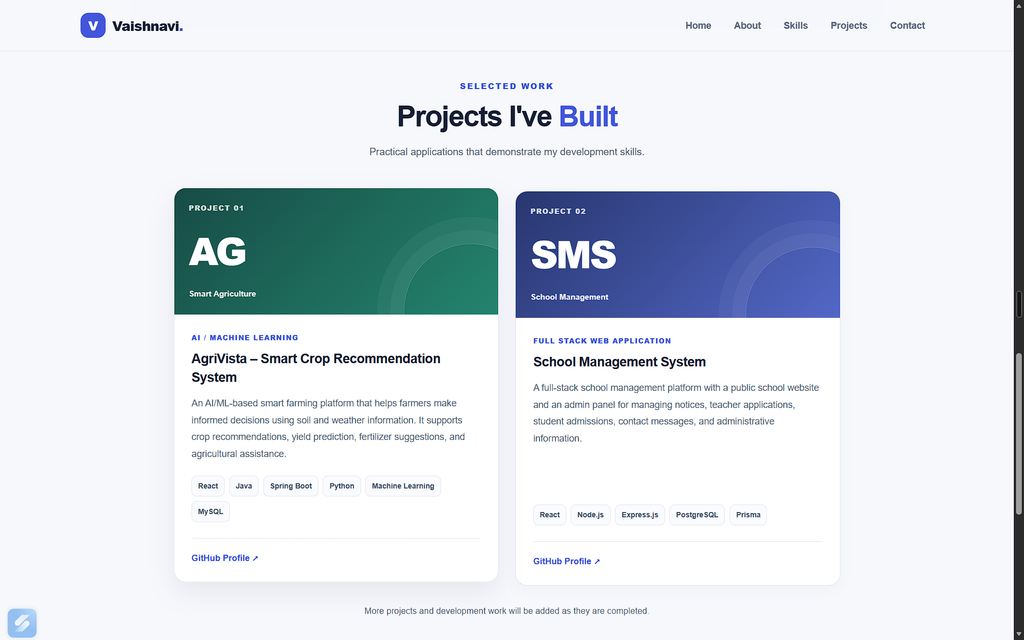
Portfolio website projects section featuring AgriVista Smart Crop Recommendation System and School Management System.
Challenges and Lessons Learned
Building a portfolio website helped me understand that frontend development involves more than placing elements on a page. Layout, responsiveness, navigation, accessibility, and consistency all influence the overall experience.
Connecting JavaScript and CSS
One challenge involved making the mobile navigation menu visible when the menu button was clicked. JavaScript could add an active class to the navigation list, but the corresponding CSS rule was also necessary to display the menu.
This helped me understand that JavaScript and CSS must work together. Changing a class alone does not automatically create the desired visual behavior; the stylesheet must define what that class does.
Maintaining Responsive Layouts
Another important lesson was that a design must be checked at different screen sizes. Grid layouts that look balanced on desktop may need to change on mobile devices.
Media queries, flexible layouts, and careful spacing help solve these issues. Testing the actual page at different widths is more reliable than assuming a design will work everywhere.
Organizing Code
Keeping HTML, CSS, and JavaScript in separate files makes the project easier to understand and update. Semantic HTML provides structure, CSS handles presentation, and JavaScript manages interactive behavior.
I also learned the importance of checking links, reviewing browser console errors, and testing changes before committing them to GitHub.
Best Practices for Building a Portfolio Website
Based on my experience, developers building their own portfolio websites should consider the following practices:
- Keep the design simple: Use consistent colors, readable typography, and clear section headings.
- Prioritize responsiveness: Test the layout on mobile, tablet, and desktop screens.
- Show real projects: Include accurate descriptions, relevant technologies, and working repository links.
- Use semantic HTML: Organize the page using meaningful HTML elements.
- Add useful interactions: Navigation menus and other small interactions can improve usability.
- Check every link: Confirm that email, social, repository, and live demo links work correctly.
- Maintain the code: Use version control and commit meaningful updates.
- Keep improving: Update the portfolio as new projects and skills are developed.
These practices can help make a portfolio more useful to visitors and easier for its owner to maintain.
Future Improvements
My portfolio website is a continuing project. There are several areas I plan to improve as I gain more experience.
I intend to add screenshots from the actual applications, link each project directly to its own repository, and expand the projects section when I have more completed work to showcase.
I also plan to continue testing responsiveness, review accessibility, check for broken links, and improve the website based on feedback. These improvements will help ensure that the portfolio accurately represents my development skills.
Conclusion
Building a portfolio website has been a valuable part of my Full Stack Web App Development Internship at Valentius Kryptix. Through this project, I applied HTML5, CSS3, and JavaScript to create a website that presents my background, technical skills, projects, and contact information.
The experience strengthened my understanding of responsive web design, semantic HTML, CSS layouts, JavaScript interactions, and version control. It also showed me the importance of testing a website across devices and presenting projects clearly.
A portfolio website is not a finished product that never changes. It should grow as a developer learns new technologies and completes new projects. I plan to keep improving mine as I continue my journey in software development.
If you are starting your own portfolio website, begin with a clear structure, focus on usability, showcase genuine work, and improve the website step by step.
Explore my portfolio: https://github.com/VaishnaviBankar14/Portfolio
Technologies used: HTML5, CSS3, JavaScript, Git, and GitHub.

Leave a Reply
You must be logged in to post a comment.