

Introduction
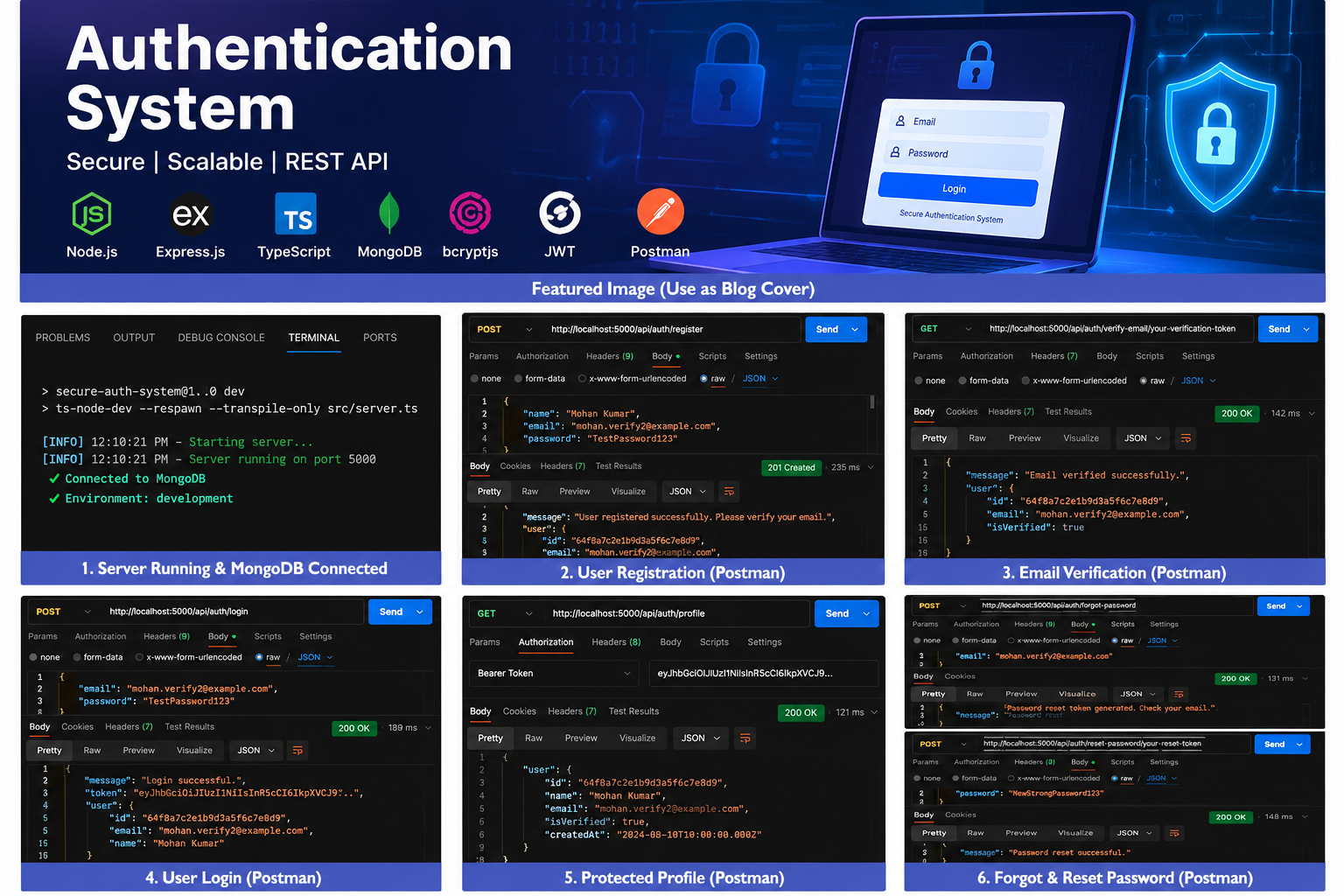
Authentication is an essential part of modern web applications. Whether users are accessing an online shopping platform, a social media application, or a personal dashboard, applications need a reliable way to verify user identities and protect private information.
As part of my internship at Valentius Kryptix, I worked on an Authentication System project to understand how secure user authentication works in backend development. The main objective was to build a REST API that supports user registration, login, email verification, password recovery, and protected routes.
I developed the project using Node.js, Express.js, TypeScript, and MongoDB. I also used bcryptjs for password hashing, JSON Web Tokens (JWT) for authentication, and Postman to test the API endpoints.
Project Overview
The Authentication System is a backend application designed to manage user accounts and provide essential authentication functionality.
The project focuses on several important features:
- User registration with password hashing
- Login with credential verification
- JWT-based authentication
- Email verification using time-limited tokens
- Forgot-password and password-reset functionality
- Protected API routes
- MongoDB integration for storing user information
The application follows a structured backend architecture that separates routes, controllers, middleware, models, configuration, and utility functions. This organization makes the code easier to understand, maintain, and extend.
1. User Registration and Password Security
The first step was implementing user registration. Users provide their name, email address, and password through a registration endpoint.
Storing passwords as plain text is unsafe because anyone who obtains access to the database could read those passwords directly. To avoid this, I used bcryptjs to hash passwords before storing them.
Password hashing transforms a password into a one-way representation. During login, the application compares the submitted password against the stored hash rather than storing or retrieving the original password.
This implementation helped me understand why password security must be considered from the beginning of application development.
2. Login and JWT Authentication
The next feature was login functionality. When a user submits their email and password, the backend checks the credentials and determines whether the account is permitted to log in.
After successful authentication, the application generates a JSON Web Token, commonly known as a JWT. The client can then use this token when accessing protected API endpoints.
The token has an expiration time, which helps limit the period during which it can be used. In this project, the access token is designed to expire after one hour.
JWT authentication is useful because it allows a backend API to verify requests without requiring users to submit their passwords repeatedly.
3. Email Verification
Email verification is another important part of the authentication workflow. It helps establish that a user has access to the email address associated with their account.
The project implements an email verification token that can be used to verify an account. The token is checked before the account is marked as verified, and invalid or expired tokens are rejected.
During local development, I used a terminal-based token workflow to test verification without depending on a live email service.
This approach made development and debugging easier. Real email delivery would require configuring an email provider and sending verification links to users.
4. Forgot Password and Password Reset
Users sometimes forget their passwords, so an authentication system needs a secure recovery mechanism.
I implemented a forgot-password endpoint that generates a temporary reset token for an existing account. The token is stored as a hash, and the reset process checks whether it is valid and has not expired.
When a valid reset token is submitted with a new password, the application hashes the new password and updates the user’s stored credentials. The reset token is then cleared so that it cannot be reused.
This feature helped me understand why password recovery needs its own security checks instead of simply allowing users to change passwords without verification.
5. Protecting API Routes
Authentication is not complete unless private resources are protected.
I implemented authentication middleware that checks the JWT included in a request’s Authorization header. If the token is missing, invalid, or expired, the request is rejected.
For example, the profile endpoint requires a valid bearer token before returning the authenticated user’s profile information.
I tested this behavior using Postman by sending requests with a valid token and comparing the results with requests that had no token.
This helped me understand how middleware can enforce authentication before a request reaches the relevant controller.
6. Technologies Used
The project provided practical experience with several backend development technologies.
- Node.js: Runs the JavaScript-based backend application.
- Express.js: Defines API routes and handles HTTP requests and responses.
- TypeScript: Adds static typing to improve code organization and catch certain errors during development.
- MongoDB: Stores user account information.
- Mongoose: Defines data models and interacts with MongoDB.
- bcryptjs: Hashes passwords before database storage.
- jsonwebtoken: Creates and verifies JWT access tokens.
- Postman: Tests API endpoints, request bodies, authentication headers, and responses.
- Git and GitHub: Maintain version history and provide access to the project source code.
Using these technologies together helped me understand how different backend components work together to provide authentication functionality.
7. Key Learnings
Working on this project helped me develop three important skills.
First, I learned the importance of secure password handling. Passwords should never be stored in plain text. Hashing, credential verification, and secure reset procedures are essential parts of authentication.
Second, I gained practical experience with JWT and middleware. I learned how access tokens can be used to authenticate API requests and how protected routes reject requests without valid credentials.
Third, I improved my API testing and debugging skills. Testing endpoints with Postman helped me understand HTTP status codes, request validation, error handling, and the importance of testing unsuccessful scenarios as well as successful ones.
These lessons strengthened my understanding of backend architecture and application security.
Conclusion
Building the Authentication System was a valuable learning experience during my internship at Valentius Kryptix. It allowed me to apply backend development concepts to a practical project and understand how registration, login, email verification, password recovery, and protected routes fit together.
The project also showed me that secure authentication involves more than simply checking a username and password. It requires careful handling of credentials, token expiration, validation, and error responses.
I look forward to applying these concepts in future projects and continuing to improve my skills in backend development and application security.
I am grateful for this learning opportunity at Valentius Kryptix and for the chance to strengthen my technical knowledge through practical implementation.
Explore the source code:
https://github.com/mohan5535/Secure-Auth-System


Leave a Reply
You must be logged in to post a comment.