
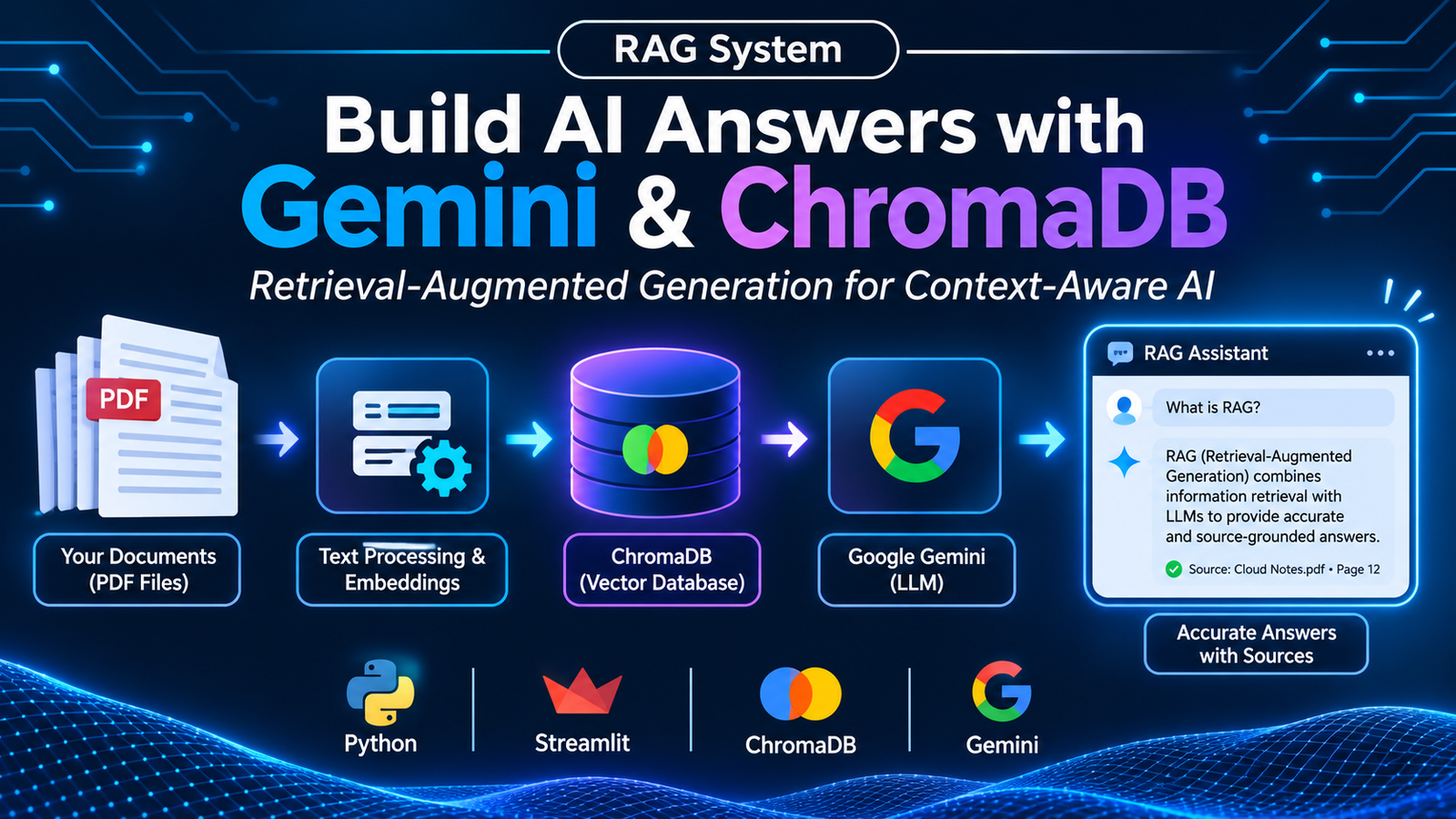

How Retrieval-Augmented Generation turns PDF documents into a context-aware question-answering application.
Introduction
A RAG System (Retrieval-Augmented Generation) helps an AI application answer questions using information retrieved from external documents. Instead of depending only on the knowledge learned during model training, a RAG application searches a collection of relevant information and provides that information to a language model before it generates an answer.
This approach is useful when working with private documents, technical notes, reports, and other information that may not be available in an AI model’s training data. In this project, I developed a Cloud Notes RAG application using Python, Google Gemini, ChromaDB, and Streamlit.
The project takes PDF documents as input, processes their text, stores vector embeddings, retrieves relevant content, and generates answers based on the retrieved context.
Why Do We Need Retrieval-Augmented Generation?
Large Language Models (LLMs) can understand questions and generate natural-sounding responses. However, they may not always have access to specific documents or recently updated information. They can also generate answers that sound convincing but are not supported by the available source material.
For example, imagine asking an AI assistant a question about a particular topic in a collection of Cloud Computing notes. A general-purpose model may provide an answer based on its existing knowledge rather than the exact information in those notes.
A RAG System addresses this problem by retrieving relevant information from the provided documents and using it as context for answer generation.
Some important benefits include:
- Document-based answers: Responses can be grounded in the supplied documents.
- Source references: Retrieved information can be associated with its original file and page.
- Knowledge customization: Users can work with their own document collections.
- Reduced unsupported responses: The model is instructed to answer using the retrieved context.
- Flexible knowledge updates: Documents can be reprocessed when the information changes.
RAG does not guarantee that every answer will be correct, but it provides a way to connect language generation with relevant source material.
What Is a RAG System?
Retrieval-Augmented Generation combines two important processes: information retrieval and text generation.
The retrieval stage searches for information related to a user’s question. The generation stage passes the retrieved information to a language model, which uses that context to prepare a response.
A typical RAG workflow follows these steps:
- Collect documents such as PDF files.
- Extract text from the documents.
- Divide the extracted text into smaller chunks.
- Convert the chunks into numerical vector embeddings.
- Store the embeddings in a vector database.
- Convert a user’s question into an embedding.
- Retrieve the most relevant document chunks.
- Pass the retrieved context to an LLM.
- Generate an answer based on the available context.
This process allows an AI application to search through a document collection before answering a question.
Project Overview: Cloud Notes RAG
The project I developed is called Cloud Notes RAG. It is a document-based question-answering application designed to answer questions using Cloud Computing notes.
The project uses five PDF documents containing a total of 135 pages. According to the project documentation, these documents are divided into 175 chunks, and the application retrieves six relevant chunks for each question.
The main objective is to make information inside PDF notes easier to access. Instead of manually searching through multiple pages, users can enter a question and receive a response based on relevant document content.
The application also provides different modes to compare a normal language-model response with a retrieval-based response.
Technologies Used
The project combines several tools and technologies.
Python
Python is used to implement the document-processing pipeline, embedding generation, retrieval logic, and application functionality.
Google Gemini API
The Gemini API is used for generating embeddings and producing answers. The embedding model configured in the project is gemini-embedding-001.
ChromaDB
ChromaDB is used as the vector database. It stores document chunks, their embeddings, and metadata so that relevant content can be retrieved when a user asks a question.
PyPDF
PyPDF is used to read PDF files and extract text page by page.
Streamlit
Streamlit provides the user interface. It allows users to enter questions, view answers, compare responses, and inspect retrieved document chunks.
Understanding the Project Architecture
The application is divided into three main Python files:
ingest.py– processes PDF documents and stores their embeddings.query.py– handles question embedding, retrieval, and answer generation.app.py– provides the Streamlit interface.
This separation makes the project easier to understand and maintain.
Step 1: Extracting Text from PDF Documents
The first stage is document ingestion.
The project uses PyPDF to read PDF files from the data/ directory. The text is extracted page by page so that the application can retain information about the source file and page number.
The extracted text is then prepared for the next stage.
This step is important because the quality of the extracted text affects the information available to the retrieval system.
Step 2: Splitting Text into Smaller Chunks
Passing an entire document to a language model for every question would be inefficient. Therefore, the extracted text is divided into smaller sections called chunks.
In this project, the configured chunk size is 2,000 characters, with an overlap of 200 characters.
Chunk overlap helps preserve context between neighboring sections. Without overlap, an important sentence or explanation near the end of one chunk might become disconnected from the information in the next chunk.
The implementation also attempts to split text at paragraph and sentence boundaries where possible.
Each chunk retains metadata such as its source filename and page number. This information is useful when displaying the origin of retrieved content.
Step 3: Generating Embeddings with Gemini
After chunking, each text section is converted into a vector embedding.
An embedding represents text as a numerical vector. Text with related meanings can be identified through similarity comparisons between these vectors.
The project uses Google’s gemini-embedding-001 model.
During document ingestion, the embedding task type is configured as RETRIEVAL_DOCUMENT. When a user submits a question, the query is embedded using RETRIEVAL_QUERY.
The project processes embeddings in batches to manage the ingestion workload.
Step 4: Storing Information in ChromaDB
Once the embeddings are generated, the application stores them in ChromaDB.
The project uses a persistent ChromaDB database in the ./chroma_db directory and a collection named cloud_notes.
Along with the embeddings, it stores the original text chunks and their metadata.
The collection is configured to use cosine distance for similarity comparisons. This allows the application to identify document chunks that are semantically related to a user’s question.
Persistent storage means the application can reuse the indexed document collection without generating all embeddings again for every question, unless the collection is recreated during ingestion.
Step 5: Retrieving Relevant Document Chunks
When a user asks a question, the application converts the question into an embedding using the same Gemini embedding model.
ChromaDB compares the query embedding with the stored document embeddings and retrieves the closest matches.
The project retrieves the top six chunks for a question.
The retrieved results include the original text, source information, page metadata, and distance values. This allows the application to provide relevant context to the language model and display where the information came from.
Step 6: Generating Answers with Gemini
After retrieval, the application combines the user’s question with the retrieved document content.
The Gemini generative model configured in the project is gemini-3.8-flash. It receives the retrieved context and follows an instruction to answer using only the supplied notes.
The system instruction also asks the model to identify the source file and page for relevant facts.
If the answer cannot be found in the provided context, the application instructs the model to respond:
“I could not find this in the provided notes.”
The generation temperature is configured as 0.0 to support more consistent responses.
This approach helps keep answers connected to the indexed documents instead of relying only on general model knowledge.
Step 7: Building the Streamlit User Interface
The project uses Streamlit to provide a simple interface for interacting with the RAG pipeline.
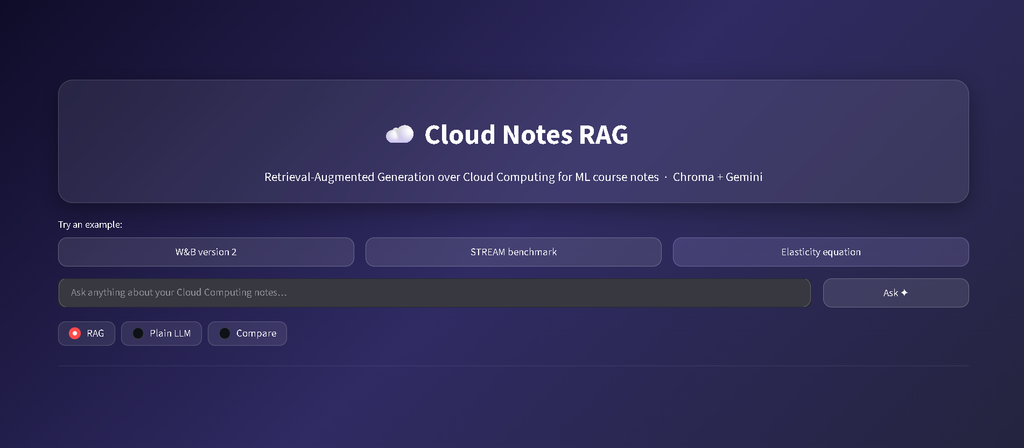
The application includes three main interaction modes:
RAG Mode
This mode retrieves relevant document chunks and generates an answer using the retrieved context. It also displays source information and expandable sections containing retrieved chunks.
Plain LLM Mode
This mode sends the user’s question to the language model without retrieving information from the document collection.
It provides a useful comparison with the retrieval-based approach.
Compare Mode
This mode displays the Plain LLM response and RAG response side by side. It also displays the sources associated with the RAG response.
The application includes another retrieval option for inspecting retrieved document chunks. These features make it easier to understand how document retrieval contributes to the final response.
Comparing RAG and Plain LLM Responses
One useful feature of this project is the ability to compare a normal language-model response with a RAG-generated response.
A Plain LLM response is generated without searching the uploaded notes. A RAG response uses retrieved document content as additional context.
For example, the project’s comparison results include questions about W&B artifact versioning, the STREAM benchmark, and elasticity.
In the W&B example, the retrieved notes include the artifact reference wandb.use_artifact('my-model:v2') and the filename model_v2.pth.
In the elasticity example, the retrieved notes show the relationships:
- Auto scaling = Scalability + Automation
- Elasticity = Auto scaling + Optimization
These examples demonstrate how retrieval can help the application locate specific information in the supplied notes. They are examples from the project’s comparison results, not universal definitions.
Error Handling and Reliability
Working with external APIs can involve temporary failures or usage limits. To make ingestion and querying more reliable, the project includes retry handling.
The embedding process uses retries with exponential backoff and jitter. It also processes data in batches and includes a delay between embedding batches.
The query pipeline includes handling for API errors and quota-related issues.
These mechanisms help the application handle temporary problems more gracefully, although they cannot eliminate every possible API or network failure.
Challenges and Limitations
Building a RAG application also involves some practical challenges.
PDF text extraction: PyPDF extracts available text from PDF pages. Image-only or scanned pages may not provide extractable text without an OCR process.
Chunking: Choosing a suitable chunk size and overlap is important. Chunks that are too small may lose context, while chunks that are too large may include unnecessary information.
Retrieval quality: The final answer depends partly on whether the retrieval process finds the correct document sections.
API usage: Embedding and generation depend on an external API, so quotas, temporary errors, and service availability can affect the application.
Answer quality: RAG can reduce unsupported answers, but it does not guarantee perfect accuracy. The retrieved information and generated response should still be checked.
Key Learnings from the Project
Developing this project helped me understand how different Generative AI components work together in a practical application.
Some of my important learnings were:
- Understanding the complete Retrieval-Augmented Generation workflow.
- Extracting and processing text from PDF documents using Python.
- Learning why chunk size and overlap matter in document processing.
- Generating document and query embeddings with the Gemini API.
- Storing and retrieving vector embeddings using ChromaDB.
- Connecting retrieved context with an LLM to generate answers.
- Building an interactive AI application using Streamlit.
- Comparing retrieval-based responses with normal LLM responses.
- Understanding the importance of source references and error handling.
The project provided practical experience in connecting document processing, vector search, and language-model generation into one application.
Future Improvements
There are several ways this project could be extended.
- OCR support: Add optical character recognition to process scanned and image-based PDF pages.
- Hybrid search: Combine semantic similarity with keyword-based search.
- Reranking: Add a reranking stage to improve the ordering of retrieved chunks.
- More file formats: Support documents such as DOCX and TXT in addition to PDFs.
- Conversation history: Allow users to ask follow-up questions while retaining relevant conversation context.
- Evaluation: Test retrieval quality and answer accuracy using a structured set of questions and expected answers.
These improvements could make the application more flexible and useful for larger document collections.
Conclusion
Building this RAG System helped me understand how Retrieval-Augmented Generation connects document retrieval with Large Language Models to create context-aware AI applications. By combining Python, Google Gemini, ChromaDB, PyPDF, and Streamlit, the Cloud Notes RAG project provides a practical way to ask questions about PDF documents and inspect the sources used for answers.
This project strengthened my understanding of Generative AI, embeddings, vector databases, and LLM-based applications. It also gave me practical experience in developing an end-to-end RAG workflow.
Project Repository
Explore the project source code:
Cloud Notes RAG – https://github.com/KRISH18833/rag-system
References
#GenerativeAI #RAG #Python #GoogleGemini #ChromaDB #ArtificialIntelligence

Leave a Reply
You must be logged in to post a comment.