
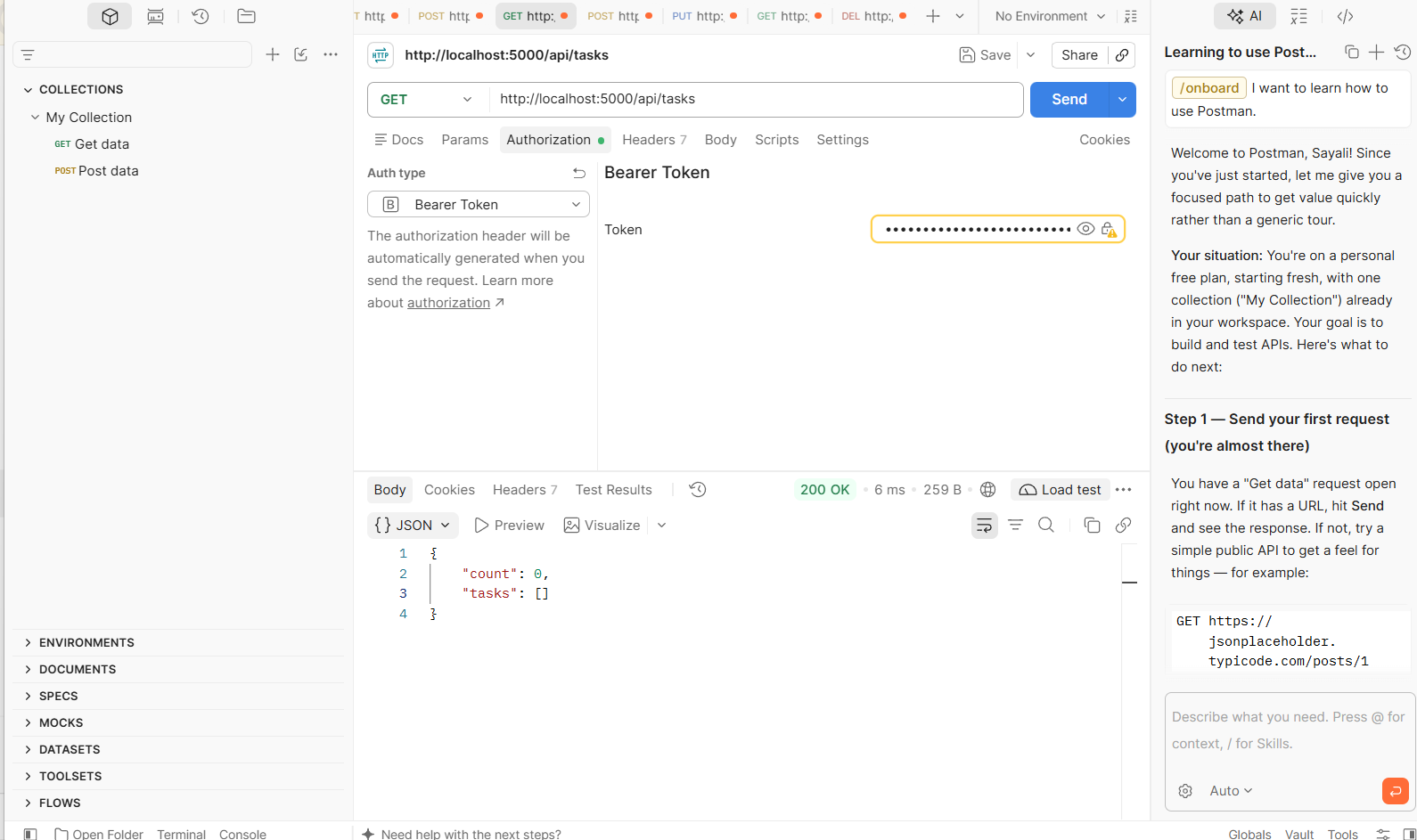

REST APIs are an important part of modern web application development because they allow different applications and services to communicate with each other using HTTP requests. As part of my technical task, I developed a Task Management REST API using Node.js and Express.js.
The project was designed to provide secure user authentication and task management functionality through RESTful API endpoints. It also helped me understand how backend applications handle requests, authentication, database operations, validation, and HTTP responses.
What is a REST API?
REST stands for Representational State Transfer. A REST API allows clients such as web applications, mobile applications, or tools like Postman to communicate with a server through HTTP methods.
The main HTTP methods used in the project are:
- POST – Create new data
- GET – Retrieve data
- PUT – Update existing data
- DELETE – Remove data
For example, a task management application can use a POST request to create a task, a GET request to retrieve tasks, a PUT request to update a task, and a DELETE request to remove a task.
Technologies Used
The project was developed using the following technologies:
- Node.js – JavaScript runtime for backend development
- Express.js – Framework for building REST API routes
- SQLite – Lightweight database for storing users and tasks
- bcryptjs – Used for securely hashing passwords
- JWT (JSON Web Token) – Used for user authentication
- Postman – Used for testing API endpoints
Key Features
The Task Management REST API includes several important features.
1. User Registration
Users can create an account using the registration endpoint. During registration, the password is not stored directly in the database. Instead, it is processed using bcryptjs and stored as a hashed password.
This improves security because the original password is not stored as plain text.
2. User Login
Registered users can log in using their credentials. The API verifies the provided password against the stored password hash.
After successful authentication, the server generates a JWT token. This token is used to access protected API endpoints.
3. JWT Authentication
Authentication is an important part of the project.
Protected endpoints require a valid JWT token. The server checks the token before allowing the user to perform operations on protected resources.
This provides an additional security layer and ensures that only authenticated users can access task-related operations.
4. Task CRUD Operations
The API supports complete CRUD operations for tasks.
Create: Users can create a new task.
Read: Users can retrieve their tasks.
Update: Users can modify an existing task.
Delete: Users can delete a task when it is no longer required.
The API also ensures that users can work with their own tasks rather than accessing tasks belonging to other users.
API Request Flow
The general flow of the application is:
Client → HTTP Request → Express Server → Authentication/Validation → Database → HTTP Response → Client
For example, when a user creates a task, the client sends a POST request to the server. Express receives the request, authentication middleware verifies the JWT token, the request data is validated, and the task is stored in the SQLite database.
The server then returns an appropriate HTTP response to the client.
API Testing with Postman
I used Postman to test the REST API endpoints.
Postman made it possible to send different HTTP requests and verify the returned responses. I tested important operations such as user registration, login, task creation, retrieving tasks, updating tasks, and deleting tasks.
Testing the API using Postman helped verify that the endpoints were working correctly and that authentication and validation were being applied properly.
HTTP Status Codes
The API also uses appropriate HTTP status codes to communicate the result of each request.
For example:
- 200 OK – Request completed successfully
- 201 Created – New resource successfully created
- 400 Bad Request – Invalid request data
- 401 Unauthorized – Authentication is required or invalid
- 404 Not Found – Requested resource does not exist
- 500 Internal Server Error – Unexpected server-side error
Using appropriate status codes makes APIs easier to understand and integrate with frontend applications.
Security and Validation
Security was an important consideration while developing the API.
Passwords are hashed using bcryptjs instead of storing plain-text passwords. JWT authentication is used for protected routes, and input validation helps prevent invalid data from being processed.
The API also separates user-specific tasks so that authenticated users can manage their own task records.
What I Learned
While developing this project, I gained practical experience in backend development and REST API design.
I learned how to:
- Build RESTful API endpoints using Node.js and Express
- Implement CRUD operations
- Connect a backend application with SQLite
- Hash passwords securely
- Implement JWT-based authentication
- Protect API routes using middleware
- Validate incoming data
- Test APIs using Postman
- Handle HTTP requests and responses
- Use appropriate HTTP status codes
Conclusion
Building the Task Management REST API was a valuable practical exercise in backend development. The project demonstrated how Node.js and Express can be used to create a secure and structured REST API with authentication, database integration, validation, and CRUD functionality.
This task also provided hands-on experience with concepts that are commonly used in real-world backend applications. The API can be further extended by adding features such as task priorities, deadlines, search and filtering, pagination, role-based access control, and API documentation.
Overall, the project strengthened my understanding of REST API development and gave me practical experience in building and testing backend services using Node.js, Express.js, SQLite, JWT, and Postman.

Leave a Reply
You must be logged in to post a comment.