

When I started this prompt engineering task, I expected a neat story: each technique would make the model a bit better, and I’d have a clean chart to prove it. That’s not quite what happened. Some techniques made a real difference, others made almost none, and I learned more from the second group.
I ran everything in Google AI Studio using a Gemini 3.8 Flash. The run settings didn’t let me change the temperature, so it stayed at the default. I didn’t write any code. Every experiment was just a prompt, a raw output, and my own judgement of whether the answer was right.
What is prompt engineering, really?
It’s the habit of writing instructions for an AI model carefully, then improving them when the result isn’t what you needed. The model can’t read your mind. It only sees the words you give it, so the clearer your words, the more dependable its answer.
This matters most when the output goes somewhere else, like into an app or a spreadsheet. In that case your prompt is basically part of the product.
Experiment 1: Zero-shot vs few-shot (sentiment analysis)
I picked eight short product reviews, including a few tricky ones: sarcasm (“Oh great, another update that breaks everything”), idioms (“Not bad at all”), and mixed feelings (“Delivery was late, though the product itself is fine”).
First I tried zero-shot, which means no examples, just the task:
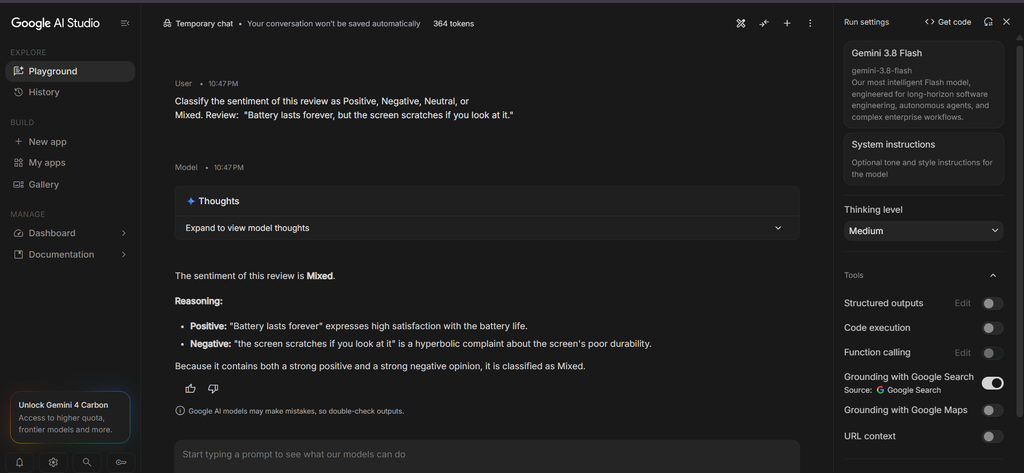
Classify the sentiment of this review as Positive, Negative, Neutral, or Mixed.
Review: "Oh great, another update that breaks everything."
Gemini got all eight right. It spotted the sarcasm, understood that “Not bad at all” is a compliment, and labelled the delivery review as Mixed. I honestly didn’t expect it to handle the sarcasm that easily.
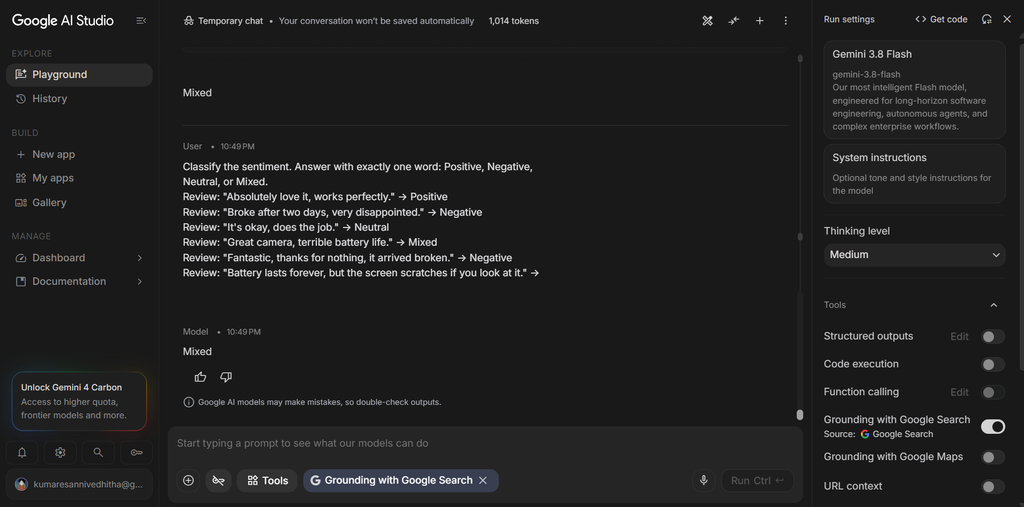
Then I tried few-shot, where I gave it five labelled examples first and told it to answer with exactly one word:
Review: "Absolutely love it, works perfectly." -> Positive
Review: "Broke after two days, very disappointed." -> Negative
Review: "It's okay, does the job." -> Neutral
Review: "Great camera, terrible battery life." -> Mixed
Review: "Fantastic, thanks for nothing, it arrived broken." -> Negative
Review: "Delivery was late, though the product itself is fine." ->
Again, eight out of eight. So the examples didn’t improve accuracy at all. What they did change was the shape of the answer. Every few-shot reply came back in the same layout, a “Sentiment:” line followed by a short explanation. One thing I noticed, though: I asked for exactly one word, and the model still added an explanation. So even a clear instruction isn’t a guarantee, which is worth knowing if you plan to parse the output with code.
Experiment 2: Direct answers vs chain-of-thought (maths)
Next I tested four maths problems, including a couple of classic trick questions. One was the bat-and-ball puzzle, and another was a train that travels at two different speeds and asks for the average.
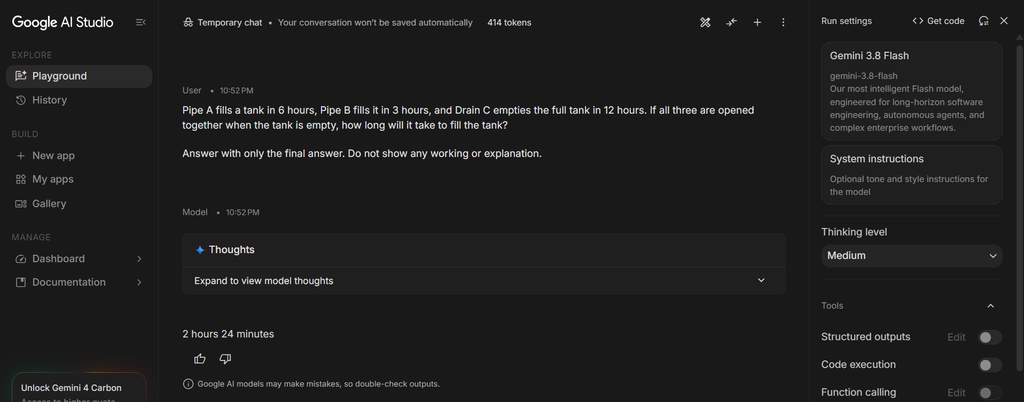
With direct prompting, I told the model to give only the final answer and no working:
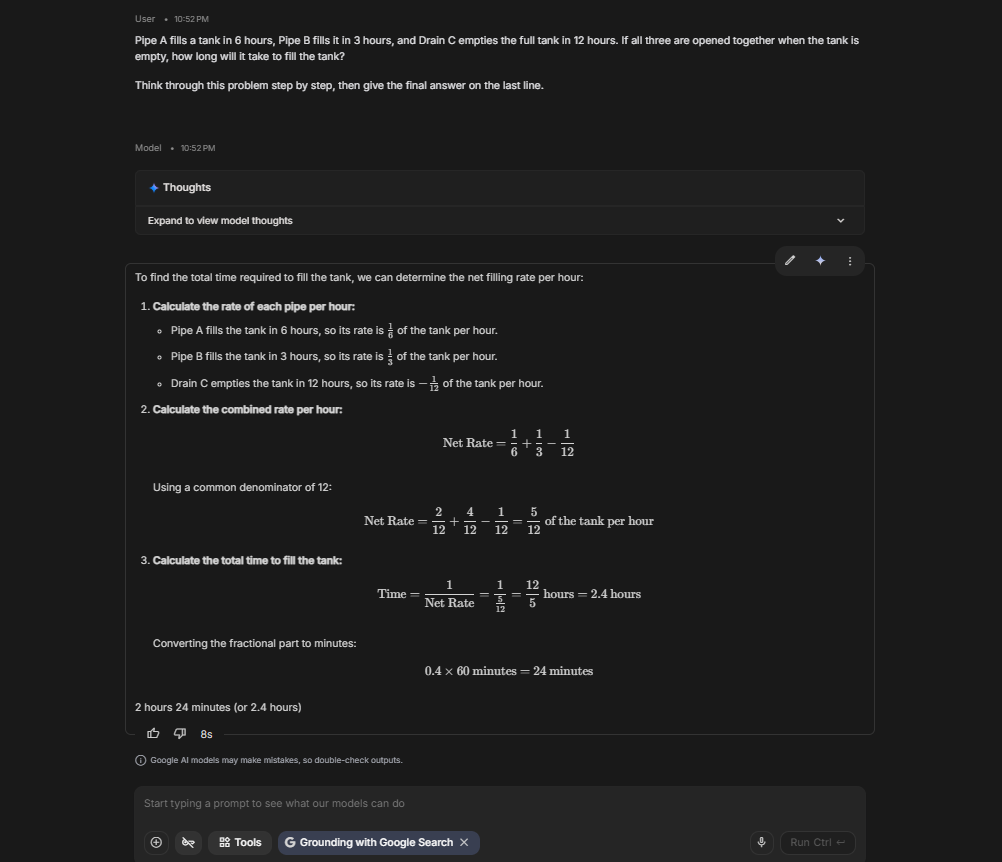
Answer with only the final answer. Do not show any working or explanation.With chain-of-thought, I asked it to reason first:
Think through this problem step by step, then give the final answer on the last line.Both approaches got all four right. The direct answers were short and correct. The chain-of-thought answers showed every step. For the bat-and-ball question, it set up the equation (x + 100) + x = 110 and solved it to get ₹5. For the pipes-and-drain problem, it added the rates 1/6 + 1/3 − 1/12 to get 5/12, then converted 2.4 hours into 2 hours 24 minutes.
So chain-of-thought didn’t make the answers more accurate this time. What it gave me was visibility. When you can see the steps, you can check them yourself, which matters a lot more when the question is one the model might actually get wrong.
Experiment 3: Getting clean JSON (where it finally mattered)
This was the experiment where prompting made the biggest difference. The task was to pull a name, date, and amount out of messy payment messages like these:
- “Hey, it’s Arjun here, I paid you 2,500 rupees on the 3rd of March 2026.”
- “This is Kiran. Sent you twelve hundred rupees on November 9, 2026.”
- “Priya paid ₹1.2k on 2026-02-20; the reminder was sent on 2026-02-10.”
- “Sana paid 3,450.50 on 04/05/26.”
My success rule was strict. An output only counted if it was valid JSON, had exactly the keys name, date, and amount, used the YYYY-MM-DD date format, and gave the amount as a plain number (or null if it was missing).
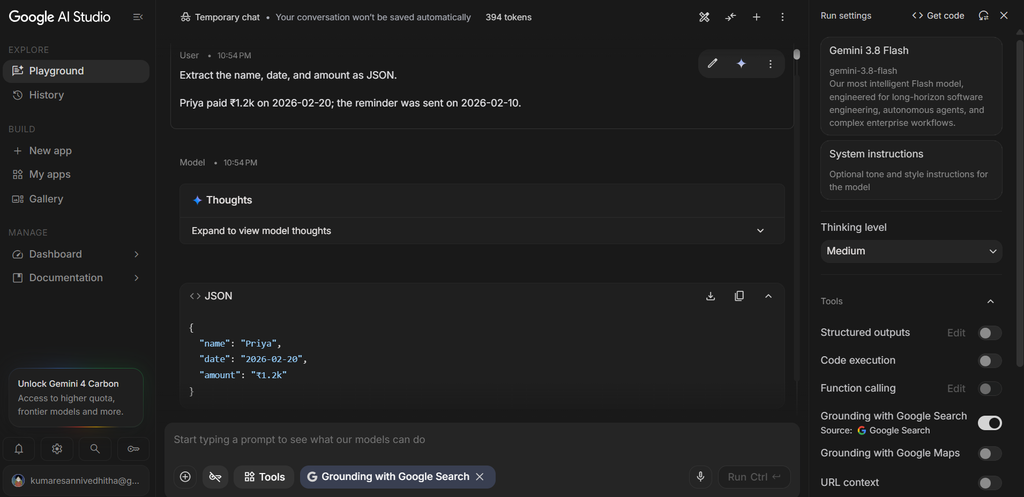
Round 1 – a basic prompt:
Extract the name, date, and amount as JSON.The model decided on its own format. Amounts came back as strings like "2,500 rupees" and "₹1.2k", and some dates stayed as "14 Jan 2026". Only 2 of 6 passed.
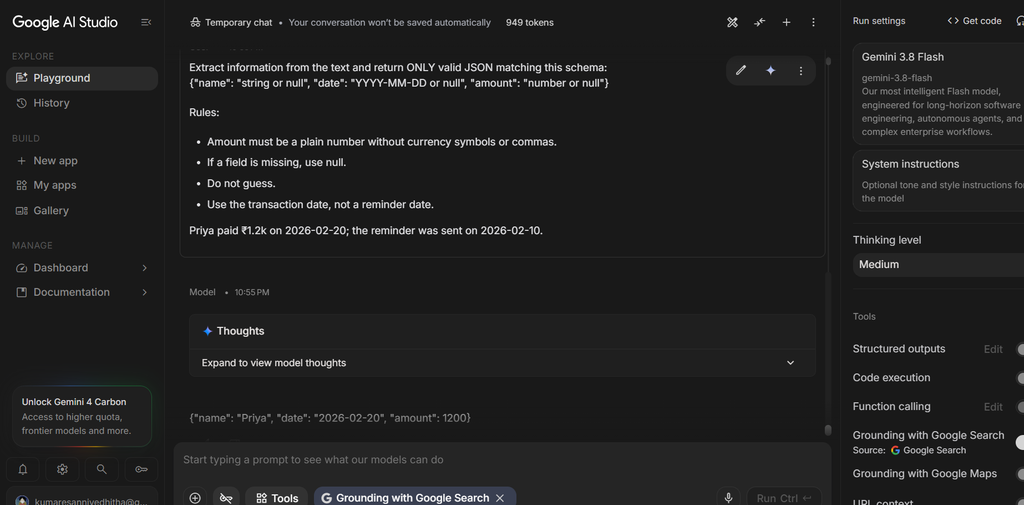
Round 2 – a schema plus clear rules:
Return ONLY valid JSON matching this schema:
{"name": "string or null", "date": "YYYY-MM-DD or null", "amount": "number or null"}

Rules:
- Amount must be a plain number without currency symbols or commas.
- If a field is missing, use null.
- Do not guess.
- Use the transaction date, not a reminder date.
Now all 6 passed. The amounts became real numbers, the dates were standardised, and the model correctly chose Priya’s payment date instead of the reminder date.
Round 3 – examples added: Round 3 – Examples Instead of the Schema
This time I removed the schema and detailed rules and gave it two worked examples plus a short “return only valid JSON, use null, do not guess” instruction. It also scored 6 out of 6.
| Round | What I changed | Success |
|---|---|---|
| 1 | Basic prompt, no schema | 2/6 |
| 2 | Added schema and rules | 6/6 |
| 3 | Two examples + short instruction, no schema | 6/6 |
One small thing worth flagging: for “04/05/26”, the model read it as 4 May 2026 without telling me the date was ambiguous. That’s the DD/MM format common in India, but it could just as easily mean 5 April. If I were building a real tool, I’d make the prompt ask the model to flag dates like that.
What I learned
- Clear rules beat clever tricks. The biggest jump in my whole experiment, from 2/6 to 6/6, came from writing a schema and a few plain rules, not from anything fancy.
- Examples help with format more than accuracy. On these tasks the model was already good enough that examples didn’t raise the score. They just made the answers look consistent.
- Reasoning steps are for you, too. Chain-of-thought didn’t change my accuracy, but it let me verify the working myself.
- Instructions aren’t guarantees. I asked for one word and still got explanations. Always check the output before trusting it.
- Test the easy stuff honestly. Because my inputs were fairly easy, some techniques showed no benefit. Harder inputs might tell a different story.
A note on limits
I want to be upfront about this. I ran each input once, and I only used six to eight inputs per test. That’s enough to show a trend, not enough to prove anything. If I repeated this with harder reviews, trickier maths, and more messy JSON inputs, the results could change.
Final thoughts
Going in, I thought prompt engineering was about secret tricks. After this task, I think it’s closer to writing a good brief for a new teammate: say exactly what you want, say what format you want it in, tell them what to do when information is missing, and then check their work.
If you want to try this yourself, start small. Take one task, run it with a basic prompt, then tighten the instructions and compare the raw outputs. Even a few minutes of that will teach you more than reading about it.

Leave a Reply
You must be logged in to post a comment.